LinkedIn Profile


Yes, LinkedIn Premium Career can be worth it, but only for a short, active job search where you send an InMail and check applicant insights every week. If your profile isn't finished or you’re only casually browsing open roles, paying for a subscription is usually a waste of money. A paid plan gives you tools to reach hiring managers, but it won't land interviews if your base profile isn't ready.
In this blog, you’ll learn what Premium Career actually includes, what each feature offers a job seeker, what you can already do for free and a simple one-minute decision rule to help you decide whether to sign up.
What LinkedIn Premium Career includes
LinkedIn offers several paid tiers, including Business, Sales Navigator and Recruiter, but these plans are built for founders, sales teams and hiring professionals rather than individual job candidates. For job seekers, the relevant subscription is LinkedIn Premium Career.
As of October 27, 2026, LinkedIn Premium Career costs $39.99 per month when billed monthly, or $239.88 per year ($19.99 per month) when billed annually.
A Premium Career subscription includes the following core features:
- InMail credits: Get 5 InMail credits per month to message recruiters or hiring managers directly without a mutual connection.
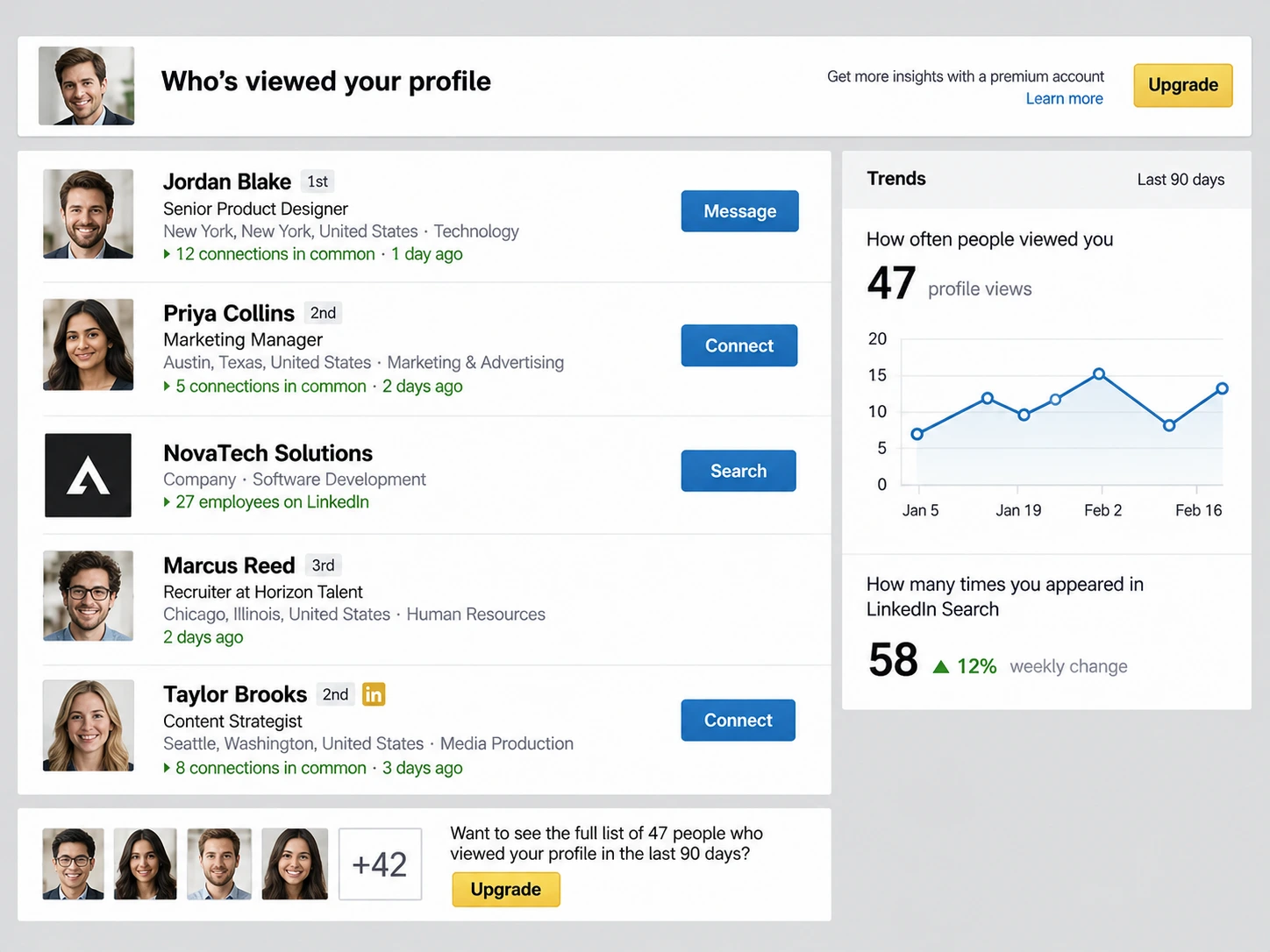
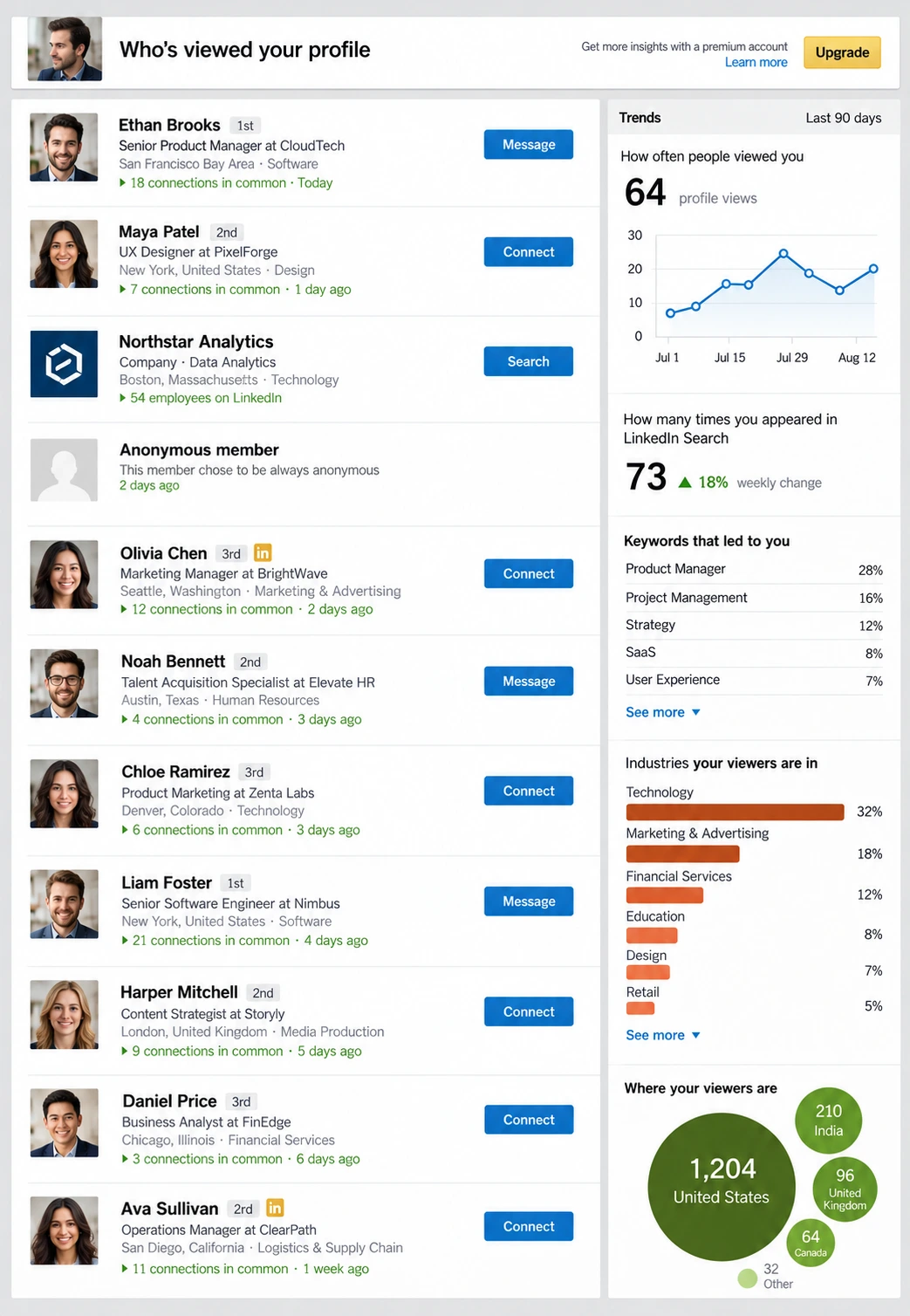
- Who viewed your profile: See the full list of people who visited your profile over the last 90 days, along with insights on how they found you.
- Applicant insights: Access data comparing your skills, education and experience level against competing candidates on open job listings.
- Top applicant recommendations: View personalized job recommendations where your profile matches the employer's target candidate criteria.
- LinkedIn Learning: Unlock unlimited access to over 25,000 video courses and professional certification programs.
- AI profile assistance: Use built-in writing tools to generate suggestions for your summary and work experience descriptions.
The features that actually help a job search
LinkedIn markets Premium Career as an all-in-one job search engine, but not every tool in the package carries equal value. Knowing how each feature operates helps you decide whether it aligns with your immediate job hunting goals.
InMail credits
InMail lets you send direct messages to LinkedIn members who are not in your personal network without sending a connection request first. Premium Career provides 5 InMail credits per month, and unused credits roll over for up to 90 days. Furthermore, if a recipient responds to your message within 90 days, LinkedIn automatically refunds that credit back to your account.
- When it helps: InMail is useful when you want to pitch yourself directly to a specific hiring manager or internal recruiter for an active opening, especially at larger companies where decision-makers rarely accept generic connection requests from strangers.
- When it does not: InMail fails if your destination profile is incomplete or unoptimized. A hiring manager who opens a cold InMail will click through to check your headline, summary and experience before replying; if your page looks outdated, the credit is wasted regardless of how well-written your message is.
Who viewed your profile
While free LinkedIn accounts only show you the last five people who visited your profile, Premium Career provides a complete 90-day history of profile visitors. It also includes analytics on viewer job titles, company sizes and search keywords that brought them to your page.
- When it helps: This insight is valuable immediately after submitting job applications or reaching out to contacts. Seeing a recruiter or team lead from a target company view your profile tells you your application was noticed, giving you a warm opening to send a follow-up message.
- When it does not: The list provides little value if you are not actively applying or networking. Simply watching recruiters view your profile without taking action to engage them will not move your application forward.
Applicant and job insights
When browsing job postings on LinkedIn, Premium Career adds competitive benchmark data directly to the listing page. It displays how your skills, experience level and education compare to other applicants who applied through the platform, while highlighting roles where you qualify as a "Top Applicant."
- When it helps: These insights help you prioritize where to allocate your time during high-volume job applications. Focusing energy on postings where your skill set matches the top applicants increases your chances of getting screened.
- When it does not: Competitor metrics are based strictly on data listed in other users' LinkedIn profiles, which is often incomplete or inaccurate. Treating these metrics as absolute truth can discourage you from applying to roles where you are qualified despite what the algorithm suggests.
LinkedIn Learning
A premium subscription unlocks unlimited access to LinkedIn Learning's library of over 25,000 video courses covering technical skills, software proficiency and leadership strategy. Completed courses automatically display verified badges in your profile's Licenses & Certifications section.
- When it helps: LinkedIn Learning is useful if you need to bridge a specific, minor skill gap required for your target roles, such as learning a specific project management framework or software tool and want an easy way to verify that learning on your profile.
- When it does not: Short online video courses rarely replace real-world experience or industry-recognized professional accreditations. Relying on basic video certificates to qualify for senior roles without relevant project work will not impress hiring managers.
What you can do for free instead
You don't need a paid subscription to run an effective job search. Free accounts include strong tools that replicate many of the primary functions offered by a premium plan:
- Open to Work in recruiters only mode: Turning on this setting alerts hiring managers that you're actively seeking roles without displaying a public badge to your current employer, replacing paid applicant spotlight badges.
- A keyword-complete profile: Placing relevant industry terms throughout your summary and experience fields ensures recruiters find you organically; follow our guide on how to optimize your LinkedIn profile and research relevant LinkedIn keywords to boost your visibility.
- Direct messaging through connections: Connecting directly with a mutual contact or sending a personalized connection request lets you message hiring leads for free, bypassing the need for paid InMail credits; read our guide on how to network on LinkedIn to master direct outreach.
- Alumni search: Using the search filters on your university's official page allows you to locate former graduates at target companies, offering warm referral paths without subscription insights.
- Following target companies: Clicking the follow button on company pages delivers real-time hiring updates, new job postings and employee content directly to your feed, replacing paid job insights.
- Advanced search filters: Leveraging standard search operations helps you pinpoint open roles without cost; learn the exact steps in our guide on how to search for a job on LinkedIn.
When LinkedIn Premium is worth it (and when it is not)
Deciding whether to pay for LinkedIn Premium comes down to your current job search stage and how aggressively you plan to reach out to decision-makers. It isn't a magical solution that lands interviews on its own, but it can speed up an active outreach strategy.
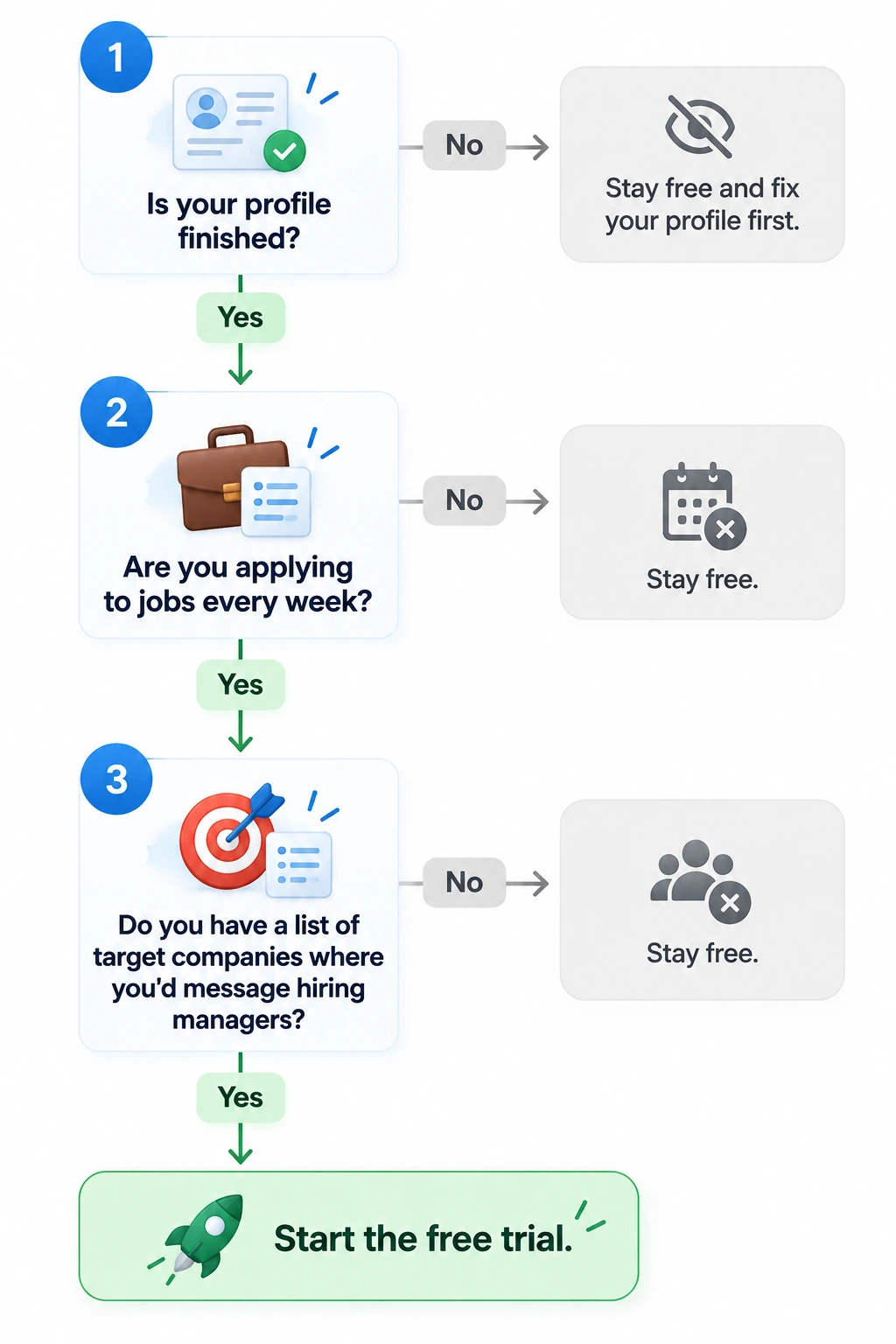
When LinkedIn Premium is worth it
Paying for a subscription or starting a free trial makes financial and practical sense in specific situations:
- An active search with target companies: You've built a list of target employers, and you're actively submitting applications every week.
- Roles that expect direct outreach: You're applying for corporate, tech or sales roles where reaching out directly to internal recruiters and hiring managers is standard practice.
- Strategic trial timing: You time your 30-day free trial to match the exact weeks you're sending out the bulk of your applications, allowing you to use all your InMail credits right when they matter most.
When LinkedIn Premium is not worth it
In many other cases, upgrading your account simply won't deliver a solid return on investment:
- An unfinished profile: Your headline, about section and work experience aren't optimized or filled out completely.
- A passive search: You're only casually browsing job listings once a week and don't plan to message hiring leads directly.
- Agency or referral-heavy fields: You work in trades, specialized clinical roles or industries where hiring happens almost exclusively through recruiters, staffing agencies or offline referrals.
Finish your free profile first, start your free trial on the day you begin actively applying and cancel before billing if your search slows down.
How to get the most from the free trial
If you qualify for LinkedIn's 30-day free trial, treat those four weeks as an active sprint. You can maximize every feature without spending a dime by following a clear plan:
- Set a calendar reminder immediately: Add an alert on your phone or calendar for day 23 of your trial so you can decide whether to cancel before auto-billing kicks in.
- Use InMail credits in week one: Save your 5 initial credits for high-priority hiring managers at your top target companies rather than spreading them across random listings.
- Review profile visitors weekly: Check your profile viewers every Friday to see which recruiters or hiring leads checked your page after you submitted applications.
- Cancel early if momentum slows: Go to your account settings and cancel the trial early if you aren't actively applying; you'll keep full access until the end of the 30-day window without risking unexpected charges.
How to do this with Careerflow
Paying for LinkedIn Premium buys extra reach and visibility, but it doesn't fix what recruiters see when they land on your page. Before spending money on a subscription, you can use our ai linkedin optimizer to audit your profile section by section and fix foundational gaps for free.
- Audit your profile quality: Run our ai linkedin optimizer to check your headline, summary and experience sections against proven industry benchmarks.
- Organize your outreach: Keep track of every application, InMail message and recruiter contact during your free trial using our ai job tracker.