Job search
.avif)
.webp)
Recruiter calls always made me feel intimidated, more than actual interviews did. With the pressure of having to say the right thing I'd end up trailing off or repeating myself trying to find the right thing to say. And the fact that none of those calls turned into interviews made me realize I needed to prepare properly for them instead of winging it every time.
I'd been using Careerflow for a while at the point these calls started coming in (for tailoring resumes, updating LinkedIn and interview prep). And since it was already handling most of my job search, after fumbling through a few of these calls, I went looking around Careerflow's dashboard to see if there was anything that could help. That's when I came across the elevator pitch feature sitting in the AI Toolbox.
I didn't expect much from it going in. But once I actually tried it, I saw how well it could work as my go-to pitch for recruiter calls.
In this guide, I'll walk you through how I used it to prepare for those calls, why it worked for me and a few mistakes I've learned to avoid along the way.
How to Prepare for Recruiter Calls using Careerflow’s AI Elevator Pitch
Here’s how I used it to prepare for a recruiter call for a content marketer role at a SaaS startup, step by step.
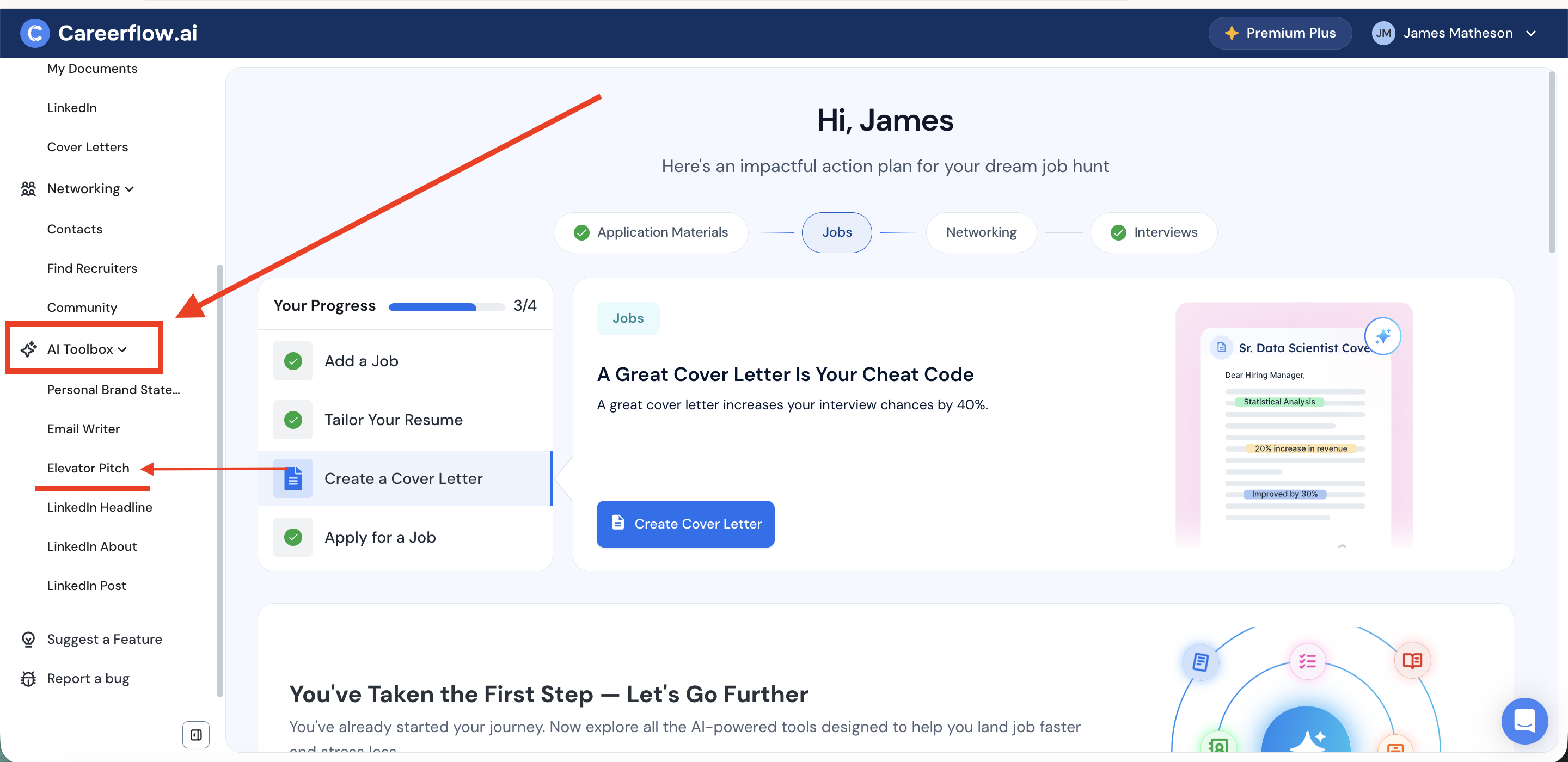
Step 1: Log in to Careerflow & Navigate to AI Toolbox
Once you're logged in, head to the AI Toolbox in the left sidebar, and you’ll find Elevator Pitch listed right under it.
Step 2: Select Elevator Pitch & Fill in the fields
Click into Elevator Pitch and you'll get a short form to fill out before it generates anything.
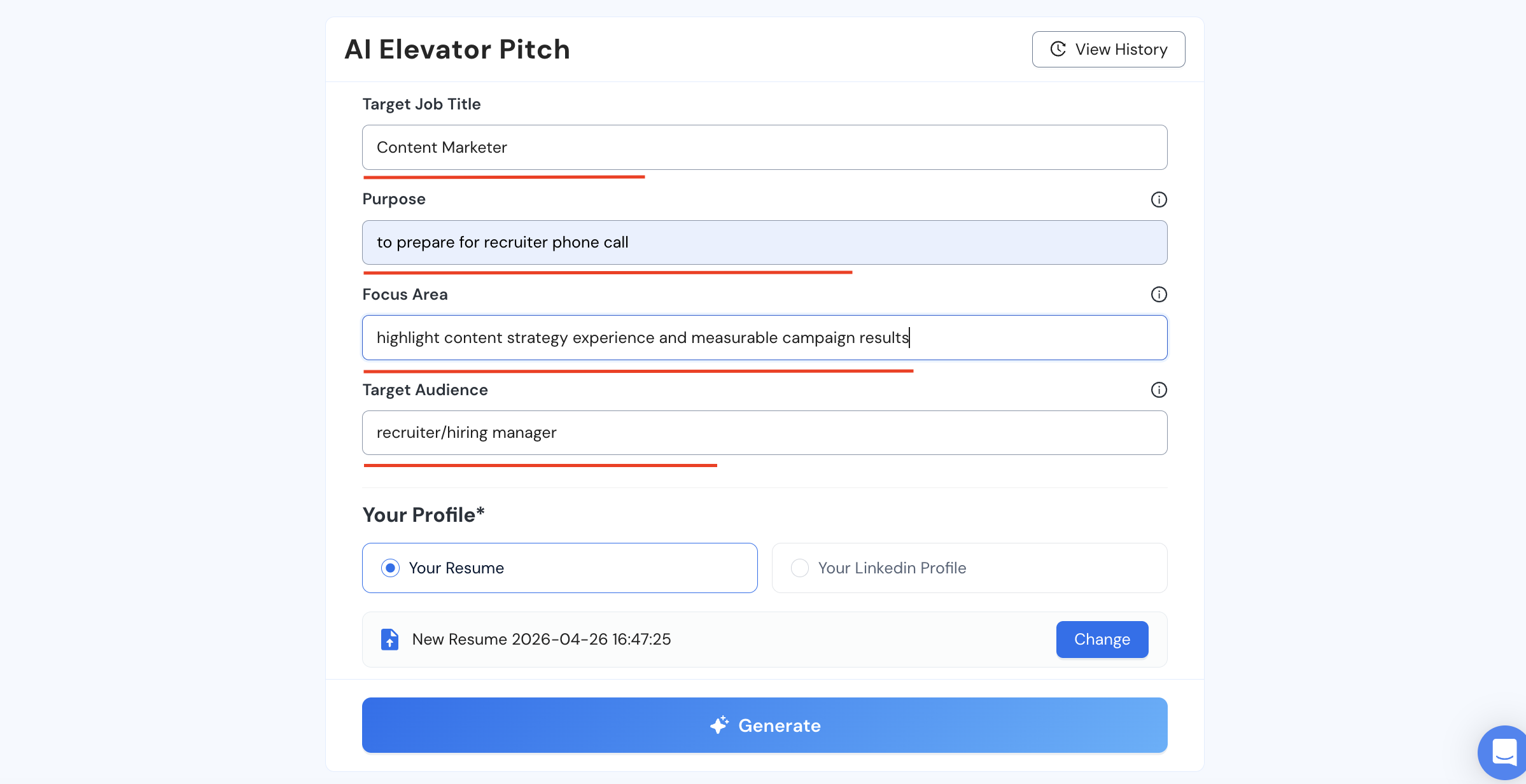
I entered my target role as Content Marketer, since that's the role I was working toward from my current role as a content strategist.
In the "purpose" field, I added “prepare for a recruiter phone call” so the pitch was anchored to that specific scenario rather than something more general, like an intro at a networking event.
The “focus area” is where I had to pause a moment and think about what I wanted the call to lead with.
I was moving from content strategist into a content marketer role, which meant going from planning content at a high level to actually executing and running campaigns day to day. So the pitch needed to translate that shift instead of just listing my strategy background on its own. I added that I wanted it to “highlight my content strategy experience and the measurable results” that came out of it. (Since that's exactly what showed I could bring that thinking into a more hands-on role.)
Then I entered "recruiter/hiring manager" as the “target audience”, because the pitch reads differently depending on who you’re having the conversation with.
Step 3: Pick your source for the pitch
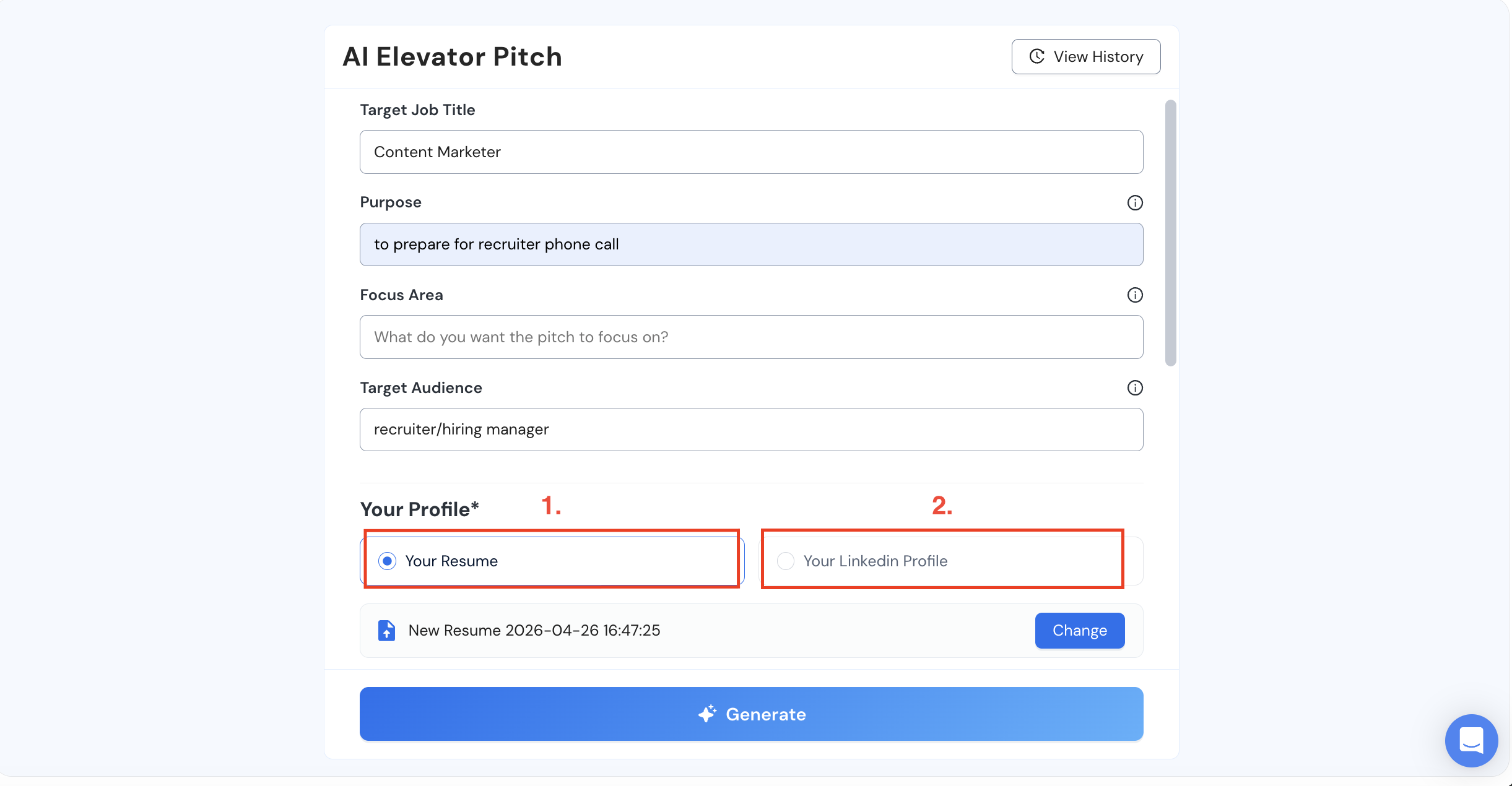
This is an important step. If you've applied to a specific role and want yourself prepared for that target company precisely, it makes sense to select the tailored resume you created for it. If you did that using Careerflow, it's already saved there, but if not, you can upload it and select that specific resume for the AI to build its context on. The output you get is specific to the role you're really after and want to ace every step of the way for.
But if you want a more general pitch ready about you, one that works for any company and job and comprehensively captures who you are and what you do, choosing your LinkedIn makes more sense instead.
I used both, because why not.
For the SaaS startup role, I had already created a tailored resume for it inside Careerflow, so I selected that specific resume to build the pitch around, which kept it precise to exactly what that recruiter would be looking for. For a more general pitch I could use across other calls, I went with LinkedIn instead.
Step 4: Choose your tone, length & language
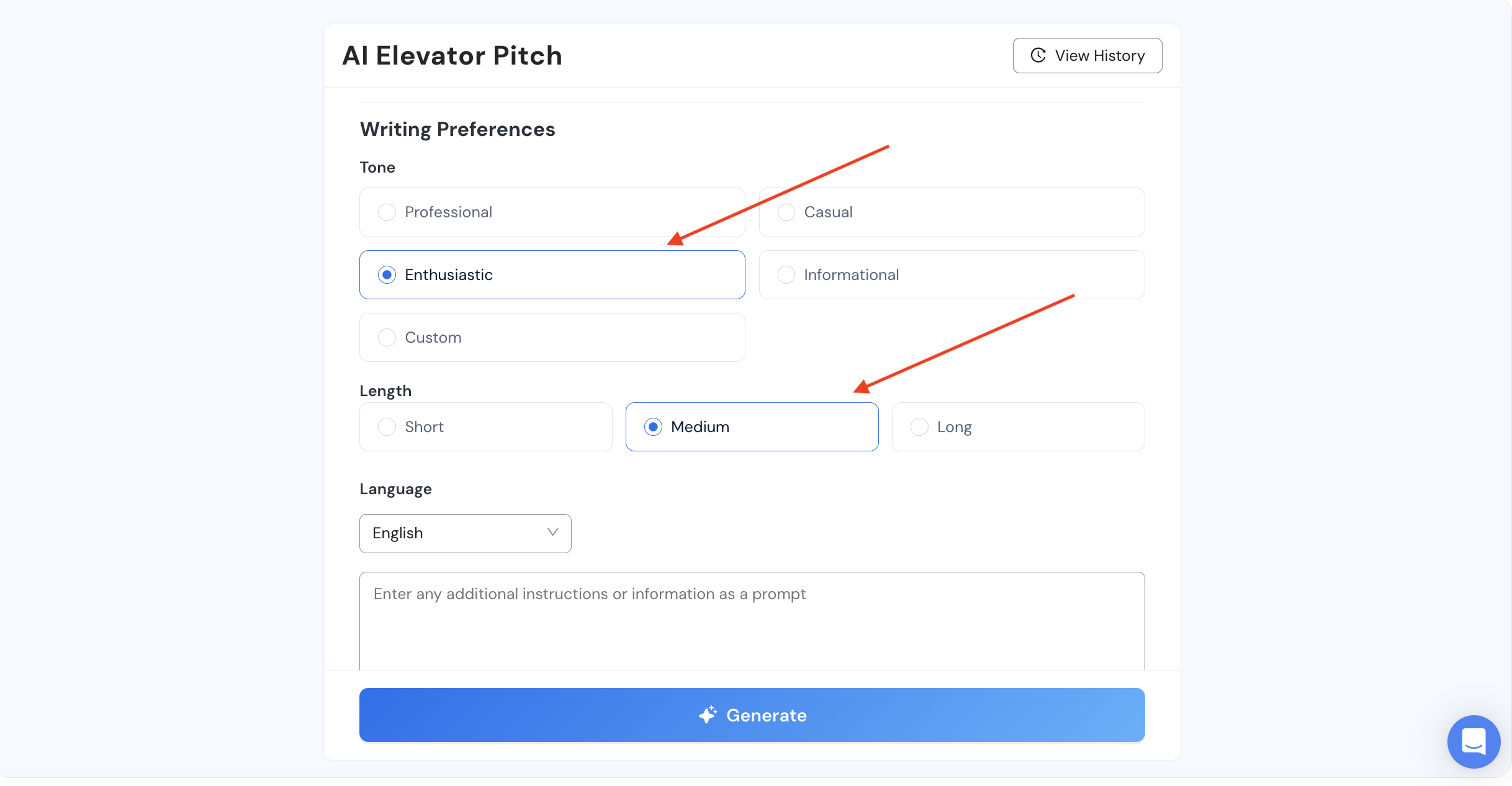
I went for enthusiastic tone, medium length and English language (it has over 20 languages to choose from).
Step 5: Hit generate
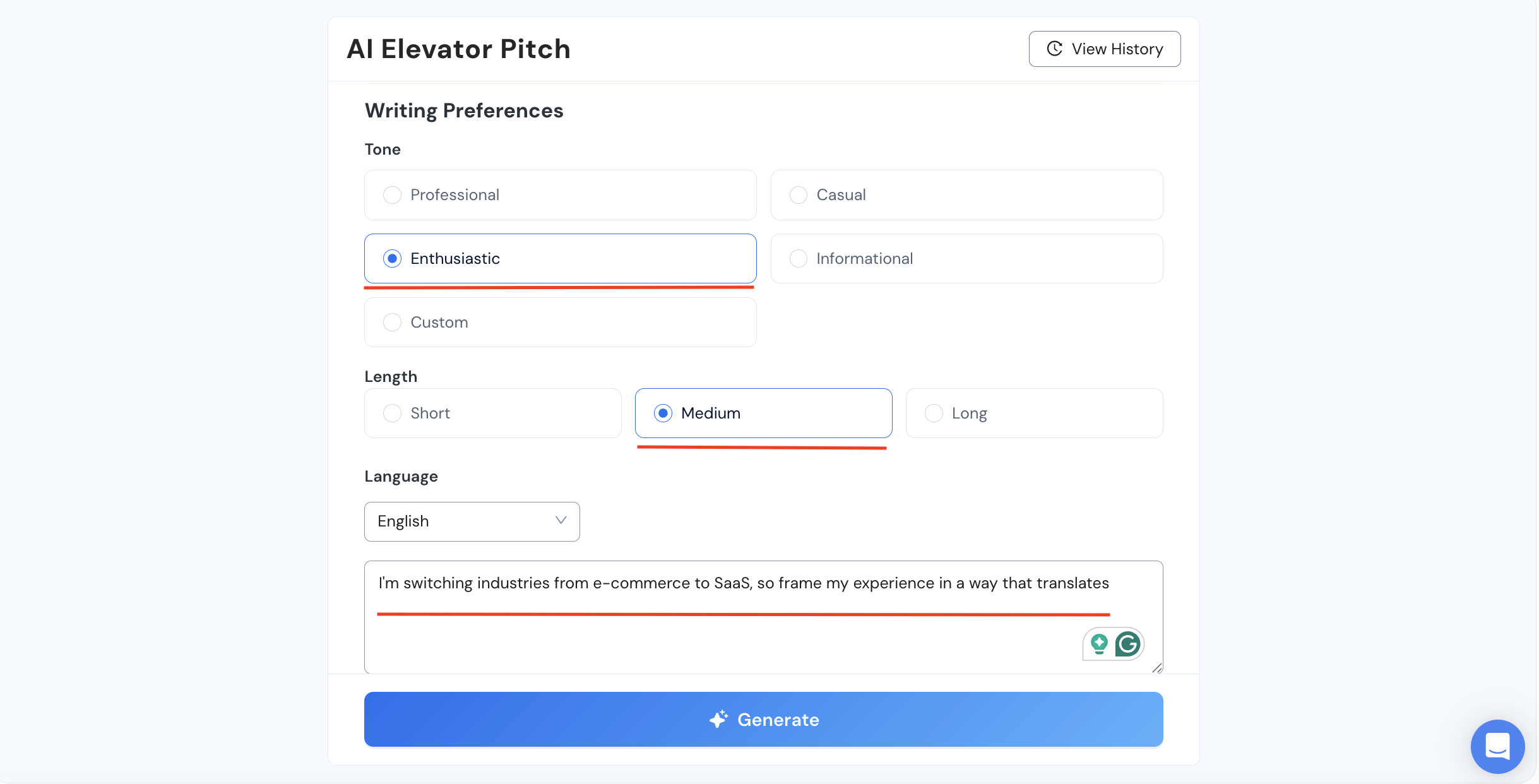
Before you hit generate though, it asks if you have any specific instructions. What I did was try once before adding any instructions to see the response it gives, and it was about 80% there. From that response I knew what needed fixing, so I went back and added those instructions, and the output came back improved.
Why it worked for me
In all honesty, you can do the same thing with an AI tool like ChatGPT.
The real hassle is getting it the right context about you, your target role, your past achievements, the goal you're actually working toward. Providing it all of that yourself is a job in itself, and even then, ChatGPT tends to miss important details.
And when you go back and nudge it to fix that or add something specific, it'll often just hallucinate to match whatever you asked for. You only realize this later when you look closely at what it gave you, and it's frustrating, because you put in all that effort feeding it your details for nothing.
Careerflow doesn't do that because,
- one, it's purpose-built for resumes and job search from a recruiter’s POV
- and two, it's working off of the deep context it has built about you from your past resumes, cover letters and LinkedIn profile.
📢 Try Careerflow’s Elevator Pitch Writer to Prepare for Your Next Recruiter Call
I read through the output a couple of times and kept it in my notes, so it was handy when the call actually came and I needed to land on a key point fast. That took care of my "I don't know what they'll ask and I don't know what to say" problem almost completely. I went into those calls knowing exactly what to lead with.
Common Mistakes Job Seekers Make on Recruiter Calls and How to avoid Them
Recruiter calls usually happen one of two ways. Sometimes they schedule a time with you, which gives you room to actually prepare, pull up the job description, reread your resume and line your story up around all of it. Other times they just call out of nowhere, which can throw you off completely, but either way here’s what most people do wrong.
1. Trying to push through a call you're not actually able to take
When a recruiter calls out of the blue while you're somewhere loud or distracted, don't try to wing it instead of just asking to reschedule. Any decent recruiter is going to be fine with that, and it's not going to hurt your chances. What will hurt your chances is trying to push through it anyway, distortion cutting in and out on their end, you struggling to hear them, having to repeat yourself over background noise.
It's an unpleasant interaction for both sides, and the recruiter doesn't actually get to learn what they need to know about you. That's a worse outcome than just asking for a better time.
2. Not having your salary range figured out beforehand
This shouldn't catch you off guard whether the call was planned or not, because you should have a range in mind from the moment you start applying, not just for this one call. Ideally that's a minimum you'd accept and an ideal number you're going for.
If you don't have that range ready when the question comes up, you end up either lowballing yourself without meaning to, or saying a number too high that it throws them off completely. And once it's out of your mouth, that's the number they stick to.
So if you genuinely don't know what to say, try to turn it back on them and ask what they've budgeted for the role, so you've got something to anchor to instead of guessing blind. But walking in with no range and no question is how you end up leaving money on the table.
3. Skipping the research before the call
If it's a scheduled call, you've got no excuse for showing up without doing the homework.
Spend some time on the company's website and LinkedIn, read the job description properly and check it against your resume so you know exactly where you line up. When you've done that, it makes your answers specific about that particular role and company instead of a generic one you'd give anyone.
Having an elevator pitch ready helps here too, scheduled or not. For a scheduled call, it's one more piece of prep already sorted. For an unscheduled one, having gone through it once already means some of it sticks in your head, so you've got something to fall back on instead of building your intro on the spot.
4. Getting off the call with nothing to ask
When the call wraps up and you've got nothing to ask, it may come across like you weren't really paying attention, even if you were. So it's worth having a couple ready, something like what the next steps look like, or who you'd actually be working with day to day. Simple stuff, but it shows you were listening and that you're actually thinking about this as a real next step.
Final Thoughts on Careerflow’s AI Elevator Pitch
Careerflow’s Elevator Pitch feature helped me get through something I hadn't really thought about, since I figured I'd covered most of the job search once the resumes were out. Turns out this mattered just as much.
The best part of why it worked so well was having everything stored in one place. That gave the AI all the context it needed without me having to feed it anything new. And the outputs came back specific to what I'd actually done, not some generic version of what an elevator pitch is supposed to sound like.
If you haven't already, try Careerflow for free and see how it can help streamline your job search.
.webp)
.webp)