LinkedIn Profile
.avif)
.webp)
Recruiters find candidates on LinkedIn by typing specific words into a search box. If your profile doesn't include those exact words, you won't show up in their search results no matter how qualified or talented you are.
There's no single, universal keyword list that works for everyone. The right words depend entirely on the specific job you want next, which is why copying a generic list online won't help you get hired.
By the end of this guide, you'll know how to build a custom keyword list tailored to your target role. You'll also learn the exact four places on your profile where those keywords belong so recruiters can finally find you. Read our full guide on how to optimize your LinkedIn profile to get your entire profile ready for any recruiters.
How recruiters use keywords to find you on LinkedIn
Recruiters don't scroll through LinkedIn randomly to discover talented candidates. Instead, they use a specialized tool called "LinkedIn Recruiter" to run targeted searches. They type exact job titles, specific skills and locations into a search bar to generate candidate lists (LinkedIn recruiter search basics). If your profile lacks those exact terms, the system excludes you before a human ever sees your page.
Once an initial search is complete, recruiters use filters to narrow down thousands of applicants to a manageable list. They apply Boolean operator words like AND, OR and NOT to combine keywords and pinpoint candidates with exact qualifications (LinkedIn recruiter boolean search). They also filter profiles directly by tagged skills (LinkedIn recruiter skills filter).
Understanding this process makes one thing clear: algorithms only read text, not potential. Placing the right keywords in the right sections ensures search filters pick up your profile when recruiters look for someone with your exact background.
Why a generic keyword list will not work
Copying a universal list of "top LinkedIn keywords" from the internet won't get you found by recruiters. These broad lists fail for two main reasons:
- Keywords are strictly role-specific: A product manager and a project manager might sound similar, but their search vocabularies share almost no overlapping technical terms. Searching for "roadmap execution" targets a product lead, while "risk mitigation" targets a project lead. Using a broad list leaves you ranking for roles you don't actually want.
- Recruiters copy their own job posts: When recruiters search roles in LinkedIn Recruiter, they copy terms straight from the job description supplied by the hiring manager. If a job post asks for "B2B SaaS marketing," the recruiter searches for that exact phrase, not a generic term like "business growth."
Static lists online cannot predict the exact requirements of your specific target role. Building a custom list from active job descriptions is the only way to capture the precise words hiring teams type into search bars.
Where to put keywords on your LinkedIn profile
Putting keywords on your profile only helps if you place them where LinkedIn search algorithms look first. Different sections carry different weight in search results. Place your top keywords in these four key sections, in order of importance.
Headline
Your headline carries the highest search weight of any section on your profile. It fits three to four core keywords naturally alongside your target job title. If you want inspiration for structuring this field, check out our LinkedIn headline examples or use our headline generator to turn your keyword list into tailored options.
- Before: Marketing professional looking for new opportunities.
- After: Marketing Professional | Google Ads, Facebook Ads, Google Analytics, Power BI | Data-Driven Campaigns, Marketing Analytics
About section
Your about section provides space to add five to six secondary keywords into your career story. Use this section to explain how you apply your hard skills and tools in real work situations. Read our LinkedIn summary examples to see how to balance keywords with a natural human tone.
- Before: Experienced marketer with a history of helping companies grow their reach and brand awareness.
- After: B2B marketing manager specializing in content strategy, SEO and lead generation. I use tools like HubSpot and Google Analytics to scale organic traffic.
Experience section
Your experience section anchors your keywords in actual work history. Aim for two to three specific tool or methodology keywords per job entry. Scatter these terms naturally inside your bullet points so recruiters can see the impact you delivered using those exact skills.
- Before: Managed digital campaigns and analyzed performance weekly.
- After: Ran multi-channel digital marketing campaigns using HubSpot, analyzing performance metrics in Google Analytics to boost conversions by 25%.
Skills section
Your skills section acts as a direct keyword index that recruiters filter by. You can list up to 50 skills, but your top three pinned skills should match your target role's most critical keywords. Ensure that 15 to 25 core terms from your research appear as standalone entries in this list.
- Before: Communication, Leadership, Strategy
- After: Content Strategy, Search Engine Optimization (SEO), Google Analytics, B2B Marketing
Job titles are the single most searched field across the entire platform. Many professionals write creative titles like "Marketing Ninja" or "Chief Happiness Officer," but recruiters never type those terms into search bars. Always use standard industry titles for your past and present roles so algorithms index your profile correctly.
📢 Note: Stuffing your profile with unnatural strings of buzzwords hurts your chances with human readers. A keyword list that looks unnatural or reads poorly to a recruiter costs you far more credibility than it gains you in search placement. Write for people first, algorithms second.
Worked example: from job posts to a finished profile
📢 Note: The following section is a worked example to show you how the process operates in practice. Do not copy these exact terms unless you are applying for this specific type of marketing manager role.
To see how this method works in real time, let's follow a job seeker targeting a senior marketing manager role.
Step 1: 5 sources of job posts
We've gathered five active job descriptions for senior marketing manager positions across mid-sized software companies and recorded their required qualifications.
- Job post 1: Demands experience in B2B marketing, content strategy, demand generation, SEO, Google Analytics, and cross-functional leadership.
- Job post 2: Highlights demand generation, pipeline growth, HubSpot, B2B marketing, lead generation, and campaign performance analysis.
- Job post 3: Emphasizes content strategy, SEO, copy editing, organic traffic growth, Google Analytics, and team management.
- Job post 4: Calls for B2B marketing, campaign management, lead scoring, HubSpot, data analysis, and product messaging.
- Job post 5: Requires demand generation, content strategy, conversion rate optimization (CRO), Google Analytics, and project management.


Step 2: Ranked keywords
After counting term frequencies across all five posts, we sorted terms that appeared at least three times into four distinct categories:
Category: Ranked Keywords (Repeated in 3+ Posts)
Job Titles: Senior Marketing Manager, Demand Generation Manager, Content Marketing Manager
Hard Skills: B2B Marketing, Content Strategy, Demand Generation, SEO, Lead Generation
Tools & Tech: Google Analytics, HubSpot, Conversion Rate Optimization (CRO)
Soft Skills: Cross-functional Leadership, Campaign Management, Data Analysis
Step 3: Finished headline
Here is how those extracted terms turn into polished profile elements without sounding like a robotic list of buzzwords.
Finished headline
Senior Marketing Manager | B2B Content Strategy | Demand Generation & SEO | Google Analytics & HubSpot
Step 4: About section
Here is how an about section should be framed using the keywords.
I am a B2B senior marketing manager specializing in demand generation, content strategy and organic traffic growth. Over the last six years, I've built multi-channel campaigns using Google Analytics and HubSpot to scale qualified pipelines.
Top 10 skills list
- B2B Marketing
- Demand Generation
- Content Strategy
- Search Engine Optimization (SEO)
- Google Analytics
- HubSpot
- Lead Generation
- Campaign Management
- Data Analysis
- Conversion Rate Optimization (CRO)
How to check whether your keywords are working
Once you update your profile, you need a way to verify that your new keywords are driving results. LinkedIn provides free, built-in analytics right on your profile dashboard so you can track performance over time (LinkedIn profile analytics help).
Watch these two important signs over the weeks following your updates:
- Search appearances: Check how many times your profile appeared in search results over the past week. Clicking into this metric reveals the exact job titles of the people searching for you and the top keywords they used to find your profile.

- Profile views: Monitor whether your overall profile views increase. Higher search appearances naturally lead to more recruiters clicking through to view your full history.
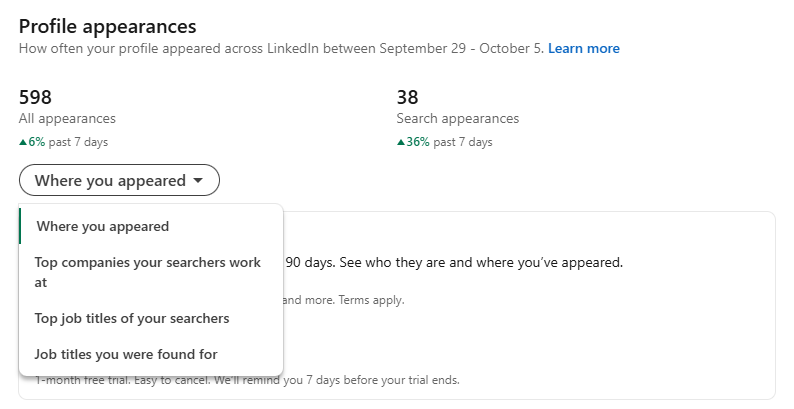
Give the search algorithm two to three weeks to re-index your updated profile and start reflecting your new terms in recruiter queries. Search volume fluctuates based on hiring cycles and recruiter activity, so focus on upward trends rather than expecting instant transformation overnight. If your search appearances don't list your target job titles after a month, revisit your job posts and refine your keywords.
How to do this with Careerflow
Checking your profile manually takes time, but dedicated tools can help speed up the process and catch missing opportunities. You can run your updated page through our AI LinkedIn optimizer to get an instant section by section score that highlights what recruiters notice first, including keyword density in your headline and skills match.
Here is how our tools streamline each step of your keyword update:
- Align your top keywords: Use our AI headline generator to turn your ranked keyword list into tailored, professional headline options.
- Check your profile layout: Follow our LinkedIn profile checklist to complete a step-by-step pass across your about, experience and skills sections.
- Identify keyword gaps: Scan your profile using our AI LinkedIn optimizer to confirm your core target terms appear in the fields recruiters weigh most heavily.
.webp)
.webp)