LinkedIn Profile
.avif)
.webp)
In today’s job market, recruiters use LinkedIn Recruiter to find qualified candidates efficiently. For the unfamiliar, LinkedIn Recruiter, is a specialized search platform with AI-assisted prompts, tools and filters.
According to LinkedIn metrics, recruiters review 62% fewer profiles with their Hiring Assistant. What this means for job seekers is just 38% of you will be seen by any recruiter that uses this function. If there was ever a reason to optimize your LinkedIn profile, this is it!
They also prioritize "Spotlights" highlighting people who are open to work, have company connections, or engaged with their content. Here's how to optimize your profile to get noticed first.
How Recruiters Actually Search on LinkedIn
Recruiters use LinkedIn Recruiter with three main search methods: filters and keywords (job title, skills, location, 40+ options), Spotlights (highlighting open candidates, past applicants, company connections), and direct outreach.
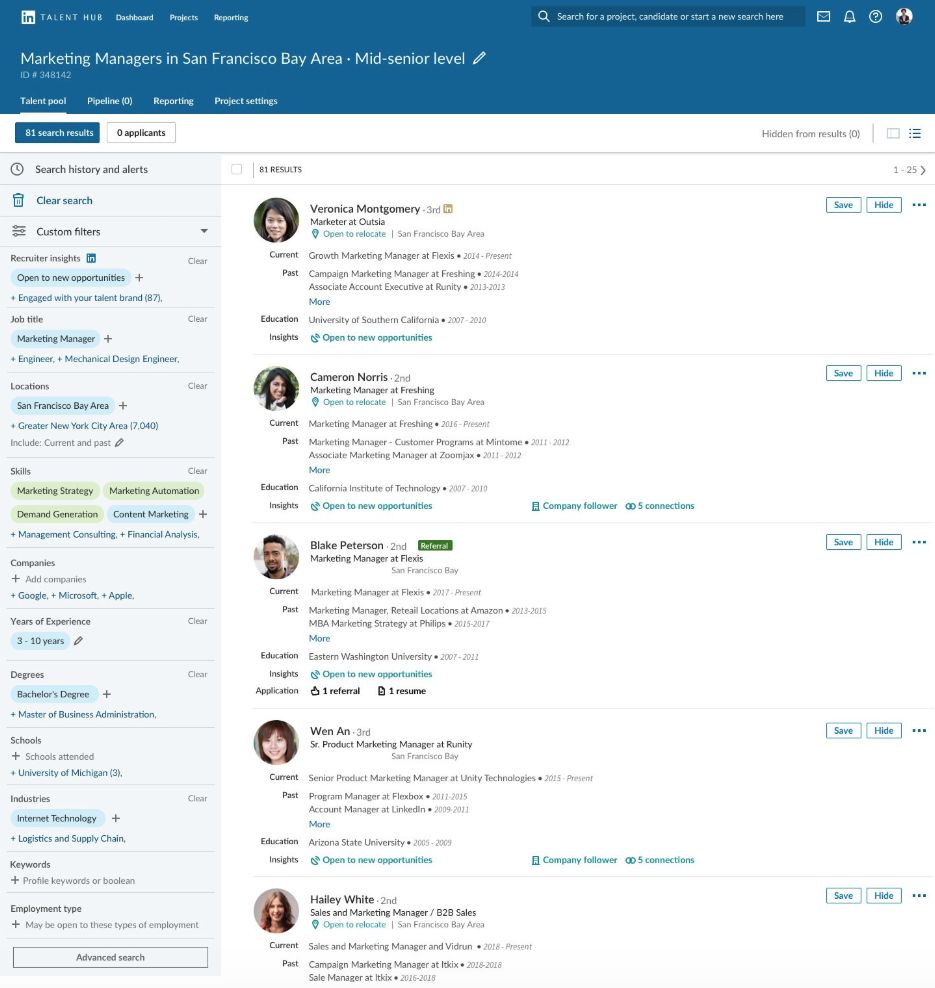
Here's exactly how each of these work.
1. Filters and Keywords: Recruiters start their search with a long list of specific filters. They can narrow down their search by things like:
- Job Title: "Software Engineer"
- Skills: "Project Management" or "Python"
- Location: "New York, NY"
- Industry: "Fintech"
- Company: "Google" or "Meta"
And over 40 other options, including experience level, education, and company size.
2. Spotlights: After applying filters, recruiters use Spotlights to quickly find the best candidates to contact. These are special indicators that highlight profiles of people who are:
- Open to work
- Connected to someone at their company
- Past applicants
- Or have recently engaged with their company's content.
3. Outreach: Once they find a promising profile, they send a message, hoping to start a conversation with a great candidate.
The Tools Recruiters Use
The core of a recruiter’s search is using keywords and filters effectively. They can use two main methods:
1. AI-Assisted Search: Recruiters can paste a job description or their notes, and LinkedIn’s AI will automatically suggest relevant candidates. This is a fast way to get a starting list of potential matches.
2. Classic Keywords and Boolean: For a more precise search, recruiters use specific keywords and Boolean operators. This allows them to build complex search queries.
- Exact Phrases: Use quotation marks to find an exact phrase, like "product manager".
- Synonyms: Use OR to include similar terms, like ("backend" OR "back end").
- Exclusions: Use NOT to exclude certain words, like (python NOT "python tutor").
- Combining Keywords: They can combine these to create highly specific searches, for example: (cloud AND (aws OR gcp)).
The key for job seekers is to mirror these search methods. Once you understand how recruiters build their queries, you can work the keywords and phrases they search for into your profile so it surfaces in their results.
When it does, you get the dm, and eventually the interview; some recruiters bring a tool to that stage too. Metaview's Notetaker, for example, joins interviews as a visible participant, turns the conversation into structured notes, and drafts a scorecard for the recruiter to review, so the specifics you give in that call carry into the hiring decision.
Spotlights: Why Some People Get Messaged First
When recruiters search on LinkedIn, they have a powerful feature called Spotlights. These aren’t a scoring system; instead, they act as smart filters that help recruiters prioritize who to message. Spotlights highlight candidates who are more likely to respond or already have some connection to the company.
Here are the most common Spotlights recruiters look for:
- Open to Work: This is a private spotlight for recruiters, meaning only they can see it. It flags profiles of people who have discreetly indicated they're open to new job opportunities.
- Past Applicants: This spotlight highlights individuals who have previously applied for a job at the company or even started an application. This is valuable as it shows a past interest in the company.
- Have Company Connections: This filter shows recruiters which candidates have a first-degree connection at their company. A personal referral or connection can significantly increase the chances of getting a message.
- Engaged with your Talent Brand: This spotlight identifies users who have followed the company page, interacted with its posts, or viewed its jobs. It shows a candidate is already interested in the company and its mission.
By understanding what these spotlights are, you can position yourself to be one of the first people recruiters reach out to.
Make Your Profile Surface in Recruiter Searches
To get found by recruiters, you need to make sure your profile speaks their language—the language of keywords and filters. Here’s how to optimize each section of your profile to show up in more searches.
Put the Right Words in the Right Places
Think of your profile as a set of keywords. The more strategically you place them, the better your chances of getting noticed.
- Headline: This is your most important piece of real estate. Include your target role, core skills, and domain. For example: "Data Analyst • SQL, Python, Tableau • Fintech."
- About: Use this section to give a quick summary. Include the titles you’re targeting, the key tools you use, and a few metrics that prove your impact.
- Experience: Don’t just list your duties. Write bullet points that focus on outcomes and results. Be sure to front-load your sentences with the keywords and tools that match your target roles.
- Skills: This section is a must-have. Add the exact skills you see in job descriptions you’re interested in. Make sure you feature your top skills in the relevant experience sections to show where you used them.
- Location: Be specific. Instead of a large region, set your location to a precise city or metro area. If you’re open to relocating or a hybrid role, mention that clearly.
Control Your “Open to Work” Settings
Using the "Open to Work" feature can significantly increase your visibility, but it’s important to choose the right setting based on your situation.
Recruiters Only: This option makes your profile visible to recruiters using LinkedIn Recruiter without displaying the green photo frame publicly. While LinkedIn tries to hide this from recruiters at your current company, it can't guarantee 100% privacy. This is a great choice if you want to be discreet.
All LinkedIn Members: This option adds the green "Open to Work" photo frame to your profile. While it offers the highest visibility, your current network and colleagues will be able to see it, so use this if you're comfortable with the lack of privacy.
Become a Spotlight
Remember those "Spotlights" we talked about? You can take a few simple steps to make sure you show up in them.
Engage with your target companies: Follow them and interact with their posts by commenting or liking. This can place you in the Engaged with your Talent Brand spotlight.
Leverage your connections: Having first-degree connections at a company you're interested in can get you noticed in the Have Company Connections spotlight. Reach out to alumni or employees to build your network.
Apply thoughtfully: When you’re a strong fit for a role, apply for it. This can get you into the Past Applicants spotlight, signaling to recruiters that you have a genuine interest in the company.
Real Boolean Examples (with Job-Seeker Translations)
Understanding how recruiters use Boolean search is your secret weapon. By translating their complex search strings, you can optimize your profile to ensure you show up for the right roles.
✅Software Engineer
Recruiter Search: ("software engineer" OR "SWE") AND (python OR java OR go) AND (kubernetes OR "microservices") NOT (tutor OR "bootcamp coach")
Translation for You: This recruiter is looking for an engineer with specific programming skills and experience with modern tech like Kubernetes. They're also actively filtering out tutors or bootcamp coaches.
👉What to Do: Use keywords from their target stack (like Python, Java, Kubernetes) in your headline and About section. Your experience bullet points should also include concrete examples of how you've used these tools.
✅ Data Analyst
Recruiter Search: ("data analyst" OR "business intelligence") AND (sql AND (tableau OR "power bi")) AND (etl OR "data pipeline")
Translation for You: This recruiter wants an analyst who can not only use SQL and a popular BI tool but also understands the full data flow, from extraction to reporting.
👉What to Do: Place SQL and your specific BI tool (Tableau or Power BI) directly in your headline and Skills section. In your experience, add 1-2 bullet points that highlight your use of these tools with clear metrics.
✅ Product Designer
Recruiter Search: ("product designer" OR "ux designer") AND (figma OR sketch) AND (prototype OR "user research") NOT (graphic)
Translation for You: This recruiter is looking for a designer with specific skills in a design tool and an emphasis on the user-centered process, not someone who only does graphic design.
👉What to Do: Make sure to highlight Figma or Sketch in your profile. Your experience section should emphasize your work in prototyping and user research. Avoid generic or art-focused language.
✅ Product Manager
Recruiter Search: ("product manager" OR pm) AND (roadmap OR "go to market" OR "A/B testing") AND (saas OR mobile)
Translation for You: Recruiters for this role are looking for specific project management skills and experience in a particular industry, like SaaS or mobile.
👉What to Do: Incorporate keywords like go-to-market, A/B testing, or roadmap into your experience and summary sections. Crucially, quantify the impact of your work by including metrics like activation, retention, or revenue.
Common recruiter filters and how to improve your visibility
Action Checklist (copy‑friendly)
Turn on "Open to Work" in 4 Taps
Want to signal to recruiters that you're open to new opportunities without your network seeing it? Follow these quick steps:
- Open your LinkedIn profile.
- Click on the "Open to" button.
- Choose "Finding a new job" and add your target titles, locations, and other preferences.
- Set Visibility to "Recruiters only" and save.
Make Your Resume Recruiter-Ready on LinkedIn
Having a polished resume on your LinkedIn profile is a key step to getting noticed. By making it easy for recruiters to find and download your resume, you give yourself a major advantage.
- Polish Your Content: Go through your resume and make sure it's optimized for the jobs you want. Put the target titles, core tools, and quantified outcomes right at the top of your experience sections.
- Create an ATS-Friendly PDF: Once your content is ready, export a clean, ATS-friendly PDF from a tool like Careerflow's AI Resume Builder. This ensures your resume is easily scannable by applicant tracking systems.
- Upload to Your Profile: Make your resume available for recruiters with just one click. You can add the PDF to your LinkedIn profile’s Featured section, along with any portfolio links. This section is a great place to pin your latest work and documents.
- Keep It Updated: Always have an organized system for your resume versions. Keep one master copy and create specific versions for different roles. Update your resume after every major project or internship to keep it fresh and relevant.
Conclusion
Start with our LinkedIn Optimizer to identify exactly which keywords and sections need updating. Then use our Resume Builder and AI Cover Letter Generator to complete your job search toolkit.
.webp)