Resumes
.avif)
.webp)
Computer skills are essential for nearly every professional role today, but listing them generically hurts your credibility. Writing "proficient in Microsoft Office" on a resume signals roughly the same thing as claiming you know how to use a smartphone; it's assumed as a baseline, not a competitive advantage.
The real challenge is specificity. Hiring managers and Applicant Tracking Systems (ATS) look for the exact platforms, tools and technical applications you operate, alongside your true proficiency level. A vague skills section wastes prime real estate, while an overstuffed list overwhelms the reader.
This guide breaks down 100+ high-impact computer skills across 15 core categories, explains how to rate your proficiency accurately and provides role-specific examples. You will also learn four strategic placement methods with concrete experience bullets, plus a five-step framework to select the exact tools that belong on your resume.
What are computer skills?
Computer skills are the practical abilities that allow you to use software, hardware and digital tools to execute work tasks. They span everything from foundational digital literacy, such as file management and business email, to advanced technical capabilities like database architecture and machine learning deployment.
These capabilities represent objective, verifiable hard skills. Unlike soft skills such as communication or adaptability, your computer skills can be proven through industry certifications, portfolio projects and direct experience with specific software.
Employers prioritize relevant computer skills because they directly correlate with job performance and lower onboarding costs. A candidate who lists the exact tools a team uses daily and demonstrates proficiency holds an immediate advantage over someone who relies on generic software categories.
Computer skills categories: 100+ examples
Microsoft Office
The most widely required suite in professional environments. Specify the applications and proficiency level rather than listing "MS Office" generically.
Word, Excel (basic formulas / pivot tables / VLOOKUP / VBA macros), PowerPoint, Outlook, Access, Teams, OneNote, SharePoint, OneDrive, Publisher, Project
Google Workspace
Increasingly standard across distributed and tech-forward teams.
Google Docs, Google Sheets, Google Slides, Gmail, Google Calendar, Google Meet, Google Drive, Google Forms, Google Sites, Looker Studio (formerly Data Studio)
Data analytics and business intelligence
Used across finance, operations, marketing and product functions.
Tableau, Power BI, SQL, Python (pandas, NumPy), R, Excel (pivot tables, data modeling), Google Analytics, Looker, Databricks, Snowflake, SAS, SPSS, Qlik
Databases and data management
Essential for technical, analytical and operations roles.
MySQL, PostgreSQL, Oracle Database, Microsoft SQL Server, MongoDB, Cassandra, Redis, Elasticsearch, IBM DB2, MS Access
Project management software
Used in project management, operations, product and cross-functional coordination.
Asana, Jira, Trello, Monday.com, Notion, Smartsheet, MS Project, ClickUp, Basecamp, Wrike, Linear
Customer relationship management (CRM)
Required for sales, customer success, marketing and account management roles.
Salesforce, HubSpot, Zoho CRM, Microsoft Dynamics 365, Pipedrive, Freshsales, Intercom, Zendesk
Accounting and finance software
Essential for accounting, finance and administrative roles.
QuickBooks, Sage Intacct, NetSuite, SAP, Xero, FreshBooks, Microsoft Dynamics Finance, Oracle Financials
Marketing and SEO tools
Required for digital marketing, content and growth roles.
Google Ads, Meta Ads Manager, HubSpot Marketing, Mailchimp, Klaviyo, Ahrefs, SEMrush, Google Search Console, Hootsuite, Buffer, WordPress, Yoast SEO, Canva
Design and creative software
Required for UX, design, creative and marketing roles.
Adobe Photoshop, Adobe Illustrator, Adobe InDesign, Adobe Premiere Pro, Adobe After Effects, Figma, Sketch, Canva, InVision, Procreate, Adobe XD, Webflow
Coding and programming languages
Required for software engineering, data science and technical roles.
Python, JavaScript, TypeScript, Java, C++, C#, Go, Ruby, PHP, Swift, Kotlin, R, MATLAB, HTML/CSS, SQL, Bash/Shell scripting
Development frameworks and tools
Required for software engineering roles.
React, Node.js, Angular, Vue.js, Django, Spring Boot, .NET, Git, Docker, Kubernetes, AWS, Azure, Google Cloud Platform, Terraform, Jenkins, GitHub Actions
Communication and collaboration platforms
Expected across nearly all professional environments.
Slack, Microsoft Teams, Zoom, Google Meet, Confluence, Notion, Loom, Miro
Content management systems (CMS)
Required for marketing, content and web management roles.
WordPress, Webflow, Squarespace, Contentful, Drupal, HubSpot CMS, Shopify, Magento
Hardware and IT infrastructure
Required for IT support, system administration and operations roles.
Network configuration (TCP/IP, DNS, DHCP), hardware troubleshooting, Windows Server, Active Directory, VMware, Azure Active Directory, VPN configuration, cybersecurity protocols, firewall management
Enterprise resource planning (ERP) systems
Required for operations, supply chain, finance and enterprise business roles.
SAP S/4HANA, Oracle ERP Cloud, Microsoft Dynamics 365, NetSuite, Workday, Infor, Epicor
How to describe your computer skills proficiency level
Simply naming a software tool is rarely enough for technical or specialized platforms. To give hiring managers a clear picture of your capabilities, you must specify your skill level and highlight the exact features you use.
Understanding the three proficiency levels
1. Basic (Foundational user)
- What it means: You understand the core software features and can complete everyday tasks independently without step-by-step guidance.
- How to describe it: Focus on foundational features, document creation and standard navigation.
- Real example: Microsoft Word (document formatting, track changes, custom templates)
2. Intermediate (Confident user)
- What it means: You use the tool regularly, navigate most features easily and handle complex functions or minor troubleshooting on your own.
- How to describe it: Highlight specific, intermediate-level functions that save time or organize information.
- Real example: Microsoft Excel (pivot tables, VLOOKUP, conditional formatting, basic data modeling)
3. Advanced (Expert user)
- What it means: You hold deep expertise in the platform. You can automate workflows, write complex scripts, build models from scratch or train other team members.
- How to describe it: Detail advanced tools, automation techniques, coding integrations or architectural framework skills.
- Real example: Microsoft Excel (VBA macros, complex nested formulas, Power Query, dynamic financial modeling)
The specificity rule: Avoid broad software suite labels
Never list a full software package name when you only mean specific programs inside it.
Generic phrases like "MS Office" or "Google Workspace" offer zero value to a hiring manager and fail to trigger specific ATS keywords. Instead, break down the package into specific tools and the exact functions you perform:
- Weak entry: MS Office
- Strong entry: Excel (pivot tables, VLOOKUP), PowerPoint (executive presentations), SharePoint (intranet administration)
Computer skills by role
Administrative assistant
Microsoft Word (advanced formatting, mail merge), Microsoft Outlook (calendar management, rules), Microsoft Excel (data entry, basic formulas), PowerPoint (meeting decks), SharePoint, Zoom, Google Workspace, DocuSign, QuickBooks (basic invoicing)
Digital marketing manager
Google Analytics 4, Google Ads, Meta Ads Manager, HubSpot, Salesforce, Mailchimp or Klaviyo, Ahrefs or SEMrush, WordPress, Canva, Hootsuite or Buffer, Looker Studio, Excel (reporting, pivot tables)
Software engineer
Git, GitHub or GitLab, VS Code or JetBrains IDE, Docker, Kubernetes, Jira, Confluence, CI/CD tools (Jenkins, GitHub Actions), AWS or Azure, Linux/Bash, relevant programming languages and frameworks (per stack)
Financial analyst
Microsoft Excel (advanced: VBA, financial modeling, sensitivity analysis), Power BI or Tableau, Bloomberg Terminal or FactSet (if applicable), SAP or Oracle ERP, SQL (basic to intermediate), PowerPoint, SharePoint
Project manager
Jira or Asana or MS Project, Microsoft Excel (project tracking, Gantt charts), PowerPoint (executive reporting), Confluence, Smartsheet, Zoom or Teams, SharePoint, basic SQL or Power BI for reporting
Healthcare administrator
Epic EHR or Cerner, Microsoft Excel (scheduling, data tracking), Microsoft Word (documentation), Outlook, Zoom, compliance tracking systems (Veeva, PolicyStat), basic knowledge of HIPAA-relevant tools
Data analyst
SQL (intermediate to advanced: joins, CTEs, window functions), Python (pandas, NumPy, matplotlib) or R, Tableau or Power BI, Excel (advanced), Google Analytics, BigQuery or Snowflake, Jupyter Notebooks, dbt (if applicable)
Computer skills by industry
Healthcare
EHR systems (Epic, Cerner, Meditech), HIPAA-compliant communication tools, telehealth platforms, medical billing software (Kareo, AdvancedMD), Microsoft Office (documentation, scheduling)
Finance and accounting
Bloomberg Terminal, FactSet, QuickBooks, SAP or Oracle ERP, advanced Excel (modeling, VBA), SQL, Power BI or Tableau, DocuSign
Education
Google Workspace for Education, learning management systems (Canvas, Blackboard, Schoology), Zoom or Teams (synchronous instruction), Microsoft Office, student information systems (PowerSchool, Infinite Campus)
Marketing and advertising
Google Analytics, Google Ads, Meta Ads Manager, CRM (HubSpot, Salesforce), email marketing platforms, SEO tools (Ahrefs, SEMrush), design tools (Canva, Adobe Creative Suite), CMS (WordPress, Webflow)
Technology and software
Jira, Confluence, GitHub/GitLab, cloud platforms (AWS, Azure, GCP), Docker/Kubernetes, monitoring tools (Datadog, PagerDuty), communication tools (Slack, Zoom), documentation tools (Notion, Confluence)
4 ways to place computer skills on your resume
How you position your computer skills dictates how quickly recruiters and ATS software recognize your technical capabilities. Using a mix of strategic resume locations ensures your technical strengths are both scannable and backed by proven results.
1. Dedicated skills section
Create an organized skills section near the bottom or side column of your resume. Group tools by subcategories, and include proficiency levels for your core technical tools.
- Data Analysis: SQL (advanced), Python (pandas, matplotlib), Excel (VBA, pivot tables)
- Data Visualization: Tableau, Power BI, Looker Studio
- Business Platforms: Salesforce, HubSpot, Google Analytics
2. Professional summary statement
Feature your highest-value technical skills in your top summary when they directly support a major career credential or achievement.
"Data Analyst with 5 years of experience turning complex financial data into executive-ready insights using SQL, Python and Tableau. Reduced monthly reporting turnaround times by 40% through automated dashboard deployment."
3. Work experience achievement bullets
Integrate software tools directly into your work experience bullets to show how you used technology to drive real-world business results.
- Process Automation: Built an Excel forecasting model using VBA and Power Query that shortened the monthly close cycle from 9 days to 5 while improving forecast accuracy from 76% to 93%.
- System Migration: Migrated client data from a legacy CRM to Salesforce for 35 team members, creating user documentation and training guides that reduced data entry errors by 41%.
- Digital Optimization: Leveraged Ahrefs and Google Search Console to identify high-volume search opportunities, generating content that grew monthly organic traffic by 18,000 visitors within 6 months.
4. Certifications and training section
Use a formal certifications section to validate your software skills with official credentials from established platforms like Microsoft, Google, Salesforce or AWS.
- Microsoft Certified: Excel Expert (MOS)
- Google Analytics: Individual Qualification
- Salesforce: Certified Administrator
- AWS Credentials: Certified Cloud Practitioner
How to choose which computer skills to include
Choosing the right computer skills comes down to balancing what the employer wants with what you can confidently deliver. Follow this simple five-step process to filter your technical inventory down to the most impactful items.
Step 1: Match the job description first
Start by carefully reviewing the target job posting and highlighting every software program, technical tool and digital platform mentioned.
- Why it matters: Applicant Tracking Systems (ATS) scan resumes for exact keyword matches. Prioritize listing the software tools you know that appear explicitly in the posting.
Step 2: Include implied industry tools
Add essential software standards to your field, even if the job description leaves them out.
- Why it matters: A project management job description might not explicitly mention Excel, but it's generally expected to be included. Make sure to incorporate these implied skills as well.
Step 3: Remove outdated or overly basic skills
Filter out generic capabilities or legacy software that no longer add competitive value to your application.
- What to cut: Standalone entries like "Microsoft Word," "Email" or "Internet Browsing" suggest entry-level capabilities rather than professional strengths. Only include foundational programs if you possess advanced capabilities worth highlighting, such as complex document formatting or template automation.
Step 4: Prioritize specific features over generic labels
Replace broad software categories with explicit platform names and specific functional capabilities.
- Weak entry: Database management
- Strong entry: PostgreSQL (advanced queries, database indexing, stored procedures)
Step 5: Do not list skills you cannot demonstrate.
Never list a technical skill or software program you cannot demonstrate on the job. Claiming expertise in a platform like Tableau without being able to build a basic dashboard during an interview creates immediate friction and risks damaging your professional credibility.
How to check your computer skills for ATS alignment with our resume optimizer
Optimize your technical skills in 3 simple steps
- Scan your resume against the job post: Open our resume optimizer, upload your resume and paste the target job description into the optimizer.
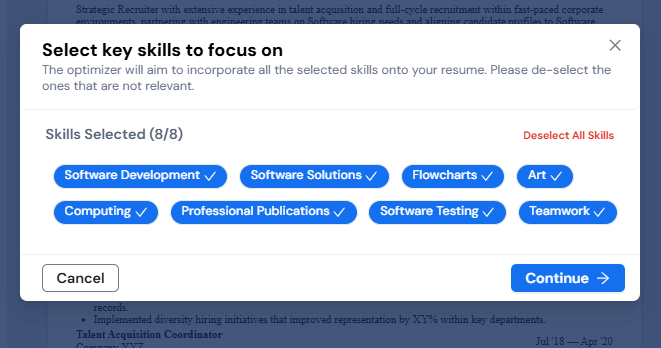
- Identify missing software keywords: Review your instant skill-gap report to pinpoint exact platforms, tools and technical competencies requested in the posting that are missing from your draft.
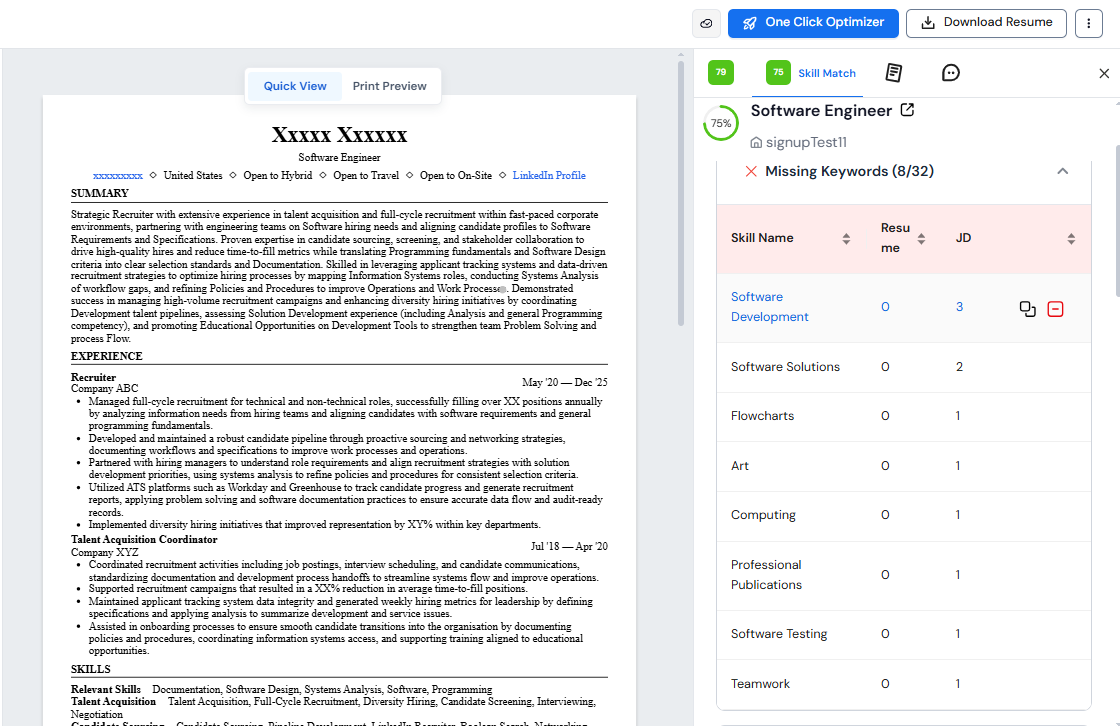
- Bridge skill gaps in one click: Use our AI recommendations to insert matching technical skills directly into your dedicated skills section or generate high-impact work experience bullets that show those tools in action.
.webp)
.webp)