


Resumes
.avif)
.webp)
Most resume builders treat a nursing resume like any other. They offer a clean template, a text box for experience, and generic AI suggestions like "managed a team" and "improved efficiency." None of that works for a nurse applying to a critical care unit.
Our Resume Builder is built for job seekers in competitive, high-ATS environments. For nurses, that means it handles the things generic builders ignore: credential formatting in the header, a dedicated certifications section with issuing bodies and expiration dates, and specialty keyword recognition. The AI writes clinical bullets in the right format instead of defaulting to corporate language.
This walkthrough covers what to look for in a nurse resume builder, and exactly how to use Careerflow to build a nursing resume that passes ATS and reads as credible to a healthcare recruiter. If you’re still working out what belongs in each section of your nursing resume, start with our nursing resume guide first and come back here when you are ready to build.
Why many resume builders don't work for nursing resumes
A generic resume builder doesn’t know that "BLS" needs to be spelled out as Basic Life Support for ATS to recognize it. It doesn’t know that your license number belongs in the header alongside your credentials. It doesn’t know that "managed patient care" is a weak bullet point and that "managed care for 4 to 6 critically ill patients per shift in a 32-bed ICU" is what a nurse recruiter is actually scanning for.
The problems show up in three specific places.
Certification formatting: Most builders offer a generic "Certifications" text block with no structured fields. There is no prompt for issuing body or expiration date, both of which many healthcare ATS systems parse specifically.
Header and credentials: Nursing convention is to list credentials directly after your name. Jane Smith, RN, BSN. Generic builders have no field for this. Nurses end up either stuffing credentials into their name field or leaving them out of the header entirely.
AI writing: General-purpose AI resume writers are trained on corporate resume language. Ask one to write a bullet for an ICU nurse and you will get something like "Delivered high-quality patient care in a fast-paced environment." That is ATS-invisible and tells a recruiter nothing.
[EXPERT CALLOUT: Healthcare Recruiter] Suggested prompt: "When you review nursing resumes, can you tell when someone used a generic resume builder? What does it look like, and what do the stronger builder-assisted resumes do differently?"
Our Resume Builder doesn’t fix all of these gaps automatically, but the AI is trained on professional resume writing standards, and the structured sections allow nurses to build the specific components their resume requires correctly, without working around the tool.
What to look for in a resume builder as a nurse
Before choosing any nursing resume builder, check for these five capabilities.
Structured certifications section: Separate fields or clear prompts for certification name, abbreviation, issuing body, and expiration date. If the builder offers a single text box labeled "Certifications," ATS formatting is entirely on you.
Flexible header: Can you add your credentials directly after your name? RN, BSN, MSN and similar designations need to appear in the header. Can you include a license number? If the header is locked to name and contact info only, the builder isn’t built for licensed professionals.
ATS compatibility by design: Single-column layout, no graphics, no text boxes inside the resume, no tables inside sections. Many builder templates that look polished are ATS-hostile.
AI that can be directed: Can you give the AI context about your specialty, patient ratio, and unit type before it generates bullets? An AI that writes from a blank prompt will produce generic output. An AI you can brief will produce usable output. This is the core capability that separates an AI resume builder for nurses from a generic one.
Job description matching: Does the builder or a companion tool let you paste a job description and see which keywords are missing? For nursing, this is not optional. Every hospital system uses slightly different ATS keyword configurations.
How to build a nursing resume in Careerflow
Step 1: Set up your header with credentials
Open the Resume Builder and create a new resume from scratch. Choose a single-column template with no graphics, icons, or text boxes in the experience sections.
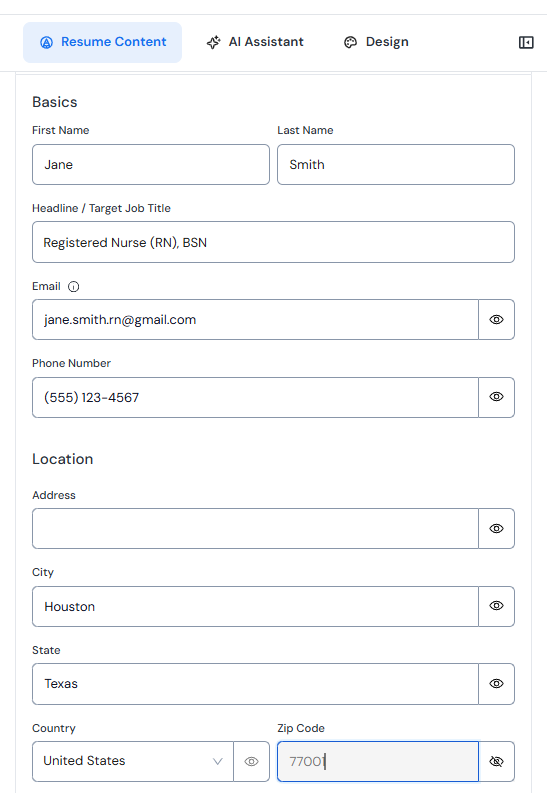
In the name field, add your credentials directly after your name: Jane Smith, RN, BSN. If you hold an advanced practice credential, list it next: Maria Smith, MSN, NP-C.
Add your contact information: city and state, professional email, phone, and LinkedIn URL. Don't include your full street address.
In the summary or profile section, include your active nursing license. Add the license number, issuing state, and expiration date. Many nurses add a brief line to their professional summary that includes this, or create a short "Licenses" line in the header area beneath contact info. Either placement works as long as it's above the fold.
Step 2: Build your certifications section
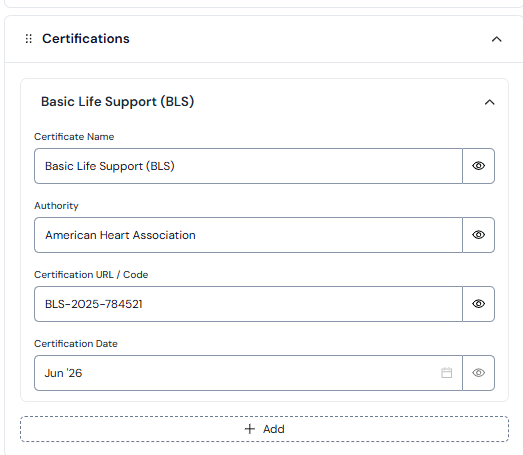
Add a dedicated Certifications section. Do not merge certifications into the skills section. Keep them separate so ATS can parse them as a distinct category.
For each certification, use this format: Full name (Abbreviation), Issuing Organization, Expiration: MM/YYYY.
Example: Basic Life Support (BLS), American Heart Association, Expires: 06/2027.
List in order of relevance to your target role. For critical care nurses, ACLS and CCRN come first. For emergency nurses, TNCC and CEN. For pediatric nurses, PALS and any NICU-specific credentials.
Never list only the abbreviation. ATS platforms at many health systems aren't consistently configured to match BLS without the spelled-out name.
Step 3: Write your professional summary with the AI
Open the AI writing assistant and give it specific context before generating. Don’t use a blank prompt.
Include your specialty, years of experience, the type of role you are targeting, and one or two distinguishing credentials.
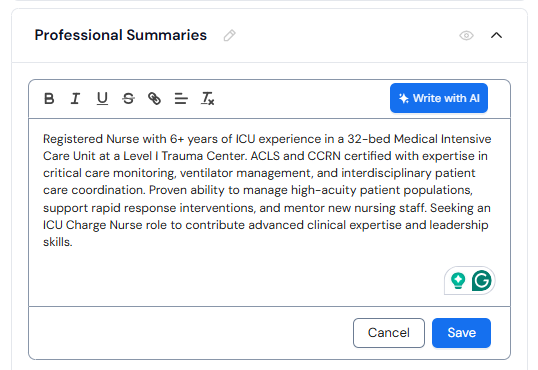
Example prompt: "I am an RN with 6 years of ICU experience. I am ACLS and CCRN certified. I work in a 32-bed medical ICU at a Level I trauma center. I am applying for an ICU charge nurse role."
Review the output and edit for accuracy. The AI will produce a structurally strong summary. Your job is to verify that the specialty, credentials, and role target are stated correctly and that no generic filler phrases slipped in.
New graduate nurses: give the AI your clinical rotation settings, total hours, certifications completed during your program, and the type of role you are applying for. It will frame your rotations as relevant experience rather than downplaying your lack of full-time employment.
Step 4: Build your clinical experience section
Add each position with employer name, hospital system if applicable, unit type and bed count, location, and dates.
Example: Memorial Regional Medical Center, Medical ICU (32-bed unit), Houston, TX. January 2021 to Present.
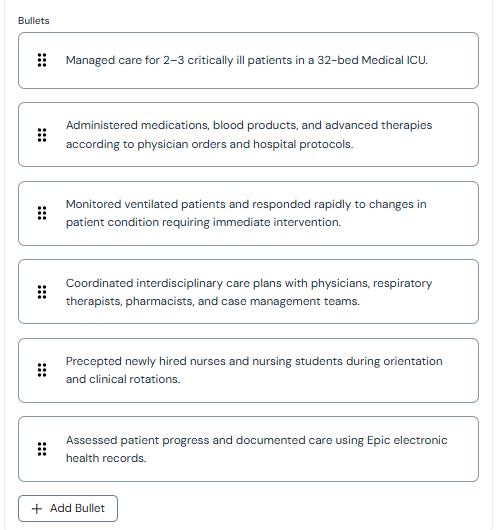
Use the AI to draft bullets for each role. Give it the same level of context you gave it for the summary: specialty, patient ratio, specific skills and procedures, any charge nurse or precepting responsibilities.
Edit every AI-generated bullet before accepting it. Check that the patient ratio is stated accurately, procedure names match what is in the job description, and no corporate language made it through.
Target 4 to 6 bullets per position. Lead each bullet with a strong clinical action verb: administered, managed, triaged, coordinated, precepted, assessed, initiated, monitored. For a full reference list, see our action verbs for resume guide.
Step 5: Run the Resume Optimizer before every application
Once your base resume is built, don’t submit it to every job without tailoring.
Open the Resume Optimizer and paste the full job description for the specific role you are applying to. Review the keyword gap analysis. Healthcare ATS keyword gaps tend to cluster in three areas: EHR system names (Epic, Cerner, Meditech); specialty terminology (telemetry vs cardiac monitoring); and certification names including full names vs abbreviations.
Add missing keywords into your bullets and skills section where they reflect real experience. Never add a keyword for something you haven’t done. Adjust your skills section to mirror the exact phrasing in the job description before submitting.
What to do after you submit
Once your applications are out, the next step is interview preparation. Nursing interviews combine behavioral questions with clinical scenario questions, and both require structured practice. Use our Mock Interview tool to run through both formats before your first call.
.webp)

%20Which%20Should%20You%20Use.webp)
