ChatGPT

How to Use ChatGPT to Write a Resume (Prompts, Workflow, and What to Double-Check)

Puneet Kohli
|
August 13, 2026

ChatGPT can write resume bullet points, tailor your resume to a job description, fill in a career summary, and rewrite weak experience statements in seconds. The catch is that the quality of its output is entirely dependent on you knowing the right inputs and being able to coach it to a usable result.

This guide covers the full workflow: what to prepare before you start, which prompts get the best results for each part of your resume, how to check the output before you submit, and where our Resume Builder and Resume Optimizer fit into the process. For the broader job search workflow beyond just the resume, see our guide to using ChatGPT for job search.

At A Glance: Using ChatGPT for Resume Writing

ChatGPT is most effective as a resume editor, not a resume author. The more specific your inputs, the less your output sounds like everyone else's.

  • Best use cases: Writing achievement-based bullets from rough notes, tailoring your resume to a job description, rewriting weak experience statements, polishing tone and consistency.
  • What to give it: Your actual job history, real accomplishments with numbers, and the specific job description you are targeting. Generic inputs produce generic output.
  • Always fact-check: ChatGPT can invent plausible-sounding metrics and titles. Read every line against your real experience before submitting.
  • ATS limitation: ChatGPT can identify keywords from a job description, but cannot score your ATS match or verify formatting. Use a resume optimizer for that step.
  • The workflow: ChatGPT for content, Resume Builder for structure, Resume Optimizer for ATS confirmation.

🔧 Build an ATS-ready resume with our Resume Builder, then confirm your keyword match with the Resume Optimizer.

Before you start: what ChatGPT needs from you

Before you use ChatGPT to write your resume, gather the right inputs. The quality of what comes out is almost entirely determined by what you put in.

Collect three things: your current resume or a rough list of past roles, the job description for the role you're targeting, and 2–3 accomplishments or metrics from your most recent positions. Numbers make everything better. Revenue amounts, team sizes, project timelines, error rates, customer counts, include it all, as it gives ChatGPT something real to work with.

The most common mistake is asking ChatGPT to "write a resume for a software engineer" with no other context. The output will be plausible and generic. Treat ChatGPT like a very capable editor that needs your raw material to work with. For guidance on which sections your resume needs and how to structure them, see our guide to essential resume elements.

How to use ChatGPT to write your resume from scratch

If you're starting from nothing, use ChatGPT to generate a first draft based on your background, then refine from there. This is faster than staring at a blank document.

Give it your job title, years of experience, top skills, and 2 to 3 accomplishments. The more specific your input, the less editing you will need to do.

Prompt: Build a resume from your background

I am writing a resume for a [Job Title] role. Here is my background:

- Current/most recent role: [Title] at [Company], [dates]
- Key responsibilities: [2-3 sentences]
- Top accomplishments: [1-3 specific achievements with numbers if possible]
- Education: [Degree, school, year]
- Key skills: [List]

The role I am targeting: [paste job description or describe the role]

Please write a professional resume with a summary, experience bullets, and skills section tailored to this target role.

Prompt: Write achievement-based experience bullets
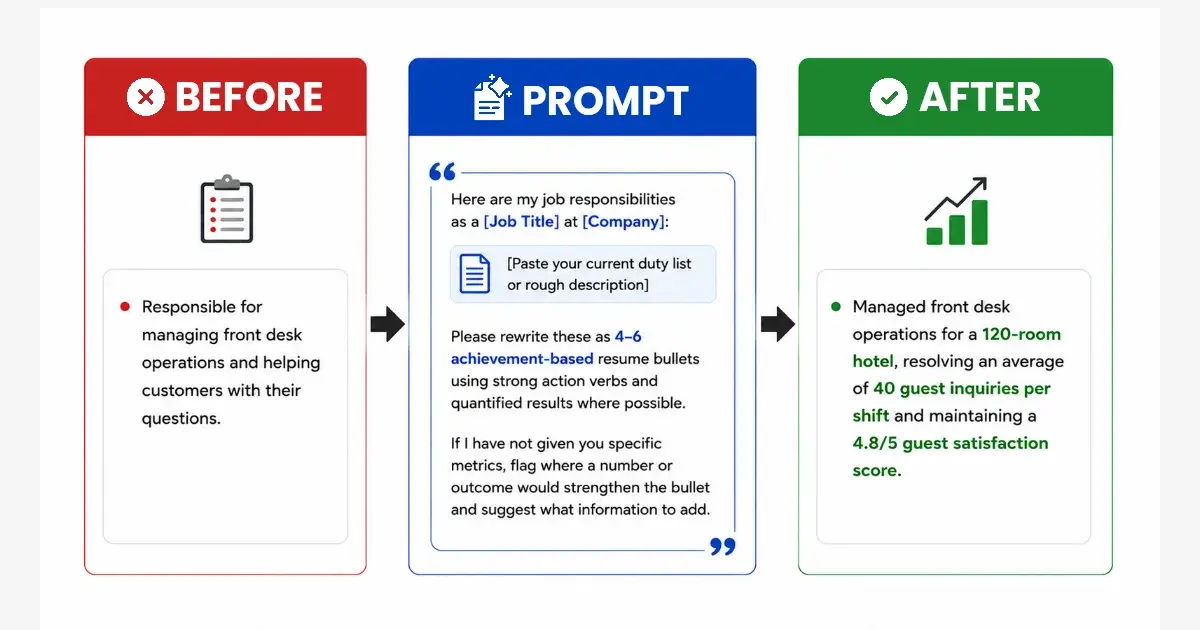
Here are my job responsibilities as a [Job Title] at [Company]:

[Paste your current duty list or rough description]

Please rewrite these as 4-6 achievement-based resume bullets using strong action verbs and quantified results where possible. If I have not given you specific metrics, flag where a number or outcome would strengthen the bullet and suggest what information to add.

For a full list of strong action verbs to review alongside your ChatGPT output, see our action verbs for resume guide.

How to use ChatGPT to update specific resume sections 

Tailoring a resume to each job description is the single highest-impact thing a job seeker can do. It's also the most time-consuming part. ChatGPT can dramatically speed this up when used correctly.

The goal is not to have ChatGPT rewrite your entire resume from scratch for every application. The goal is to adapt your professional summary, reshuffle the emphasis in your bullets, and identify missing keywords from the job description.

Prompt: Tailor an existing resume to a job description
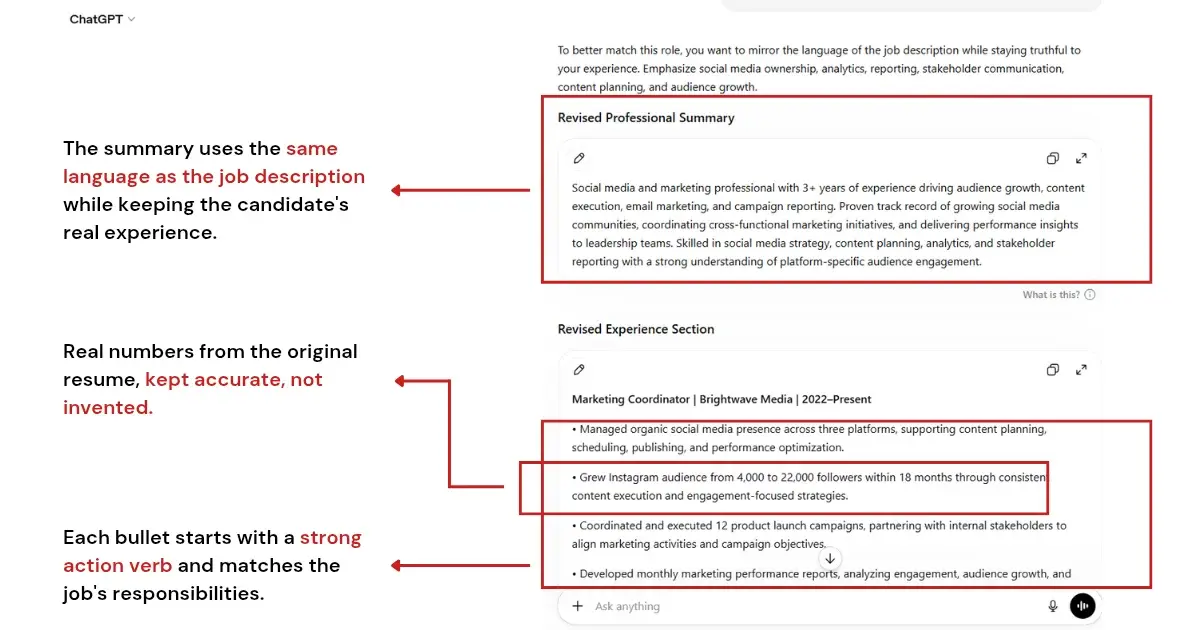
Here is my current resume:

[Paste resume text]

Here is the job description I am applying to:

[Paste job description]

Please rewrite my experience bullets and professional summary to better match this role. Highlight the skills and accomplishments most relevant to this position. Identify any gaps between my resume and the job description that I should address.

Prompt: Rewrite your professional summary for a specific role

Here is my current professional summary:

[Paste current summary]

Here is the job description I am targeting:

[Paste job description]

Please rewrite my professional summary (3-4 sentences) to position me specifically for this role. Keep my voice and real experience. Highlight the skills and background most relevant to this position.

Prompt: Identify missing keywords from a job description

Here is my resume:

[Paste resume]

Here is the job description:

[Paste job description]

Please identify keywords and phrases from the job description that are missing from my resume. For each missing keyword, suggest where in my resume I could naturally incorporate it, and only if it reflects genuine experience I have.

Prompt: Strengthen weak experience bullet points

Here are some of my current resume bullets that feel weak:

[List 3-5 bullets]

Please rewrite each one using stronger action verbs and a clearer impact statement. Where a metric would strengthen a bullet (e.g., percentage improvement, team size, revenue), note what I should fill in. Do not invent numbers or outcomes. Flag where I need to add real data.

How to use ChatGPT to polish your resume

Once the main content is in place, ChatGPT can help with consistency, language, and final checks before you submit. These prompts work best at the end of the process, not the beginning. Polish after the content is solid.

Prompt: Full resume polish and consistency check

Here is my complete resume:

[Paste resume]

Please review it for:
1. Consistency in tense (past roles in past tense, current role in present tense)
2. Consistent formatting in dates, titles, and bullet style
3. Action verb variety (flag any verbs used more than twice)
4. Any bullet points that are duties rather than achievements
5. Anything that sounds generic and could apply to anyone

Please provide specific suggestions, not just general feedback.

Prompt: Rewrite a career summary for a career change

I am changing careers from [Previous Field] to [Target Field].
Here is my current professional summary:

[Paste current summary]

Here is the type of role I am targeting:

[Describe target role or paste a sample job description]

Please rewrite my summary to bridge my previous experience and my target career direction. Focus on transferable skills, relevant accomplishments, and genuine alignment between my background and the new field.

The one thing to always check: AI hallucinations on resumes

ChatGPT can invent plausible-sounding but inaccurate content if you don't give it specific inputs. This happens most often with metrics. It may generate "increased sales by 40%" based on patterns in training data, not your actual results. It happens with job titles too, reframing your role in a way that misrepresents your seniority. And with skills, adding tools you mentioned once in passing as though they are core competencies.

Before submitting any ChatGPT-assisted resume, read every bullet and claim against your actual experience. The test: could you speak confidently and specifically about this in an interview? If yes, it's yours to use. If not, remove it or replace the invented detail with something accurate.

The rule: ChatGPT is an editor, not an author. It works with material you provide. The accuracy of the output is your responsibility.

ATS optimization: what ChatGPT can and cannot do

ChatGPT can identify keywords from a job description and suggest where to incorporate them — useful for the initial tailoring step before running an ATS check.

What it can't do: score your resume against a specific employer's ATS configuration, tell you your actual keyword match percentage, or confirm whether your formatting will parse correctly through a specific system.

The workflow that works: use ChatGPT to tailor content and identify keywords, then run your resume through the Resume Optimizer to confirm your ATS match score before submitting.

How to do this with Careerflow
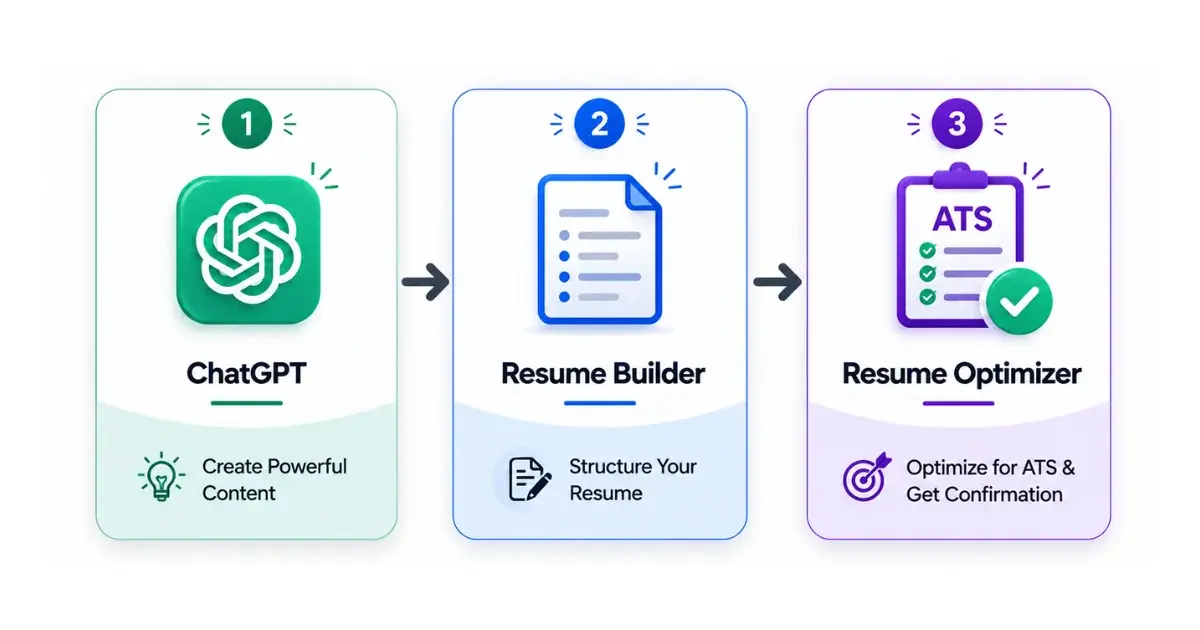
Using ChatGPT to write resume content is only one part of the process. The output still needs to live in a properly structured, ATS-readable format. And it still needs to be scored against the specific job description before you submit.

Resume Builder | Structured resume creation

Build your base resume in the Resume Builder. This gives you a clean, ATS-compatible format that parses correctly through employer systems. ChatGPT output in plain text doesn't guarantee that.

Use ChatGPT to write or refine your experience bullets and professional summary using the prompts above, then paste the improved content into the Resume Builder. The combination gives you AI-assisted content in a properly structured, ATS-readable format.

Resume Optimizer | ATS keyword matching

Once your resume is built, paste the specific job description for the role you're applying to into the Resume Optimizer. Review the keyword match score and gap analysis. These are the keywords ChatGPT should have helped you add in the tailoring step.

If the score is low, use the prompts above to do another round of tailoring, then recheck your score. Submit when your match score reflects the keywords the role requires.

Once your resume is ready, the next step is your cover letter. See our ChatGPT cover letter prompts guide for the same prompt-first approach applied to cover letters.
FAQ: Using ChatGPT for Resume Writing

Can ChatGPT write a full resume from scratch?

ChatGPT can generate a complete resume draft if you give it enough context: your job history, key accomplishments, target role, and relevant skills. The output is a starting point, not a final product. Expect to edit for accuracy, voice, and ATS formatting. Paste the final content into a properly structured resume builder rather than submitting plain text output directly.

Will employers know my resume was written by AI?

AI-assisted resumes are not inherently detectable and are widely used. The risk is output being generic. ChatGPT defaults to predictable language when given minimal input. The more specific and accurate the information you provide, the less the output sounds like every other AI-generated resume. Focus on specificity, not on hiding AI involvement.

Does ChatGPT know what keywords ATS systems look for?

ChatGPT can identify keywords in a job description and suggest where to include them in your resume, which is useful. What it cannot do is score your actual match percentage, account for ATS formatting requirements, or tell you whether your resume will parse correctly through a specific employer's system. Use a dedicated resume optimizer for ATS scoring after using ChatGPT for content tailoring.

Which is better for resume writing: ChatGPT or Gemini?

Both can write resume bullets and tailor content to a job description. ChatGPT tends to produce more polished, natural-sounding language. Gemini has real-time web access, which is useful for researching what a specific role or company currently values before writing. The workflow: research with Gemini, write and refine with ChatGPT, then optimize for ATS with a dedicated resume tool. See our Gemini vs ChatGPT comparison for a task-by-task breakdown.

What is the biggest mistake people make when using ChatGPT for resumes?

The biggest mistake is giving ChatGPT too little input and accepting the output without editing. Vague inputs produce generic bullets. Unreviewed outputs may contain invented metrics or slightly inflated titles that create problems in interviews. Treat ChatGPT as an editor that needs your raw material: the more specific your inputs, the less editing the output requires. Always read the final resume against your actual experience before submitting.

Recommended Articles

Here are some of the recommended articles from our team

Ready to Transform Your Job Search?

Sign up now to access Careerflow’s powerful suite of AI tools and take the first step toward landing your dream job.