


Resumes
.avif)
.webp)
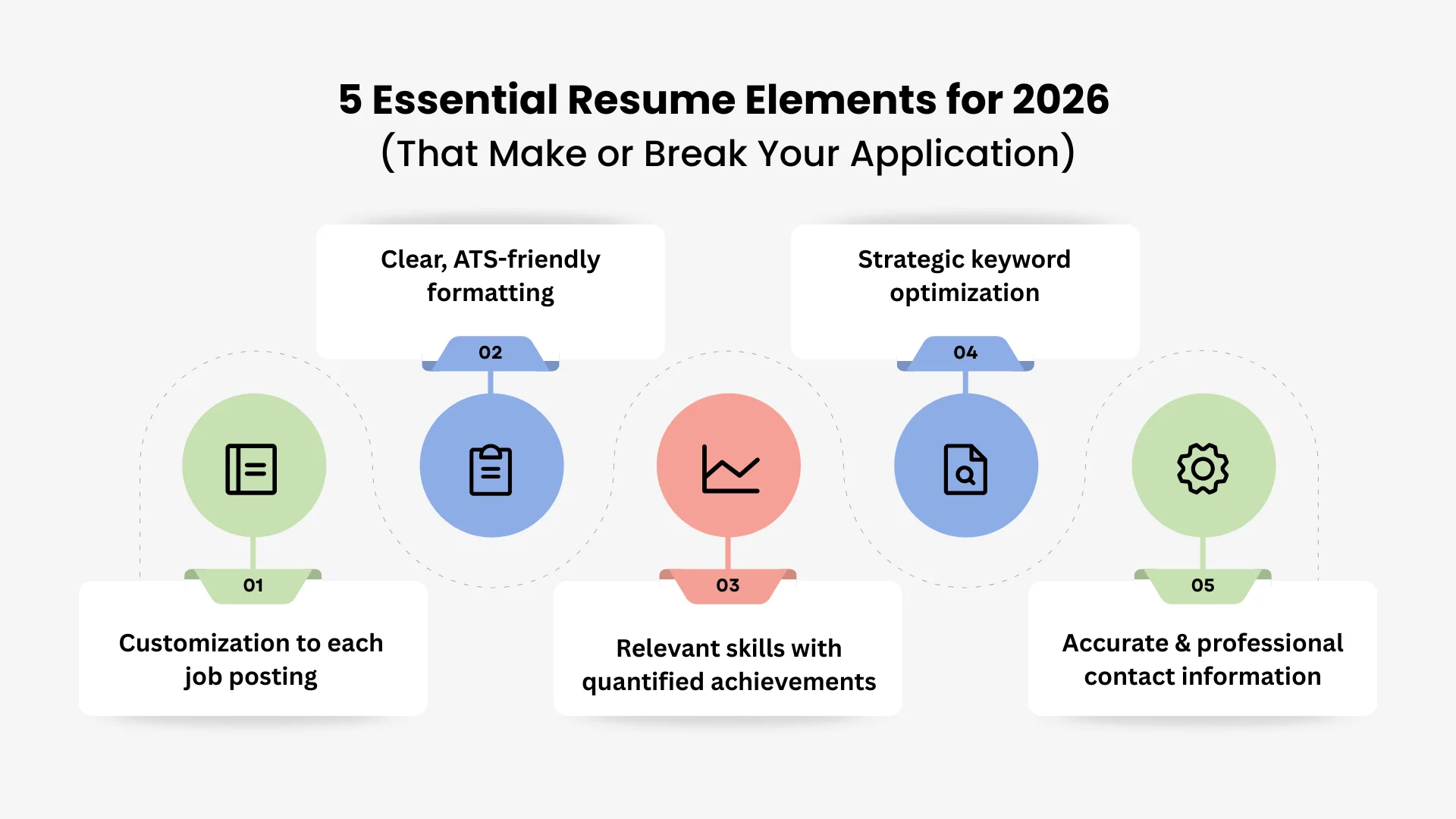
There are five main things that will make your resume work for you in 2026. Your resume needs to be highly customized, follow ATS formatting rules, show your achievements in numbers, use keywords naturally, and have correct contact information. Fancy designs may look nice, but hiring managers and Applicant Tracking Systems (ATS) look for these basic things first to see if you're a good fit. This guide breaks down each essential element with actionable examples and common pitfalls that trigger immediate rejections.
Tools like our AI resume builder can automate the tedious parts of customization. What used to take two hours per application can take 10 minutes. The steps below cover how to write bullets that prove your worth, format for both ATS and human readers, and use keywords without raising red flags.
Element 1: Customization to each job posting
Customizing your resume is the most effective way to signal genuine interest to hiring managers and pass Applicant Tracking Systems (ATS). Sending a generic resume suggests you’re mass-applying, whereas tailoring 3 key sections ensures your skills align with specific job requirements. You don't need to rewrite everything; instead, spend 15 minutes adjusting your summary, skills, and recent bullet points.
How to customize your resume effectively:
1. Analyze the job description for required skills and keywords
Read the posting and look for 5-10 skills, tools or qualifications that are mentioned more than once. Pay attention to the exact words the company uses, like "cross-functional collaboration" instead of "teamwork."
Find out which requirements are necessary and which are nice to have. These are usually in the first paragraph or marked with asterisks. If you focus on these things, your resume will get through the first ATS filters and recruiter screenings.
2. Update your Professional Summary (if you use one) to mirror their needs
Most resumes don't need summaries, but if you include one, make it specific to the role. A tailored summary acts as a "hook" that immediately proves your value to the reader.
Avoid vague phrases like "results-driven professional seeking challenging opportunities".
Use a specific statement like "Marketing Manager with 5+ years driving digital campaigns and SEO, seeking to bring data-driven growth to [Company Name]".
3. Reorder and rewrite your Skills section to match their priorities
List your skills in the same order of priority found in the job description. If the job emphasizes "project management" first, place that at the top of your list.
Use their exact terminology when describing your abilities to improve keyword density. Remove irrelevant skills, such as "Photoshop" for a data analyst role, to keep your profile clean and focused.
4. Adjust 2-3 bullet points in your recent roles to highlight relevant experience
Tailor 2-3 bullet points in your most recent role to highlight experience that directly solves the employer's problems. If the job requires "managing cross-functional teams", ensure one bullet explicitly mentions this.
Add metrics that align with their specific goals to build authority. If they care about revenue growth, emphasize your revenue-related achievements to show you'll deliver similar results for them.
Example of customization:
To make your resume bullet points more specific, you need to change them from general descriptions to specific accomplishments that are relevant to the job title. You show that you are a good fit for the role's main goals by using relevant keywords and metrics. This change from "what you did" to "what you accomplished" grabs a recruiter's attention right away.
Original resume bullet point:
"Led marketing campaigns that increased brand awareness and engagement"
Customized for job seeking "email marketing specialist":
"Led email marketing campaigns that increased open rates by 25% and drove $50K in attributed revenue"
Customized for job seeking "content marketing manager":
"Led content marketing campaigns including blogs, whitepapers and webinars that increased organic traffic by 40% and generated 200+ qualified leads"
How long customization should take:
Making your application fit the job is good; that gets easier as you make a "master" resume. The level of alignment depends on how senior you are, but the goal is always quality over quantity. These timeframes can help you plan your daily application routine:
- 5-10 minutes for entry-level roles with simpler requirements
- 10-15 minutes per application for mid-career professionals
- 20-30 minutes for senior or executive roles requiring detailed alignment
Tools that speed up customization:
Using technology lets you customize content on a large scale without losing quality. These tools can help you find "blind spots" in your resume that people might miss when they look at it quickly. You'll save hours of editing manually and get more interviews to attend.
- Careerflow's AI Resume Builder: Upload your master resume and paste the job description to get AI suggestions. This tool identifies which skills to emphasize and which bullet points to rewrite.
- Skills Match Score: See which keywords from the job posting you’re missing and add them naturally. This ensures your profile is optimized for both the ATS and the hiring manager.
Element 2: Clear, ATS-friendly formatting
Even the most impressive resume will face rejection if an Applicant Tracking System (ATS) cannot parse it correctly. According to a Harvard study, over 75% of companies use these systems to filter applications before a human recruiter ever reviews them.
The goal is to create a resume that is clean, scannable for humans and structured so software can extract your information accurately. ATS often struggle with multi-column layouts, tables, text boxes and graphics.
ATS-friendly formatting rules for 2026
Following modern technical standards makes sure that your data goes into recruitment databases correctly. Follow these specific rules to keep a professional and easy-to-read structure.
1. Use a simple, single-column layout
Avoid multi-column designs, as they frequently break ATS parsing sequences. Stick to standard sections with clear headings like "Experience", "Education" and "Skills" rather than creative titles like "Career Journey".
Standard section titles are recognized globally by parsing algorithms. This ensures your professional history is categorized correctly without manual intervention from a recruiter.
2. Choose readable, standard fonts
Select safe fonts such as Arial, Calibri, Georgia or Helvetica. Keep your body text between 10 and 12 pt, your name at 14-16 pt and section headings between 11 and 13 pt.
Avoid decorative or script fonts like Comic Sans, which are difficult for both humans and software to read. Never use a font size smaller than 10 pt for critical information.
3. Never put critical information in headers or footers
Place your name and contact details at the top of the main body of the resume. ATS software often ignores headers and footers entirely during the data extraction process.
If your phone number or email address remains trapped in a header, many ATS platforms cannot contact you. Always test your resume by copying the text into a plain Notepad file to see what remains visible.
4. Avoid graphics, images, photos and text boxes
Remove headshots, logos and icons from your final resume. ATS cannot read text contained within images or text boxes, leading to significant gaps in your profile.
Save charts and graphs for your LinkedIn profile or digital portfolio. These elements clutter the layout and often cause the parser to skip entire sections of your experience.
5. Use standard bullet points
Stick to traditional round bullets (•) or open circles (◦) for all lists. Don't use custom symbols, checkmarks or arrows because they can make text look like gibberish on older systems.
6. Save as PDF unless specified otherwise
Submit your resume as a PDF to preserve your formatting across different operating systems. Always check the job posting for specific instructions, as some systems still prefer .docx files.
7. Keep formatting consistent throughout
Use the same date format, such as "June 2023 - Present", across every section of your resume. Ensure all bullets start with action verbs and maintain consistent spacing between headers.
Resume length guidelines for 2026:
Your resume length should reflect your years of relevant experience rather than every role you have ever held. Aim for density and impact over high page counts.
- 1 page: Recent graduates and career changers with 0-5 years of experience
- 1-2 pages: Mid-career professionals with 5-15 years of experience
- 2 pages max: Senior professionals and executives with over 15 years of experience
Standard corporate roles should never exceed 3 pages (academic CVs are an exception). See our guide on resume length for more helpful info on this topic.
8. Career-stage section ordering
The optimal section order changes as you gain experience to ensure your most impressive credentials appear first. Leading with a weaker asset can hurt your chances of passing the initial six-second recruiter scan.
For entry-level candidates, education is often their best credential, so it comes first. Senior candidates should switch to a "Key Achievements" block to give busy readers a quick look at their most important accomplishments.
See our guide on 10 ATS resume mistakes to avoid in 2026 for more guidance!
Element 3: Relevant skills with quantified achievements
Skills sections are important parts of a modern resume, but they don't mean anything without proof. Anyone can say they have "strong leadership" or "excellent proficiency," but hiring managers and recruiters prefer candidates who can back up their claims with measurable accomplishments.
To create a high-impact Experience section, use the proven formula for compelling bullet points: Action Verb + Task + Result (with metric).
How to write achievement-focused bullets
Transitioning from a task-based resume to a result-oriented one requires a shift in language. Follow these four rules to ensure your contributions stand out.
1. Start with strong action verbs
Avoid passive phrases like "responsible for" or "duties included," which describe a job description rather than your performance. Use authoritative verbs that categorize your impact:
- Leadership: Led, Managed, Directed, Spearheaded, Coordinated.
- Achievement: Generated, Exceeded, Optimized, Reduced, Delivered.
- Creation: Developed, Launched, Implemented, Engineered, Designed.
- Analysis: Evaluated, Researched, Identified, Forecasted, Audited.
2. Quantify your results whenever possible
Numbers help a recruiter see and remember your accomplishments. If you can't get to revenue data directly, you can still measure your impact with other important metrics:
Examples of quantified achievements:
3. Focus on impact, not just tasks
Don't just say what you did; explain why it was important for the business. Instead of saying you "organized company events," say that you "organized 8 company-wide events for 200+ employees, which raised engagement scores by 25%."
4. Tailor skills to the job description
To get past ATS filters and catch a recruiter's eye, use the same words as the job posting. If a job description says "data analysis," you could say something like, "Analyzed Salesforce customer data to find patterns in cancellations, which cut cancellations by 18%."
What to include in your Skills section
The Skills section of your resume should be a short list of all the things you can do professionally. Put them together in a way that makes sense so that both human recruiters and ATS can read them more easily.
- Technical Skills: List software, tools, and programming languages (e.g., "Excel: Pivot Tables, Macros; Salesforce; SQL; HubSpot").
- Industry-Specific Skills: Include relevant methodologies or frameworks like "Agile/Scrum, SEO/SEM, or Financial Modeling."
- Languages: Include your proficiency level if relevant to the role (e.g., "Spanish: Fluent, French: Conversational").
- Soft Skills: Use these sparingly. Only list "Leadership" or "Negotiation" if you have provided quantified proof in your Experience bullets.
Skills anti-patterns to avoid
It's important to avoid common mistakes when writing your Skills section, as these can make you look less credible and lower your chances of being noticed by recruiters or applicant tracking systems (ATS).
- Don’t list soft skills as standalone entries. Terms like "team player" or "strong communicator" are vague without evidence. Instead, demonstrate these qualities through achievement-focused bullet points in your Experience section.
- Omit basic-expectation software. Programs such as Microsoft Word or Google Docs are assumed skills at any professional level and do not add value to your resume.
- Avoid keyword stuffing. Putting down too many skills in the hopes that some will fit the job description can backfire. Both recruiters and ATS prefer a short, relevant list that shows your real skills and matches the job's requirements.
Certifications: When and how to list them
Certifications are often buried in the Skills section or skipped entirely. For roles where credentials carry weight, give them a dedicated section placed either after Skills or Education.
Standard Format: Certification Name | Issuing Organization | Year Earned
High-value certifications by industry
- Tech: AWS Certified Solutions Architect, Google Cloud Professional, Azure Fundamentals, CompTIA Security+/Network+
- Project Management: PMP, Certified Scrum Master (CSM), CAPM, PMI-ACP
- Finance: CFA (Level I/II/III), CPA, Series 7/63/65, FINRA licenses
- Healthcare: CPHQ, CPR/BLS/ACLS, CCRN, Six Sigma (Green/Black Belt)
- Marketing/Data: Google Analytics, HubSpot, Salesforce, Tableau Desktop Specialist
Take a look at our guide on adding hard skills to your resume for even more info on this topic.
Element 4: Strategic keyword optimization (without keyword stuffing)
ATS systems look for certain keywords in resumes that match the job description to weed out candidates who aren't qualified. If your resume doesn't have enough of these keywords, a human recruiter might never see it. However, putting too many keywords in your text in a way that doesn't make sense can get your application marked as spam.
The goal is to use keywords in a constructive form in your resume, not just as a list of words that don't go together. Proper optimization shows the ATS that you have the right skills and the recruiter that you know how to use them.
How to optimize keywords effectively
For optimization to work, there needs to be a balance between technical alignment and human readability. Use these four tips to add the right words to your professional story.
1. Identify the right keywords from the job posting
Carefully review the target job description to extract the specific language the employer values. Focus on four primary categories:
- Hard skills: Note specific tools, software, and technical abilities (e.g., "Salesforce," "Python," "Google Analytics").
- Job-specific terminology: Look for industry jargon and role-specific language (e.g., "stakeholder management," "customer acquisition," "full-cycle recruiting").
- Required qualifications: Identify must-have degrees, years of experience, or specific certifications like a "PMP" or "CPA."
- Explicit soft skills: If the posting mentions "strong communication" or "cross-functional collaboration" multiple times, ensure these exact phrases appear in your resume.
2. Integrate keywords naturally in context
Include the keywords in your Experience bullets, Skills section, and Professional Summary. Instead of just listing a skill, use it in a sentence to show how good you are at it and how it affects you.
❌ Keyword stuffing (Avoid): "Skills: Project management, agile, scrum, Jira, stakeholder management, cross-functional teams, leadership, communication, Excel, data analysis."
✅ Natural integration (Better): "Skills: Project Management (Agile/Scrum, Jira), Data Analysis (Excel, Tableau), Stakeholder Communication."
👉 Experience bullet (Best): "Managed a cross-functional agile team of 8 using Jira, delivering 15+ projects while maintaining transparent stakeholder reporting."
3. Use keyword variations
Different ATS algorithms may look for different versions of the same term. If a job description mentions "Search Engine Optimization," you should also include the acronym "SEO" elsewhere in your resume. Mirror the employer's exact phrasing whenever possible; if they specify "email marketing," use that specific term instead of the broader "digital marketing."
4. Don't overuse the same keyword
You don't have to use the same keyword over and over again to "rank" higher in an ATS. It's enough to list a skill once in your Skills section and once in a bullet point about your relevant experience. If you write "project management" ten times on one page, a recruiter will think you're trying to trick them, and it won't help you technically.
Element 5: Accurate and professional contact information
A resume must have correct and professional contact information, but surprising mistakes in this area are often why candidates are rejected. If a recruiter can't get in touch with you or sees that your email address isn't professional, there’s a good chance they’ll move on to the next candidate. Always put your contact information at the top of your resume, but not in a header or footer, because some Applicant Tracking Systems (ATS) may not be able to read them correctly.
What to include in contact information:
A modern contact section is simple and focused on making it easy for professionals to get in touch. Include these six things to make sure people can reach you and trust you.
1. Full name
Use the name you use for work. It's fine to use your nickname here if you go by one. Don't use middle names or initials unless they are part of your professional brand.
2. Phone number
Give one phone number that is reliable and includes the area code. Make sure your voicemail has a professional greeting. If you're applying for jobs in a different country, don't forget to include your country code (for example, +1 for the US).
3. Professional email address
Your email should follow a standard format like firstname.lastname@gmail.com. Avoid using nicknames, birth years, or unprofessional handles like partygirl2003@yahoo.com. If your current email is dated, create a new one specifically for your job search to maintain a polished image.
4. City and State
Full street addresses are no longer required for privacy and space reasons; city and state are sufficient. This helps with location-based ATS filters and signals whether you are a local candidate or open to relocation. Use a clean format like "Austin, TX."
5. LinkedIn profile URL
Including a LinkedIn link is highly recommended in 2026. Customize your public URL to remove the string of random numbers (e.g., linkedin.com/in/yourname) to make it look cleaner on the page. Ensure the content on your profile aligns with the data on your resume.
See our guide on editing your LinkedIn URL if you need to make a change.
6. Professional portfolio or GitHub
For developers, designers, or writers, a link to your work is essential. Verify that the link is active and the landing page is mobile-responsive and professional.
What NOT to include:
Leave out personal information that doesn't have anything to do with your ability to do the job to save space and avoid bias.
- Photos: Do not include a headshot unless you are applying in a region where it is legally expected.
- Sensitive Personal Data: Omit your date of birth, age, marital status, or Social Security number.
- Redundant Contact Points: Do not list multiple phone numbers or secondary email addresses. Choose the most reliable one for each.
Example of well-formatted contact information:
Target title (resume headline): The often-overlooked differentiator
A target title, which is also known as a resume headline, is a short, powerful phrase that goes right below your contact information. It's not the same as a professional summary; its job is to tell recruiters and ATS systems exactly what job you want. This is often the first field an ATS checks, so it's very important for your whole application.
Older guides might call this a "resume headline," but "target title" is now the more common term in modern resume guidance, and it's the label used in most current ATS and builder platforms.
How to construct a high-impact target title
The goal of a target title is to match the role you want, not just the titles you have held in the past.
Use a simple, specific formula: [Level] + [Target Role Title].
Your professional summary talks about what makes you different, but the target title gives the recruiter the "signal" they need right away.
Examples:
- "Senior Content Strategist" (Use this even if your current title is "Content Writer" to signal you are targeting the next level).
- "Product Manager—B2B SaaS" (Add the industry vertical if the job description specifies it).
- "Technology Sales Executive" (Use this to pivot from a "Sales Representative" background).
Avoid vague headlines
A lot of candidates waste this valuable space on their resumes with phrases like "Results-Driven Professional Seeking New Opportunity." These generic headlines don't help an ATS at all and don't tell a recruiter anything about how well you fit the job. Be brave, be clear, and make sure your title matches the job description's headline exactly to get past the first 6-second screen.
To Know More, Check Out 👉 How to Write a Resume to Get a Job in 2025
Optional resume sections
The main part of your resume should be about your work experience, but adding three optional sections—Projects, Volunteering/Leadership, and Awards/Scholarships—can really help your application stand out. These aren't just extra things to put on your resume. Only include them if they directly relate to the job you're applying for or show a skill that your work history doesn't already show.
If an optional section would only contain one weak entry, it is better to skip it entirely. A sparse or irrelevant section can distract a recruiter from your primary qualifications.
1. Projects
A projects section is most valuable for career changers, recent graduates, or technical professionals like developers and designers. It allows you to showcase relevant work that occurred outside of a traditional 9-to-5 environment. Focus on a maximum of 2–3 high-impact projects and include the project name, a brief description of your role, and the final outcomes.
2. Volunteering and Leadership
This section is particularly useful for management candidates or those looking to fill employment gaps with transferable experience. Include these roles if you have led teams, managed budgets, or run programs that produced results relevant to the job description. Demonstrating leadership in a volunteer capacity signals character and initiative to a potential employer.
3. Awards and Scholarships
Awards show that other people recognize your skills and work ethic. If they are relevant to your target role or show that you know a lot about the subject, you should note both individual and team accomplishments. Adding college scholarships to your resume is a great way for recent graduates to show recruiters that they are smart and did well in school.
How to ensure all 5 essential elements with our AI Resume Builder
Making a great resume doesn't have to be hard. Careerflow's AI Resume Builder is built to do all the hard work for you, making sure that your resume meets all five important criteria before you even hit "submit." You can turn a stressful writing task into a smooth, data-driven process by using a structured tool.
Resume Builder (automated essential element checking)
Follow these steps to build a resume that recruiters notice and ATS platforms approve:
1. Sign in: Sign in to our AI Resume Builder
2. Select an ATS-friendly template: After signing up or uploading your existing draft, choose from our library of templates. Every design is pre-optimized for ATS reading, ticking off Element 2 immediately.
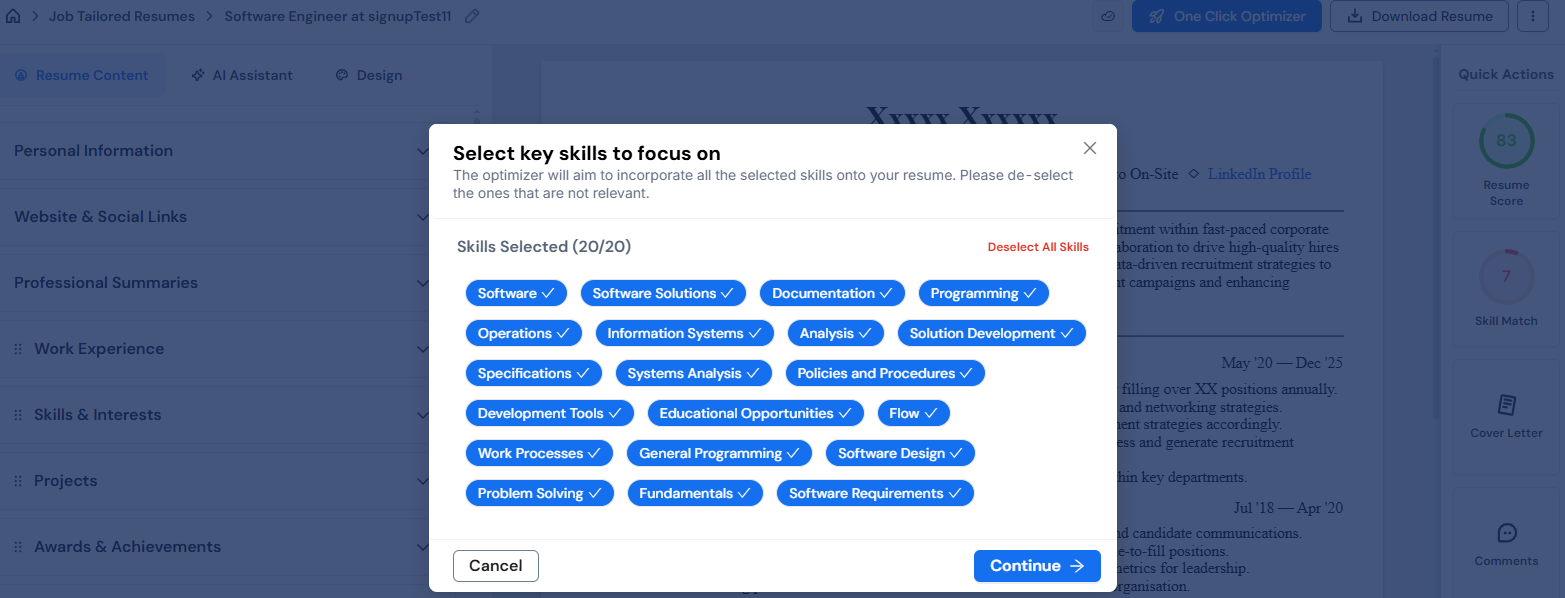
3. Leverage the "Skills Match" feature: Paste your target job description to see exactly which keywords are missing from your current draft. You can then add these naturally to your Skills and Experience sections to satisfy Element 4.
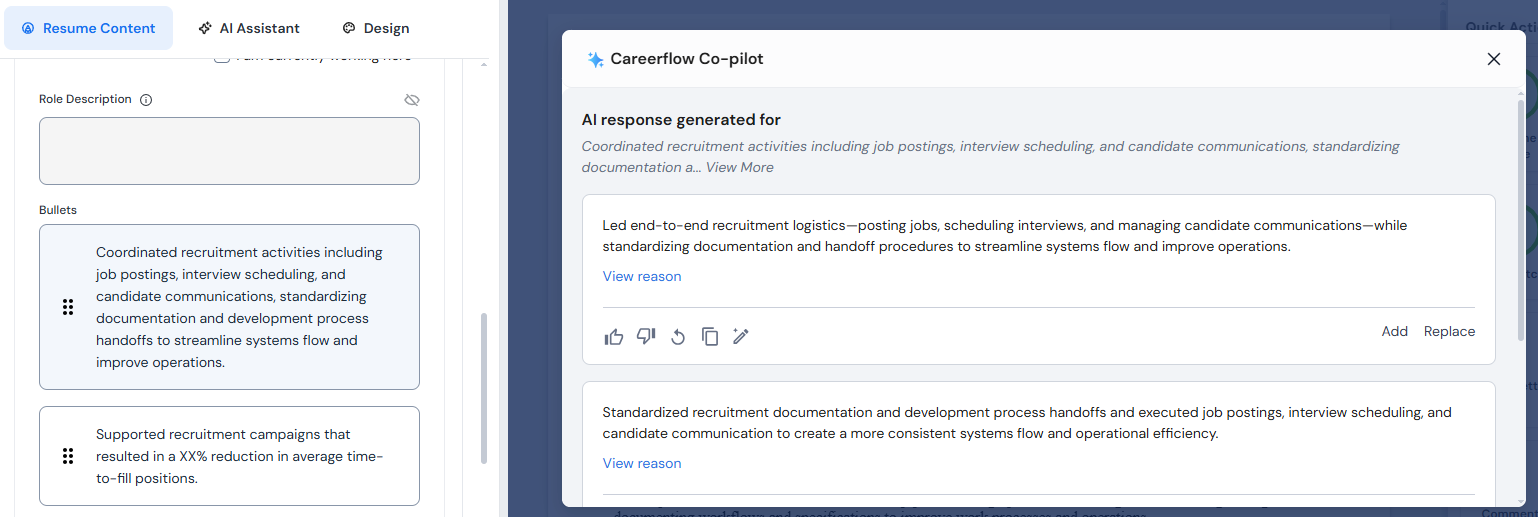
4. Use the AI bullet point generator: Input your raw accomplishments, and the tool will rewrite them using powerful action verbs. It even suggests specific metrics to include, ensuring you meet the standards for Element 3.
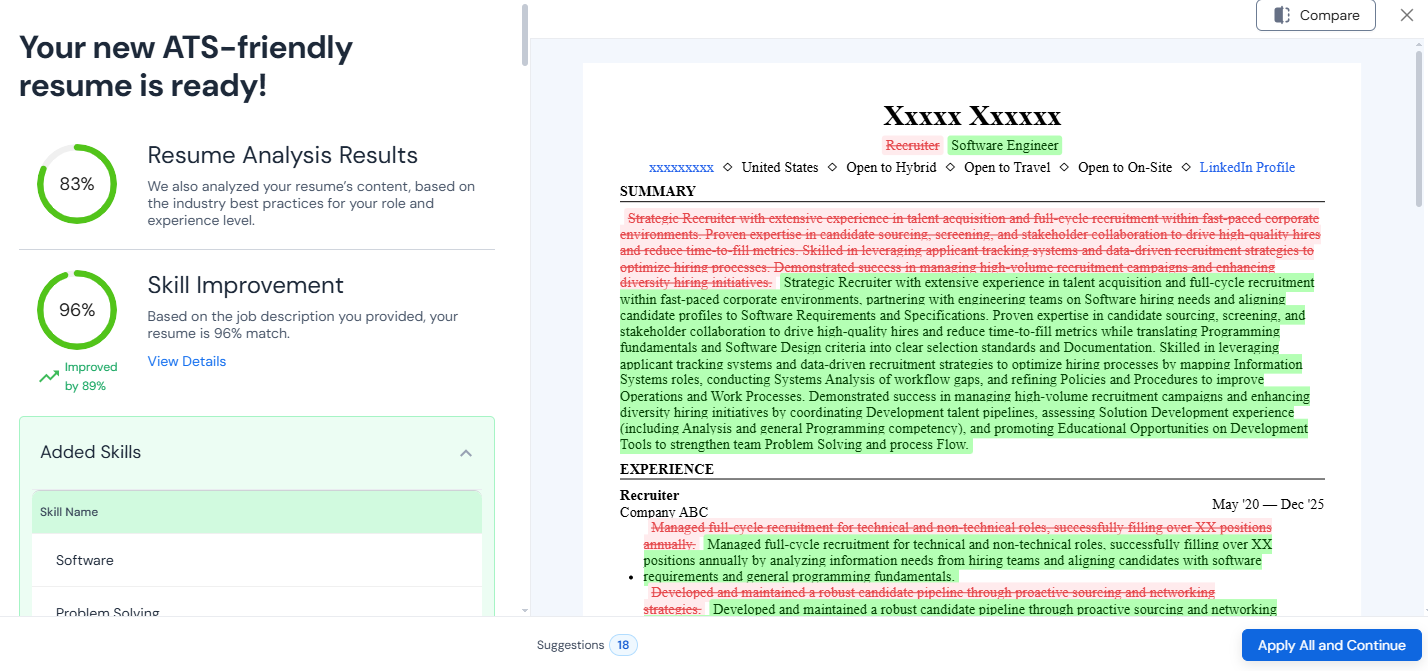
5. Apply "Customization Suggestions": Careerflow identifies exactly which sections need a refresh to align with a specific role, helping you master Element 1 for every application.
6. Check your contact details: The builder flags common formatting issues and unprofessional email structures, ensuring Element 5 is professional and error-free.
7. Final Review: Download your completed resume as a PDF and conduct a final consistency check before you start applying.
Why this works
Using a dedicated builder saves you 30–60 minutes per application by automating the tedious parts of customization. The built-in quality checks find mistakes that are "invisible," like missing keywords or weak bullets, that can get your application turned down right away. You can focus on your story while we take care of the formatting because the templates are pre-designed for compatibility.
Resume Review (get expert feedback on the 5 essentials)
Take advantage of our Expert Resume Review Service to check your work for an extra level of confidence. Just upload your draft and get detailed feedback from a real person on each of the five most important parts.
Our experts look over your resume to give you specific formatting advice, find skills that don't have metrics, and tell you if you're missing any keywords or contact information.
Make the suggested changes and upload your resume again for a final check to make sure it's ready for an interview.
.webp)

%20Which%20Should%20You%20Use.webp)
