


Interviews
.avif)
.webp)
Mock interviews often come up as a preparation step, but are rarely explained in a way that actually helps people use them well. Many candidates jump straight into answering questions without first organizing their resume, the job they’re interviewing for, or the experiences they plan to draw from.
That leads to rushed answers, important details getting skipped, and questions catch you off guard, even though, in hindsight, they were completely predictable.
A simple preparation process changes that. When you take the time to prepare your notes, write things out, and practice intentionally, mock interviews become structured, focused, and genuinely useful.
This guide walks through that process step by step – how to prepare, write, and practice mock interview answers, whether you’re working with another person or using AI-powered mock interview tools.
Step 1: Prepare Your Notes Before Any Mock Interview
Relying on memory alone is never a good idea when preparing for mock interviews. It can only help you with the broad picture of your roles and experience, but it fails you on specifics, especially with nerves in play. And then once the interview is over, the obvious details come rushing back, and you’re left thinking about how much stronger your answer could have been.
Preparing notes fixes that problem. It gives your brain a chance to put the specifics of each role, responsibility, and accomplishment down on paper, connect them directly to the job description, and shape your story around the themes the company highlights.
With that in mind, the first place to start is your resume.
Review your resume intentionally
Start by reading your resume line by line. Anything on that page is fair ground for interview questions, from your main responsibilities to tools, side projects, coursework, and metrics.
As you review each role or project, pause and add quick bulleted notes around:
- what you were responsible for,
- the tools or methods you used,
- the context or problem you were working within,
- what changed as a result of your work.
These notes don’t need to be detailed or polished. Their purpose is to make sure you remember the specific details when asked about it and can explain each line on your resume without having to reconstruct it on the spot during an interview.
Study the job description closely
Next, look at the job description with the same level of attention. Instead of reading it once and moving on, break it down into its core parts.
Focus on:
- responsibilities that appear multiple times,
- tools or skills mentioned across different sections,
- language used to describe how work gets done, such as ownership, collaboration, or problem-solving.
This helps you understand what the role prioritizes and how your experience should be framed when you start practicing answers.
Put your resume and the job description side by side
With both documents in front of you, start connecting them. Take each key responsibility from the job description and identify where you’ve addressed it in your resume, even if the wording is different.
For each match, add a short story note, either on a copy of your resume or in a separate document, about how you handled similar work. Keep it practical:
- what you were asked to do,
- how you approached it,
- tools you used (that are the same or similar as listed in JD)
- what the outcome was.
By the end of this step, you should have a set of notes that clearly connect your experience to the role you’re targeting. That foundation makes the rest of the mock interview process far more focused and useful.
Step 2: Write Answers to Common Mock Interview Questions
Start by creating a master list of mock interview questions that make sense for your role and level.
Your list should include a mix of:
- opening questions, like “tell me about yourself” or “walk me through your resume,”
- behavioral questions,
- situational questions,
- technical or role-specific questions,
- questions about your job history and experience,
- and questions around salary, expectations, and availability.
Once you have the questions, start answering them in writing using the notes you prepared earlier.
Write in your own words, the way you would naturally explain your experience to another person. After you’ve written everything out, read through your answers a couple of times - NOT to memorize sentences or lock in exact wording, but to build familiarity. That way, when similar questions come up later, your brain already knows the path - what example to reach for, what points matter, and how they connect, so your answers come out more naturally under pressure.
Step 3: Use Your Q&A Document to Practice Out Loud
Once you’ve written out your answers, the next step is to say them out loud. This is where things start to feel more real, because speaking is very different from writing. Answers that look good on paper can sound rushed, long, or slightly off once you hear yourself say them.
If possible, give your question-and-answer document to someone else and ask them to run a mock interview using it.
Ask the person listening to pay attention to a few specific things:
- where you hesitate or pause for too long,
- where you rush through an answer or lose structure,
- where your point becomes unclear or incomplete.
At the same time, record the mock interview session. This makes the feedback far more useful.
When you review the notes later and see a comment on a specific question, you can listen to that exact part of the recording and hear how your answer actually came across. That combination – someone else’s observations plus your own playback – helps you identify the gaps between what you meant to say and what actually came out. Once those gaps are visible, they’re much easier to fix before the real interview.
Step 4: Practice With a Mock Interview Tool Like Careerflow
Practicing with another person isn’t always an option - or if you want to practice more frequently - it helps to use a mock interview tool that’s built specifically for this kind of preparation.
Careerflow’s AI mock interview tool gives you space to practice without pressure.
You can take as many mock interviews as you need, pause when you want, and try again without worrying about being judged or wasting anyone’s time. That alone removes a lot of friction from the process.
Another helpful part is that you don’t have to start from scratch every time.
Careerflow comes with pre-built interview templates for most roles, so you’re not guessing what kind of questions to practice. There are also dedicated practice scenarios for behavioral and situational questions, which are often the hardest to answer clearly, even when you know your experience well.
Within each scenario, you’re asked multiple questions, and every answer you give is reviewed. You get feedback on:
- what worked well in your response,
- where important details were missing,
- and what could be improved next time.

Sessions end with an overall grade and verdict, which helps you see progress over time instead of relying on how you felt the interview went.
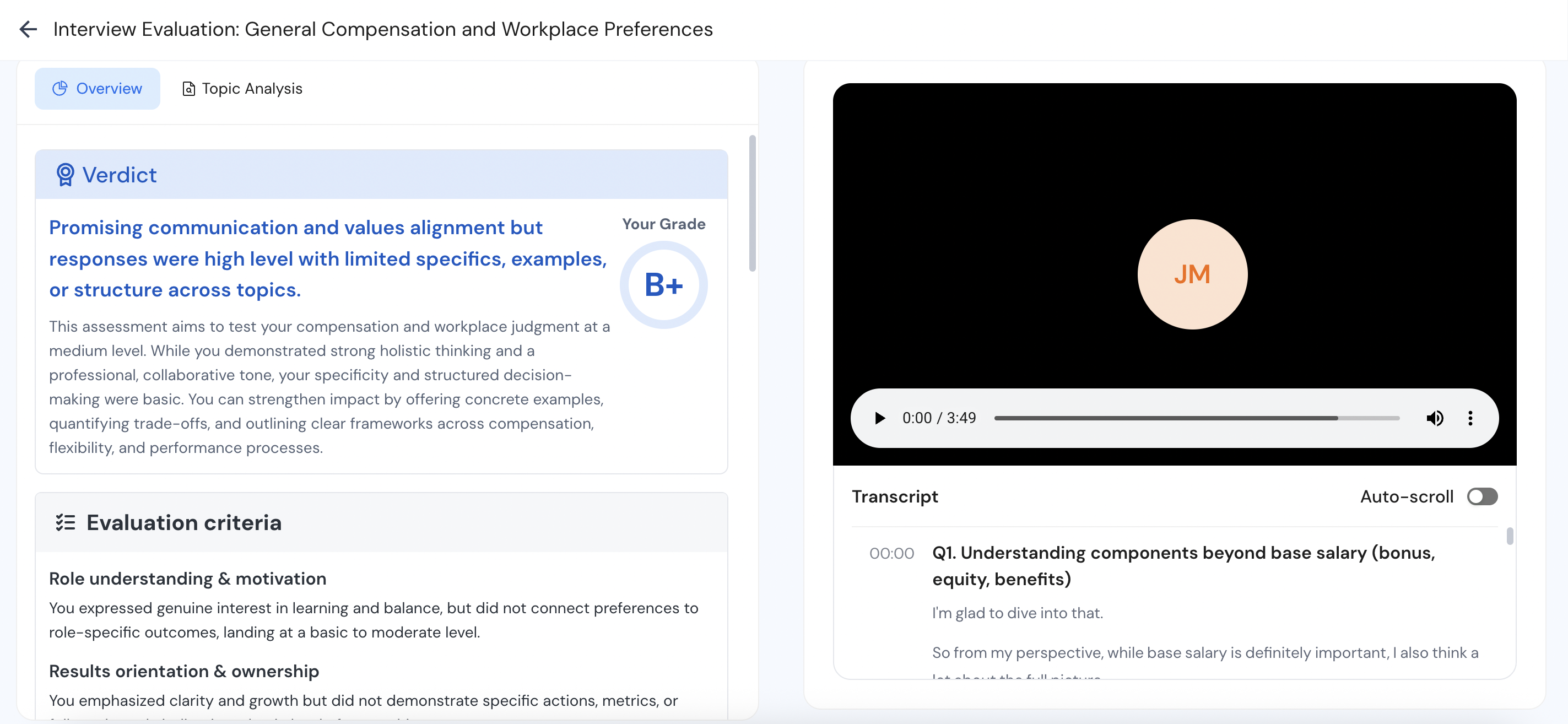
This step works especially well alongside the earlier ones. You come in with prepared notes and written answers, and the tool helps you pressure-test them in a setting that feels close to a real interview – without the stakes.
How to Conduct a Mock Interview with Careerflow:
Step 1: Log in and go to Mock Interviews
Sign up or log in to your Careerflow account and head to the Mock Interviews section from your dashboard.
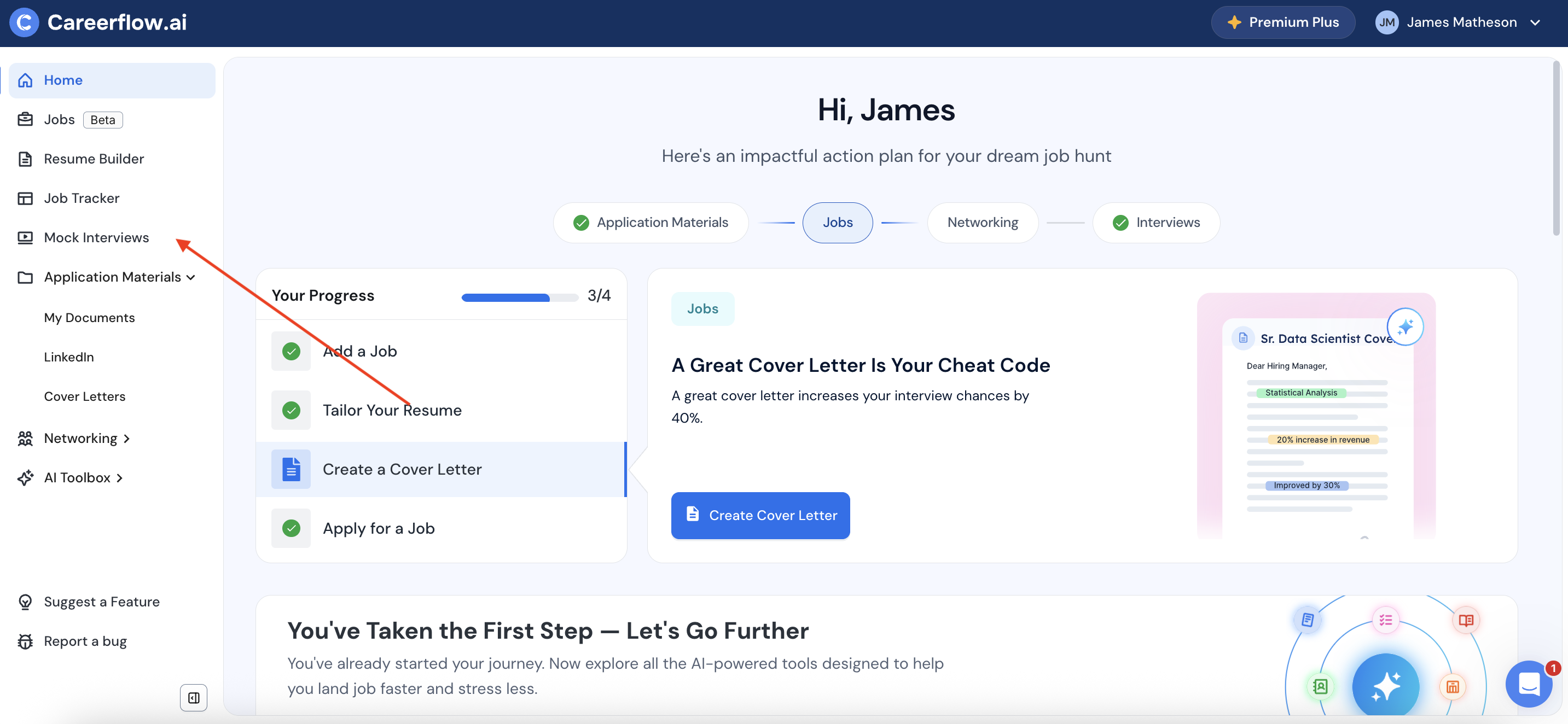
Step 2: Run a job-specific mock interview
You can pick from 90+ pre-built role-specific and situational practice scenarios to start preparing for your interview. Alternatively if you’ve already applied for a role through Careerflow’s Job Tracker, you can pull that job directly into mock interviews along with the exact resume you used to apply. This helps Careerflow build context around what the role asks for and how your experience aligns.

Step 4: (Optional) Add your own questions if you want focused practice
If there are specific questions or areas you want to revisit, you can add your own questions instead of repeating a full role-based interview. This is useful when you want to sharpen weaker answers without redoing everything else.
.png)
Step 5: Start the interview
Once your scenario is set, click Start Interview. You’ll be taken straight into the interview room.
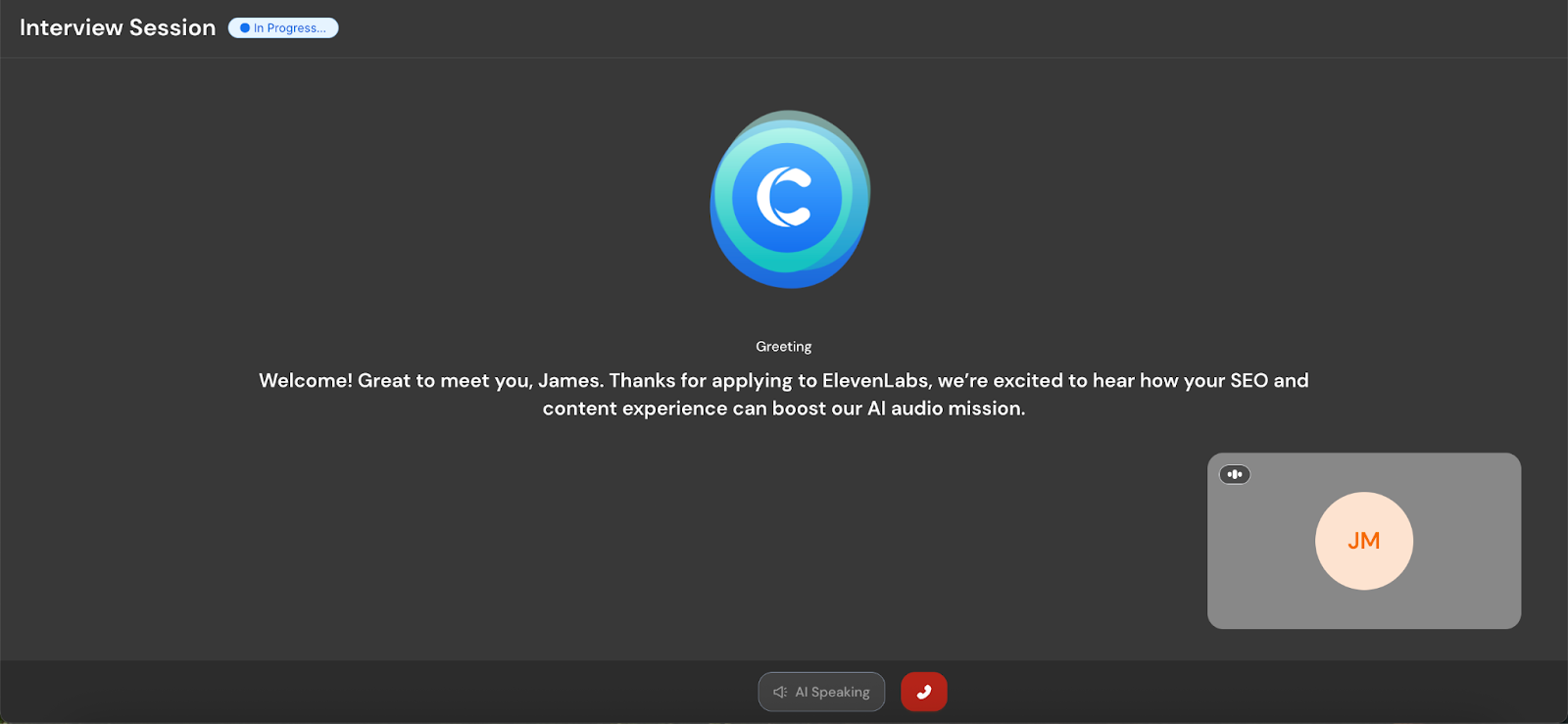
Step 6: Answer questions in a real interview-style environment
Questions appear on screen, and the Careerflow AI interviewer also asks them out loud. When you click Start Answering, the timer begins, and your response is recorded.
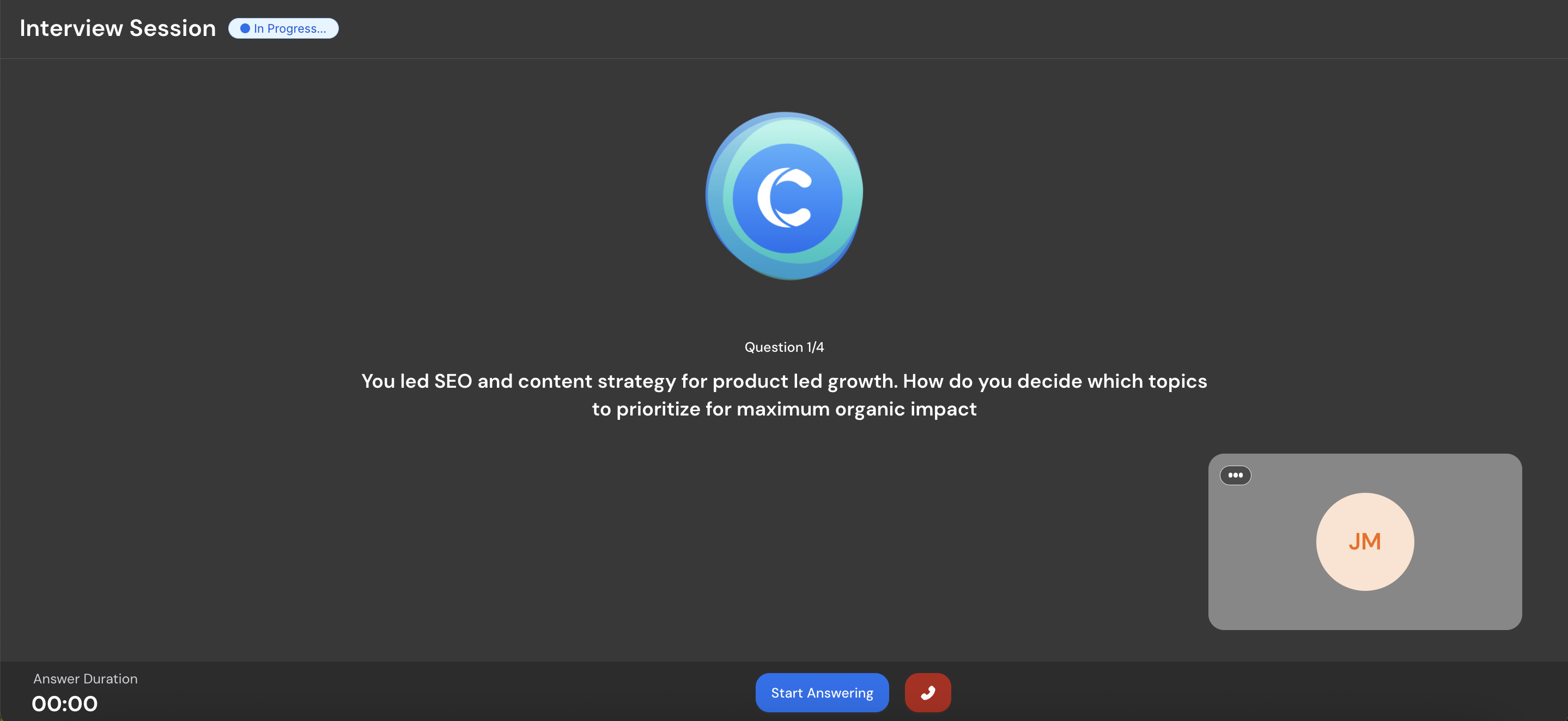
Step 7: Review feedback and repeat as needed
Each answer is evaluated from a recruiter’s point of view, and you’re provided feedback for each answer, covering what you said, how clearly you said it, what you missed, and where you can improve. You can retry the same scenario as many times as you want until your answers feel solid.
Final Thoughts on Mock Interviews
The goal of mock interviews isn’t to produce perfect answers. It’s to build familiarity with your own experience, align your stories with what the role actually requires, and reduce hesitation when you’re put on the spot. When you’ve already thought through your answers and practiced saying them out loud, interviews stop feeling like a test of memory and start feeling like a conversation you’re prepared for.
Tools like Careerflow’s AI Mock Interview make that kind of practice easier to maintain. They give you space to practice without judgment, repeat sessions as many times as you need, and receive feedback that doesn’t just point out what didn’t land, but shows you how to improve it.
.webp)

%20Which%20Should%20You%20Use.webp)
