


Job Applications

.webp)
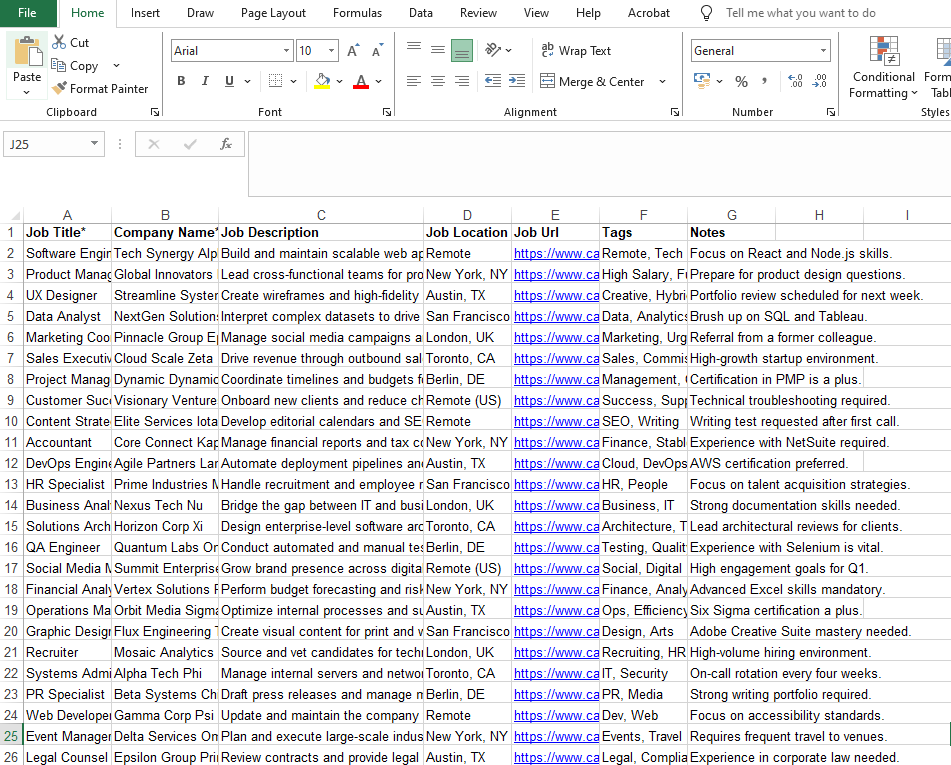
Spreadsheets work for tracking your first 10 job applications, but AI job trackers save 5+ hours weekly once you hit 15-20 applications. The breaking point? When manual data entry, missing follow-up reminders, and zero analytics start costing you interviews. Here's exactly when to make the switch.
This blog breaks down when spreadsheets are enough and when an AI job tracker saves you hours weekly. We provide a real-world time study comparing 20 applications tracked in Google Sheets versus an AI tracker like Careerflow.
You'll learn the breaking point where spreadsheets fail and which features AI trackers automate. We will cover one-click job saves, autofill for applications and automated follow-up reminders.
We will also show you a clear cost-benefit analysis for your search intensity. And how to migrate from your spreadsheet to a professional tracker without losing your data.
The traditional approach: Why job seekers start with spreadsheets
Spreadsheets are the default choice for most job seekers. They are free, familiar and require no new tools. This gives you complete control over your data structure.
You track everything in one place. This includes company names, job titles, application dates and status updates. For the first five applications, a spreadsheet works perfectly fine. There is minimal overhead, and updating takes only a minute.
When spreadsheets actually work:
Spreadsheets are sufficient if you are early in your job search with fewer than 10 active applications. They work well for those applying to 1-3 roles per week. Use this method if you have time to manually input all details.
This approach suits people who prefer setting their own calendar reminders. It is ideal if you don’t need automation and prefer a custom data structure.
The appeal of spreadsheet flexibility:
Spreadsheets offer complete customization. You add any columns you want, such as referral sources or commute times. Google Sheets and Excel are free or already available to most users.
These tools provide offline access and work without an internet connection. Most professionals already know how to use them, so there is no learning curve.
👉 To Know More: Why You Should Be Using a Job Application Tracker in 2025
When spreadsheets start to break: The 10-20 application wall
The breaking point for most job seekers occurs around 10 to 20 active applications. At this volume, manual tracking shifts from simple bookkeeping to a daily time drain. You spend 30 minutes daily just copying job details and checking for responses.
The hidden work spreadsheets create
- Manual data entry for every application: Every time you apply, you manually copy the company name, job title and any other information present. This takes five minutes per application just for data entry. Apply to 15 positions weekly, and you'll spend over an hour on administrative tasks alone.
- No automatic follow-up reminders: You have to remember to check your sheet every day for follow-up dates. These important tasks get missed without automated reminders. You either forget about events on your calendar or have to add them manually.
- Constantly switching between tasks: You go from one job board to another, then to your spreadsheet, and finally to your email inbox. Every time you switch, you lose minutes of focus time. Research shows that broken-up workflows make your job search much less effective.
- Zero insights or analytics: Spreadsheets don’t tell you which job boards generate the most responses. You can’t easily visualize your pipeline to see conversion rates. Without data, you make decisions based on gut feelings rather than results.
- Difficulty tracking communication history: It's hard to keep track of networking calls and interview notes when they're all in one "Notes" column. You can't easily find important information right before a call. It is often impossible to attach customized resumes or portfolio samples to certain rows.
- Poor mobile accessibility: Updating a multi-column spreadsheet on a phone is a painful experience. Tiny text and horizontal scrolling make on-the-go updates difficult. This leads to lost data when you receive interview confirmations while away from your desk.
Time study: Tracking 20 applications in a spreadsheet vs. AI tracker
Comparing the time investment for 20 job applications reveals a significant gap between manual and automated tracking. This scenario assumes you apply to roles across LinkedIn, Indeed and company career pages over one week. Estimates vary based on source, so the numbers below are an aggregate of various sources.
Spreadsheet approach: 6 hours 55 minutes total
Finding and saving jobs (2 hours): Searching job boards and opening postings takes 20 minutes. You spend 40 minutes reading each description to decide which roles fit your goals. Manually copying details like company name, title and URL into a sheet takes 60 minutes for 20 jobs.
Applying to jobs (3 hours 20 minutes): Filling out applications on Workday, Greenhouse, or company sites takes eight to 10 minutes each. Without autofill tools, you spend three hours manually entering your personal data and work history. This repetitive task offers zero value to your actual interview performance.
Updating statuses and reminders (1 hour 5 minutes): Marking statuses as "Applied" and pasting confirmation details takes 35 minutes across all roles. You spend another 30 minutes manually creating calendar events for one-week and two-week follow-up reminders. These administrative tasks distract you from researching companies or practicing interview answers.
Daily check-ins (30 minutes): Opening the spreadsheet daily to review upcoming interviews or missing responses consumes five minutes per day. Over a six-day week, this adds 30 minutes of pure tracking overhead. The spreadsheet approach requires over four hours of administrative labor that does not directly lead to an offer.
✅ Total time spent: 6 hours and 55 minutes on tracking and organizing overhead.
AI job tracker approach: Total time = 1 hour 40 minutes
Searching for a new role often feels like a full-time job. Traditional spreadsheets are clunky, require manual entry and quickly become outdated. By switching to an AI-powered job tracker, you reduce your weekly administrative workload from over ~7 hours to just 1h 40 minutes.
Finding and saving jobs (25 minutes):
Stop wasting time copying and pasting URLs or company names into a document. Use a browser extension to capture opportunities instantly as you browse job boards like LinkedIn or Indeed.
- One-click saving (15 min): Capture the company name, job title, description and application URL in seconds. AI auto-imports these details directly into your dashboard.
- Strategic prioritization (10 min): Spend your energy on the right roles. Review your saved list and use the dashboard to tag "High Priority" jobs based on salary, fit, or interest.
Applying to jobs (1 hour 10 minutes):
The "manual" way of applying takes roughly 8-10 minutes per application. With AI-assisted autofill, you cut that time by more than 60% for various job search platforms and other company portals.
- Autofill efficiency: Populate repetitive fields (contact information, experience and social links) automatically.
- Time saved: Reducing application time to 3.5 minutes per role allows you to complete 20 applications in just 70 minutes. This was a task that previously took 3 hours and 20 minutes.
Updating tracker after applying (5 minutes):
Managing your pipeline shouldn't feel like a chore. Automation ensures your data stays fresh without manual logging.
- One-click status updates (< 1 min): When you hit submit, change your status to "Applied." The tracker automatically logs the date and moves the role to your active pipeline.
- Zero-effort follow-ups (0 min): Set automated triggers to remind you to follow up exactly one and two weeks after your application.
- Visual dashboard check-ins (5 min/week): Spend 30 seconds a day reviewing a visual Kanban board. You get a clear view of your progress without scanning rows of data.
✅ Total time: 1 hour and 40 minutes—this results in a savings of 5 hours and 15 minutes over the course of one week.
Key time savers:
Switching from a manual spreadsheet to an AI-powered job tracker isn't just a tech upgrade—it's a time investment that pays for itself. In 2026, the gap between manual and automated searching has grown even wider.
The data below shows how 1h 40 minutes of focused AI work replaces over 6 hours and 55 minutes of manual effort every week.
What changes when you hit 10, 20, or 50+ applications
Managing a job search in 2026 is a difficult task. While a simple spreadsheet might work for your first few applications, the time you spend managing tasks grows exponentially as you scale. Knowing your "breaking points" in your search will help you switch to automation before you get too tired.
1-10 applications: Spreadsheets are fine; trackers are nice-to-have
At this level, you're either early in your search or applying selectively to a few targeted roles. A simple spreadsheet does everything without being too much work because it doesn't require a lot of brainpower.
- Why spreadsheets work: You remember most details without checking the sheet, and manual entry only takes about 5–10 minutes per week.
- When to consider a tracker anyway: If you plan to ramp up soon, starting with an AI tool now establishes good habits. If you are also applying on various platforms, using one-click saving from day one keeps all your notes and job details in one centralized tool.
10-20 applications: The breaking point where trackers save time
This is the point at which spreadsheets go from "easy" to "hard." You spend 20 to 40 minutes a week just entering data, and things start to slip through the cracks.
- Emerging pain points: You forget to follow up on applications from two weeks ago or struggle to remember which resume version you sent to which recruiter.
- Tracker ROI becomes clear: The time saved on reminders and data entry pays for itself within two weeks. A visual Kanban board helps you see gaps, like having many applications but zero interviews, signaling it is time to adjust your strategy. Centralized notes and a history of communication make getting ready for an interview faster and less stressful.
20-50 applications: Spreadsheets become a liability
At this intensity, a spreadsheet is no longer just inefficient; it actively harms your search. It consumes time you should spend networking or practicing for technical interviews.
Critical failures:
- Scrolling through 20-50 rows to find one application wastes minutes every time.
- Without automated reminders, you likely miss follow-ups for 30% of your active roles.
- You can't remember details of a company you applied to 3 weeks ago, so your follow-up emails lack specificity and get ignored.
- You sent 6 different versions of your resume, but you can't remember which one went to which company.
Essential tracker features:
- Search and filter functionality lets you find specific roles instantly.
- Centralized file storage keeps all resume versions and portfolio links attached to the correct application.
- Automated workflows take care of the busywork, like sending reminders, status updates and deadline alerts.
- Analytics tell you which job boards, types of roles, or application strategies lead to interviews.
50+ applications: You need automation and insights, not just organization
If you are tracking 50+ roles, you need strategic insights, not just a list. At this scale, the bottleneck is no longer time—it is data.
- Pipeline analytics: You need to see conversion rates at each stage (Applied → Phone Screen → Interview) to identify exactly where you are losing opportunities.
- Performance tracking: An AI tracker shows which job boards generate the most responses so you stop wasting time on platforms that don't work.
- Scaling limits: Spreadsheets can’t provide automated interview preparation workflows or mobile-friendly access for 50+ detailed rows.
Features you didn't know you needed: What AI trackers automate
AI job trackers are not just digital spreadsheets. They automate and optimize the entire application workflow to give you a competitive edge. Here is what you get that manual tracking can’t provide.
Intelligent automation and saving
- One-click job saves via browser extension: Use a browser extension to capture roles from LinkedIn or Glassdoor instantly. The tool auto-imports the company name, title, URL and description. This eliminates manual copy-pasting and saves up to 60 minutes weekly.
- Autofill for repetitive application fields: Stop typing your contact info and work history 20 times a week. AI populates repetitive fields on platforms like Workday, Greenhouse, Lever, iCIMS, or Taleo. This saves roughly 5 minutes per application, totaling over 100 minutes weekly.
Proactive management tools
- Automated follow-up reminders: Set rules to receive alerts one week after applying. These notifications trigger automatically, ensuring zero missed follow-ups without manual calendar entries.
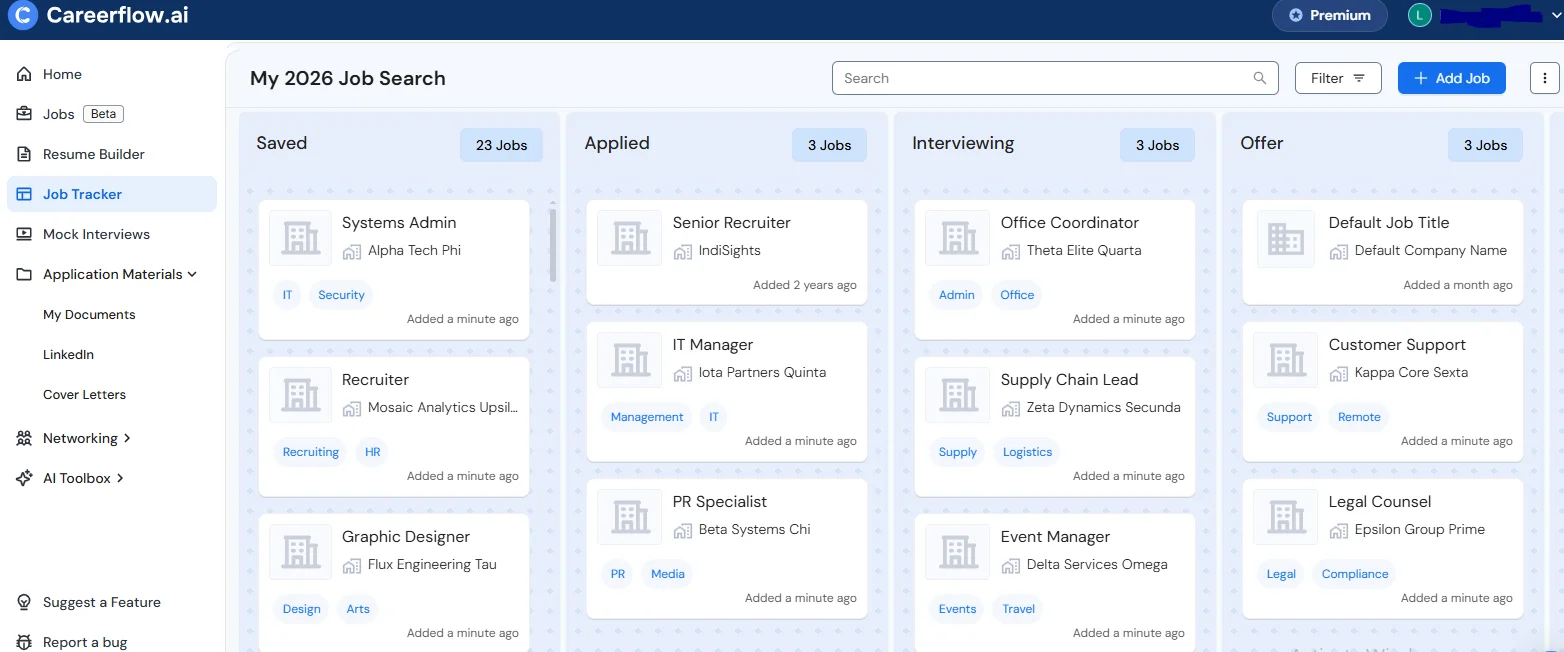
- Visual pipeline board: See your progress through Kanban-style stages like "Applied" or "Interviewing." This overview helps you identify bottlenecks in your search strategy immediately.
- Centralized communication history: Store hiring manager contacts, networking notes and tailored resumes in one place. You avoid scrambling to find context before an important interview. This saves 5-10 minutes before each interview.
Strategic insights and mobility
- Search analytics: Track your conversion rates from "Applied" to "Interview." Insights show you which job boards or strategies actually generate responses so you can pivot your effort.
- Deadline and urgency flags: Get alerts before a saved job expires. Prioritize roles by interest level or application deadlines to ensure you never miss a dream opportunity.
- On-the-go updates: Use mobile apps to update your status or review company research while commuting. Your search stays active even when you are away from your desk.
👉 To Know More: Job Tracker Apps vs Spreadsheets: Which Should You Be Using?
Cost-benefit analysis: Is a job tracker worth paying for?
The choice between a manual spreadsheet and an AI tracker isn't just about a subscription fee. It is a choice between administrative work and strategic execution. For any serious job seeker, the "free" spreadsheet is actually the most expensive option when considering the lost opportunity.
Break-even analysis: When does a paid tracker pay for itself?
Investing in a premium job tracker is a strategic financial decision. If a tool costs $20 per month and saves you 2.5 hours every week, the return on investment (ROI) becomes clear within the first month.
Calculating the value of your time
- In one month (4 weeks), you save a total of 10 hours (i.e., 2.5 hours/week x 4 weeks).
- If your time is valued at $20 per hour, you save a total of $200 ($20 × 10 hours) in one month for a cost of $20, resulting in a return on investment (ROI) of 10 times (i.e., $200/$20).
- If your time is valued at $50 per hour, you save $500 ($50 × 10 hours) in value for a cost of $20, resulting in a return on investment (ROI) of 25 times (i.e., $500/$20).
If you apply to 15 or more jobs per week for at least two weeks, the tracker pays for itself. This calculation only considers pure time savings. It does not account for the additional value of higher interview rates through better follow-ups or the significant reduction in job search stress.
How to migrate from a spreadsheet to an AI job tracker without losing data
Switching from a spreadsheet to an automated tracker does not mean starting from scratch. You can move your data quickly to maintain continuity. Follow this six-step process to migrate in under 40 minutes.
Step 1: Export your spreadsheet data (2 minutes)
Download your Google Sheet or Excel file as a CSV. Ensure your columns have clear labels like "Company," "Job Title," and "Status." This makes it easier for the tracker to read your data.
Step 2: Sign up and check import options (5 minutes)
Create your account on an AI tracker like Careerflow. Look for a CSV or bulk import option as shown in the image below in the settings menu. This tool allows you to map your existing columns to the internal fields, which makes it easy for import.
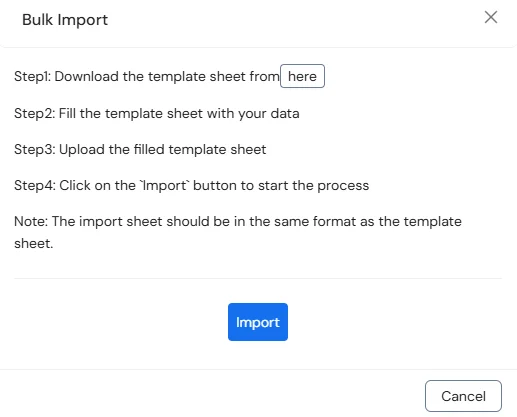
Step 3: Import your active applications (20 minutes)
Upload your file and match your columns to the tracker's stages. Focus on active roles from the last three weeks rather than old rejections. Prioritizing current interviews and pending offers saves you significant time during migration.
Step 4: Set up automation and reminders (5 minutes)
Set follow-up reminders for each imported application based on their current stage. If you applied one week ago, schedule a follow-up reminder for tomorrow. Add interview prep alerts for any upcoming scheduled calls.
Step 5: Start fresh with automated features (ongoing)
Use the browser extension to save new jobs directly from LinkedIn or Indeed. This eliminates manual data entry immediately. Let the tracker handle repetitive fields through autofill and rely on its automated notification system.
Step 6: Archive your old spreadsheet (1 minute)
Keep your original spreadsheet as a backup for one month. Don’t delete it until you are confident all details are in the new system. Once your active pipeline is fully migrated, you can archive the manual sheet.
Total migration time: 25-35 minutes to transition from spreadsheet to tracker with full data continuity
When spreadsheets are actually fine (and when you should upgrade)
Stick with a spreadsheet if:
- Low application volume: You apply to fewer than 10 total jobs and expect a short search.
- Extreme selectivity: You only target one or two "dream roles" per month.
- Manual preference: You prefer familiar tools and want to avoid a learning curve.
- Privacy concerns: You want complete control over where your job search data lives.
- Simple tracking: You easily remember the status of every application without reminders.
Upgrade to an AI tracker if:
- High volume: You apply to 15+ jobs weekly and waste 30 minutes on manual updates.
- Missed opportunities: You have missed follow-ups due to a lack of automated reminders.
- Complex interview loops: You need a centralized place for notes and communication history.
- Data-driven search: You want analytics to see which job boards generate the most interviews.
- Time management: You prefer spending 10 hours monthly on networking instead of admin work.
- Repetitive forms: You want autofill to handle platforms like Workday or Greenhouse.
- One-click saves: You want to capture job details instantly without manual copy-pasting.
How to do this with Careerflow Job Tracker
Careerflow consolidates your entire application workflow into one platform. This eliminates spreadsheet overhead by automating the busywork that slows down your search.
Browser extension for one-click saves: Save jobs from over 100 platforms, including LinkedIn, Indeed and Glassdoor, with a single click. It automatically imports the company name, job title and description. You never have to manually copy and paste details again.
Visual pipeline and board: View your entire search at a glance with a drag-and-drop Kanban board. Organizable stages include Saved, Applied, Interviewing, Offer and Rejected. This visual layout is much easier to scan than dense spreadsheet rows.
Application autofill: Auto-populate repetitive fields on major platforms like Workday, Greenhouse and Lever. This feature saves up to five minutes per application. It allows you to focus on tailoring your responses instead of typing your address.
Centralized notes and contacts: Attach tailored resumes, cover letters and portfolio samples to each specific application. Store hiring manager contacts and interview feedback in one place. You will be able to access these critical details seconds before a call begins.
Analytics dashboard: View conversion rates and job board performance to see what actually works. The dashboard tracks your application velocity and average time-to-interview. Use these data-driven insights to adjust your strategy and find success faster.

.webp)

%20Which%20Should%20You%20Use.webp)
