Job search
.avif)
.webp)
Finding a job is easier when you use the right AI tools. These tools can cut your application time in half and help you get more responses from recruiters.
This guide explains a simple five-tool workflow: improve your resume, analyze job descriptions, write better cover letters, boost your LinkedIn visibility and track applications. You'll get clear steps and prompts to avoid common mistakes while staying authentic. See how Careerflow combines all these steps into one platform to save you five hours every week.
If you’ve ever interacted with an AI chatbot like Wonderchat during your job search, you've seen how effectively companies are using AI to streamline their workflows too. In 2026, it’s just how the hiring game moves. Make sure you don't get left behind!
Quick Answer: The 5 AI Job Search Tools You Should Use
Many job seekers spend 20 to 25 hours a week on manual tasks. Using the right five tools can cut this time in half. This stack helps you stay organized and improves the quality of your applications.
The Essential 5-Tool AI Job Search Stack:
- AI Resume Optimizer and ATS Checker: This tool tailors your resume to each job. It finds missing keywords so your application passes through tracking systems and reaches a human recruiter.
- Job Description Summarizer and Skill Matcher: This tool finds the most important skills in a job posting quickly. It helps you decide which roles to focus on and how to present your experience.
- AI Cover Letter and Outreach Email Writer: This tool generates personalized letters and emails. It uses the company’s language to highlight your skills so you never have to start from a blank page.
- LinkedIn Profile Optimizer With Headline and Summary Generators: This tool makes your profile easier for recruiters to find. It uses smart keywords and clear headlines to help your profile stand out.
- AI Job Tracker With Autofill and Automated Reminders: This tool keeps all your applications in one place. It fills out forms automatically and reminds you when to follow up so you never miss an update.
Who Should Use This Stack?
This workflow is perfect for active job seekers applying for several roles each week. It also helps career switchers and recent graduates who need to build a professional presence. If you are managing multiple applications and want to save time, these tools are for you.
Tool 1: AI Resume Optimizer and ATS Checker
What It Does
An AI resume optimizer compares your resume to a job description. It finds missing skills, keywords, and formatting that Applicant Tracking Systems (ATS) need. This tool then suggests ways to improve your resume, such as adding keywords or rewriting bullet points. This helps you get past automated filters so a human recruiter can see your application.
The best tools also check for formatting errors like tables, text boxes and unusual fonts that can break an ATS. These tools ensure your resume is easy for a computer to read.
How to Use It Step by Step
- Paste the target job description: Copy the entire job posting into the tool. Include the responsibilities and requirements.
- Upload your current resume: Use your main resume or a version you have already created for this role.
- Review the skill match and gap analysis: Look at the skills the tool says you’re missing. Focus on hard skills, such as specific software or certifications mentioned in the job post.
- Revise experience bullets with outcomes and keywords: Update your bullet points to include missing terms naturally. Instead of just listing a skill, show how you used it to achieve results. For example, write, "Led five projects using Jira to deliver tasks 15% under budget."
- Run an ATS formatting check: Make sure your resume uses simple headers and standard fonts like Arial or Calibri. Avoid using images or tables.
- Re-run the check until you hit the target score: Keep improving your resume until you reach a match score of 80% or higher.
What to Watch For
- Keyword stuffing: Don’t just list keywords. They should sound natural when you read them aloud.
- Inconsistent job titles: If a job post uses a specific title, try to use that same title in your resume if it matches your experience.
- Formatting that breaks ATS: Keep your layout simple. Fancy graphics can make your text impossible for an ATS to read.
Before and After Example
❌ Before: "Responsible for customer onboarding and training."
✅ After: "Led onboarding for 50+ customers using Salesforce, reducing training time from 6 weeks to 3 weeks."
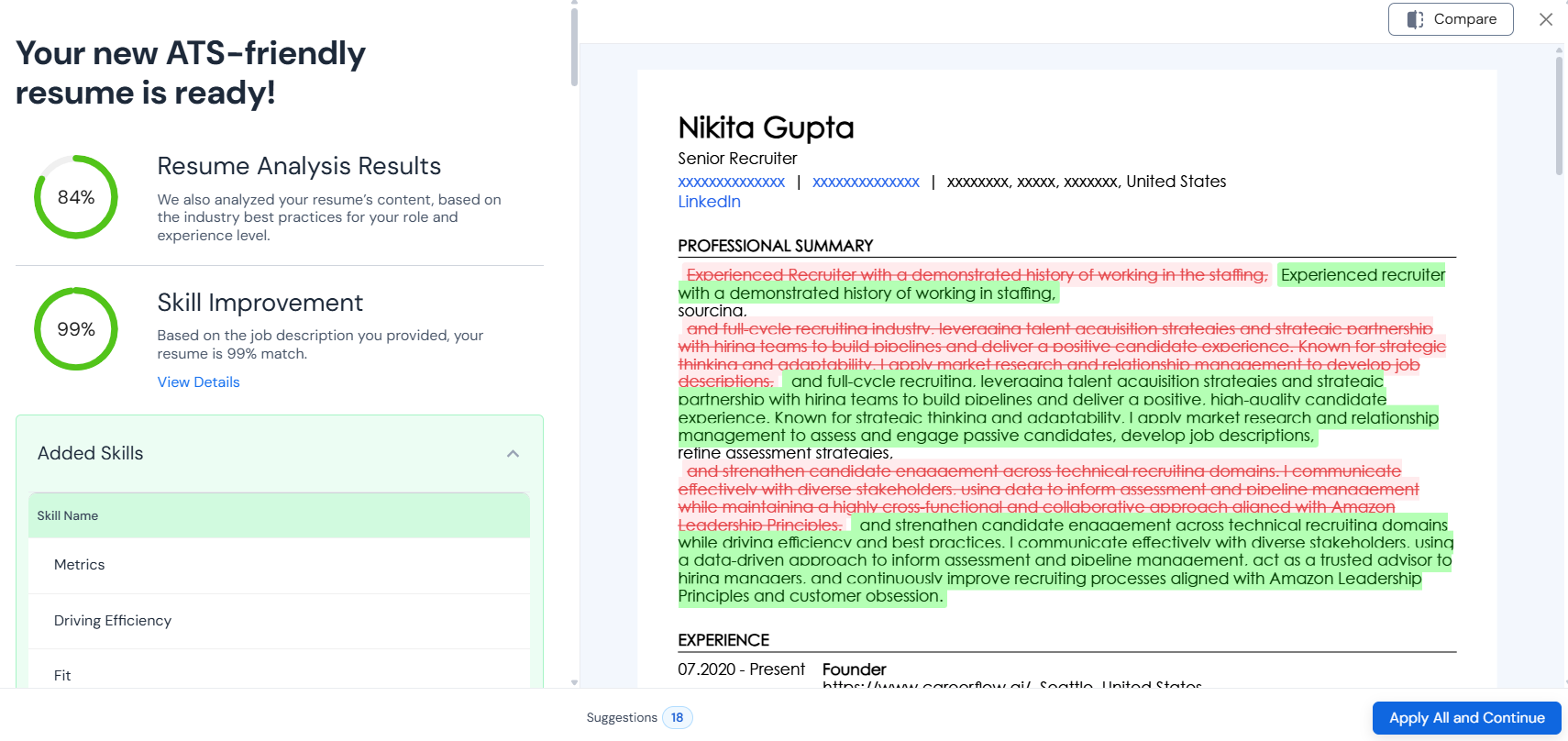
How to Do This With Careerflow
Resume Optimizer:
- Log in to Careerflow’s AI Resume Builder.
- Open a saved resume or start a new one.
- Select the One-Click Optimizer and paste the job description for the role you want.
- Get instant feedback on your resume.
- Select Apply and Continue to update your resume with the suggested changes.
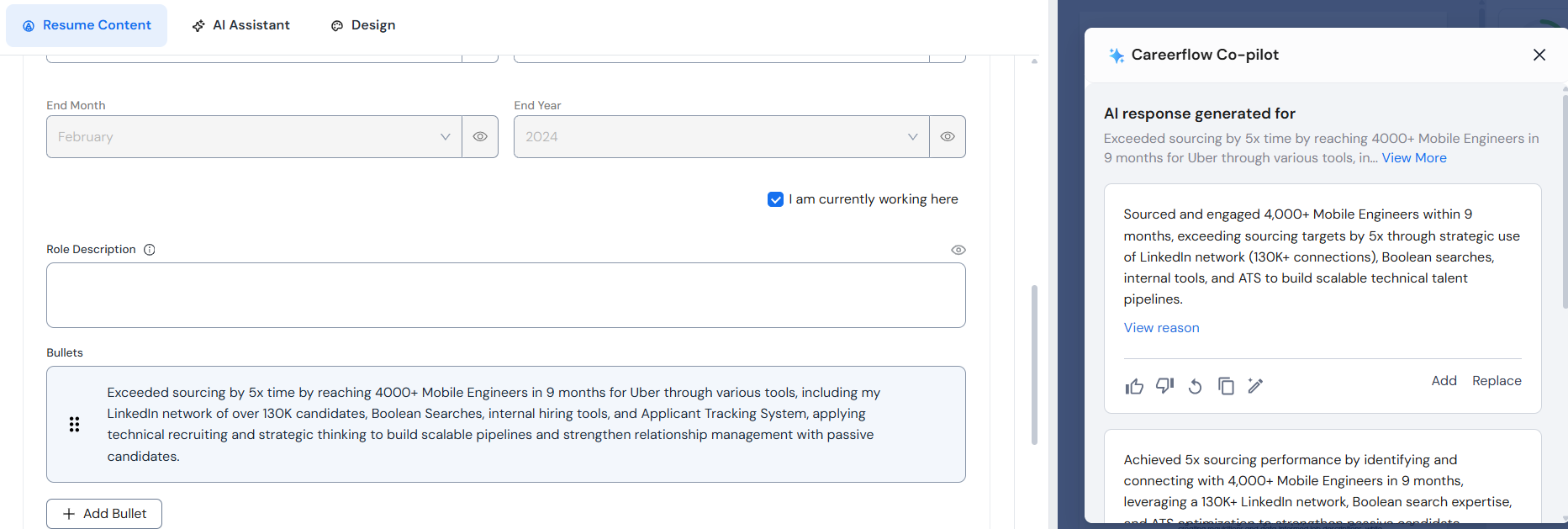
Resume AI Bullet Point Writer:
- Go to the specific bullet point you want to improve.
- Select Rewrite with AI.
- This will create strong, professional bullet points that include metrics and important keywords.
ATS Score Checker: Check for formatting issues and see your match score before you apply.
Tool 2: Job Description Summarizer and Skill Matcher
What It Does
Job postings are often very long. A summarizer finds the 5-7 most important skills and core tasks using AI. This saves you time and helps you decide if the job is a good fit for you. Some tools also compare your profile to these requirements to show you exactly what you’re missing.
How to Use It
- Paste the full job posting: Put the whole text into the summarizer tool.
- Get the summary and top skills: The tool will list the must-have skills, main duties, and "nice-to-have" qualifications.
- Map your achievements to each top skill: Find examples from your past work that prove you have the top skills listed.
- Build a tailored resume summary from extracted skills: Use the top 5 skills to write the summary section at the top of your resume.
How to Do This With Careerflow
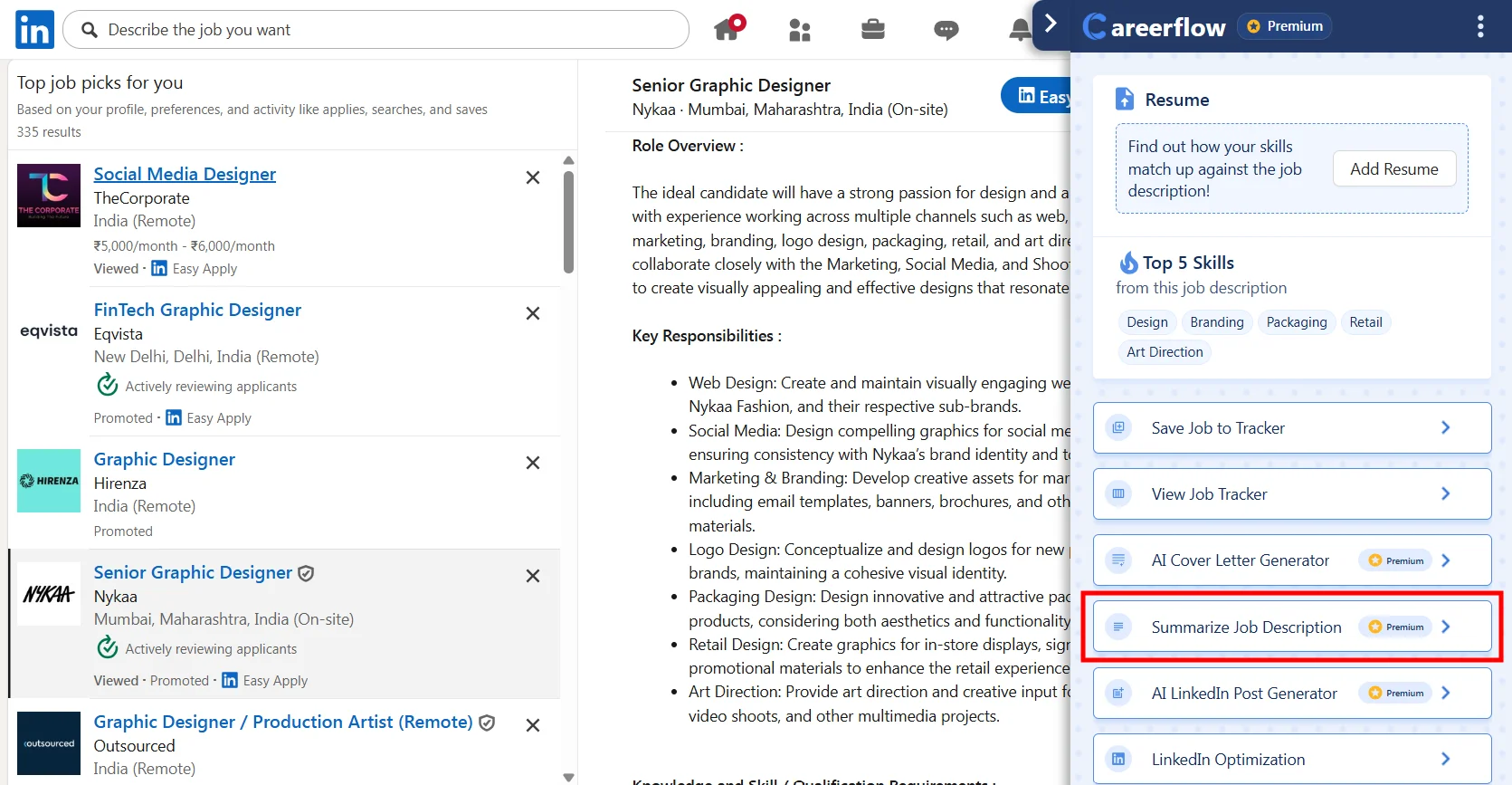
Job Description Summarizer
Ensure that the browser extension is installed and that the floating icon is visible in your browser.
- Locate the job you want to apply for on your preferred job search platform.
- Click on the floating icon associated with the browser extension.
- Select the “Summarize Job Description” button from the options presented.
- The job description should automatically populate in the designated box. If it doesn’t, copy the job description manually and paste it into the box.
- Select the language you want the summarized job description to be generated in from the available options.
- Click the “Generate” button to create the summarized job description.
- Review the summarized job description and proceed with your application as needed.
To Know More 👉: Setup Careerflow Chrome Extension for LinkedIn Optimization
Skill Match
Automatically see how your resume compares to the job requirements.
Tool 3: AI Cover Letter and Outreach Email Writer
What It Does
An AI cover letter and email writer creates first drafts for your applications. It looks at the job description and your resume to write content that matches the company’s style. It highlights your best achievements and follows professional rules.
Effective AI writers do more than provide templates. They use specific details about the company's goals and your actual experience. This gives you a great starting point so you don’t have to stare at a blank page.
How to Use It
- Feed the posting summary and your resume highlights: Give the AI the job description and your top 3-5 career wins. Include the company name and one recent piece of company news (product launch, funding round or partnership).
- Generate a draft: Let the AI write a first draft of your cover letter or email. Check it carefully to make sure all the facts are true.
- Personalize with 2–3 sentences: Add a human touch. Mention a recent company blog post or a product update you liked. This shows you have done your research.
- Keep it concise: Keep emails short, around 150 to 200 words. Cover letters should be under 350 words. Recruiters scan these quickly, so make every sentence count.
Templates and Prompts
Subject lines for networking emails:
- "Quick question about [Role Name] at [Company]"
- "[Name] suggested I reach out about [Topic]"
- "Impressed by [Company Achievement]—would love to connect"
3-paragraph cover letter structure:
- Paragraph 1: Why you want the role and what you know about the company.
- Paragraph 2: Your biggest achievement that proves you can do the job.
- Paragraph 3: Why you’re a great fit and a request for an interview.
How to Do This With Careerflow
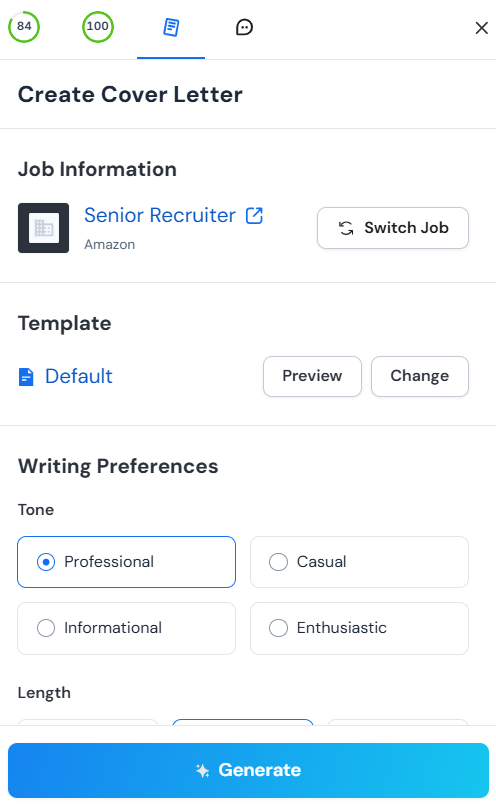
AI Cover Letter Generator
- Select the resume you want to use for your cover letter.
- Click on Cover Letter on the right side of your screen.
- Fill in the required details to create a tailored draft in seconds.
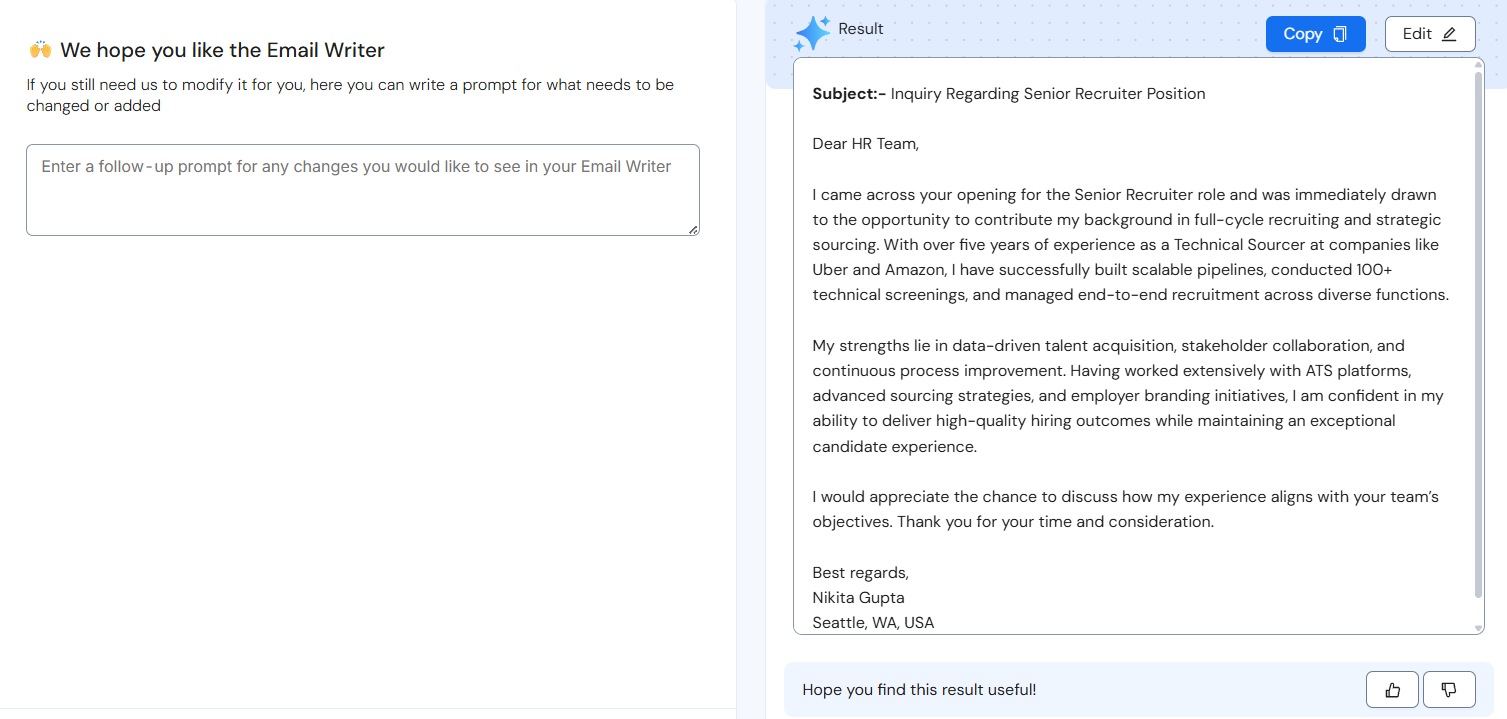
AI Email Writer
- Go to the AI Toolbox and select Email Writer.
- Provide the job description and the company details.
- Upload your resume to generate professional networking or follow-up emails that get responses.
Tool 4: LinkedIn Profile Optimizer and Headline/Summary Generators
What It Does
LinkedIn functions as a search engine for recruiters. ~94% of recruiters use LinkedIn’s keyword search to find candidates for an active role. Your profile's keywords determine whether you appear in their searches.
LinkedIn works like a search engine for recruiters. They search for keywords to find the right candidates. A LinkedIn optimizer checks your profile against the jobs you want. It tells you which keywords are missing and how to improve your visibility.
Headline and summary generators help you write sections that attract recruiters while still sounding like a real person.
How to Use It
- Run a profile check: Use the LinkedIn Optimizer tool to scan your profile. It will give you a score based on how complete and keyword-friendly your profile is.
- Get headline and about suggestions: The tool will suggest a headline (the line under your name) and an "About" section. Your headline should include your job title and your top skills.
- Add target keywords: Find the top 10 keywords for your dream job. Use them naturally in your headline and the first part of your "About" section.
- Stay active: Post once a week and comment on five posts. Regular activity signals LinkedIn's algorithm to boost your profile in recruiter searches.
To Know More 👉: How to Optimize LinkedIn Profile
Example Headlines for 3 Common Roles
- Product Manager: "Senior Product Manager | B2B SaaS | Driving Growth Through Data-Driven Roadmaps & Cross-Functional Leadership"
- Marketing Manager: "Digital Marketing Manager | SEO, Content Strategy & Paid Media | Scaling Startups from $1M to $10M ARR"
- Software Engineer: "Full-Stack Software Engineer | React, Node.js, Python | Building Scalable Web Applications for FinTech"
Summary Paragraph Template
"[Job title] with [X years] of experience in [industry/specialization]. I help [target customer/company type] achieve [specific outcome] through [key skills/methods]. At [current or recent company], I [major achievement with metric]. I specialize in [3 core competencies] and am passionate about [relevant interest or value]. Currently [what you're doing now or seeking—e.g., 'seeking opportunities in [field]' or 'leading [initiative]']."
How to Do This With Careerflow
LinkedIn Optimizer
- Install our Chrome Extension and open your LinkedIn profile.
- Get an instant profile score that shows how well your profile is optimized.
- Follow the step-by-step checklist to improve your sections and boost your rank in recruiter searches.
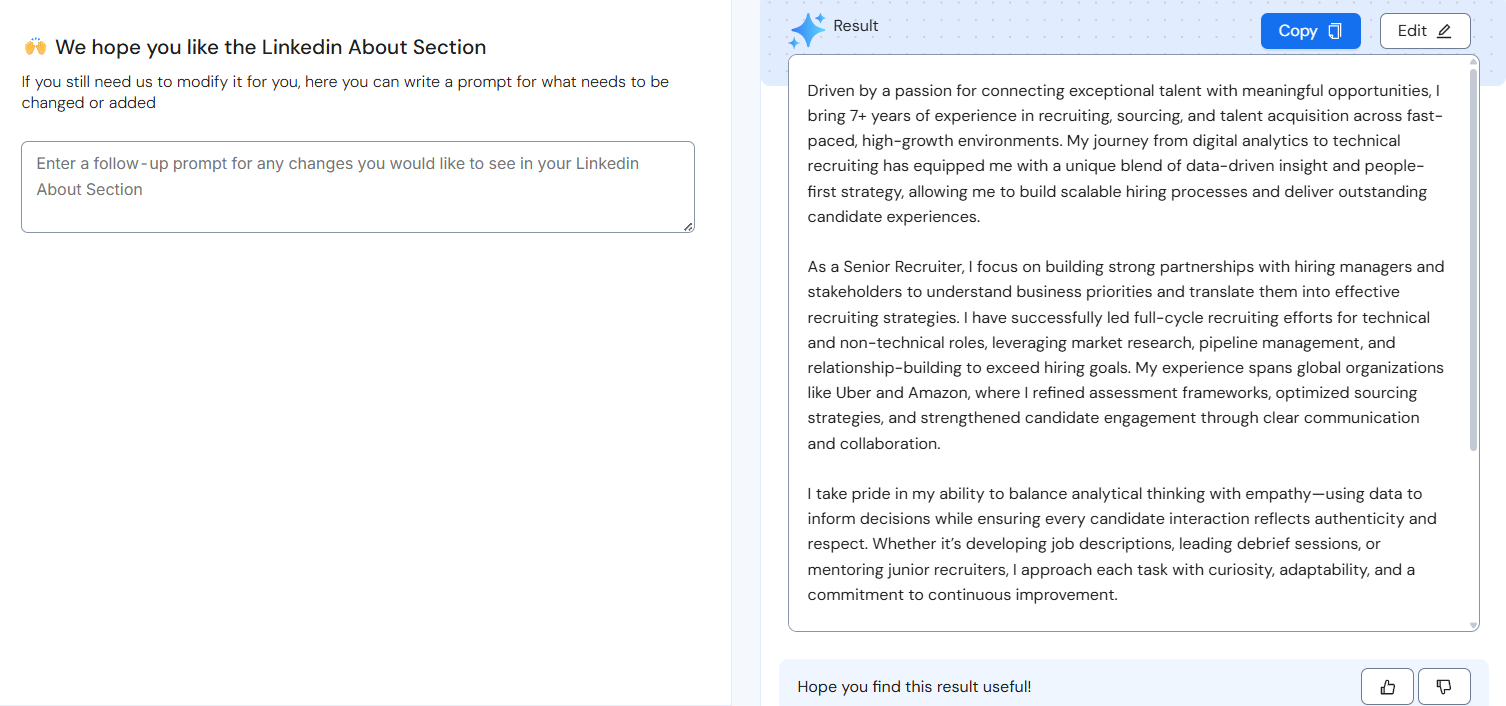
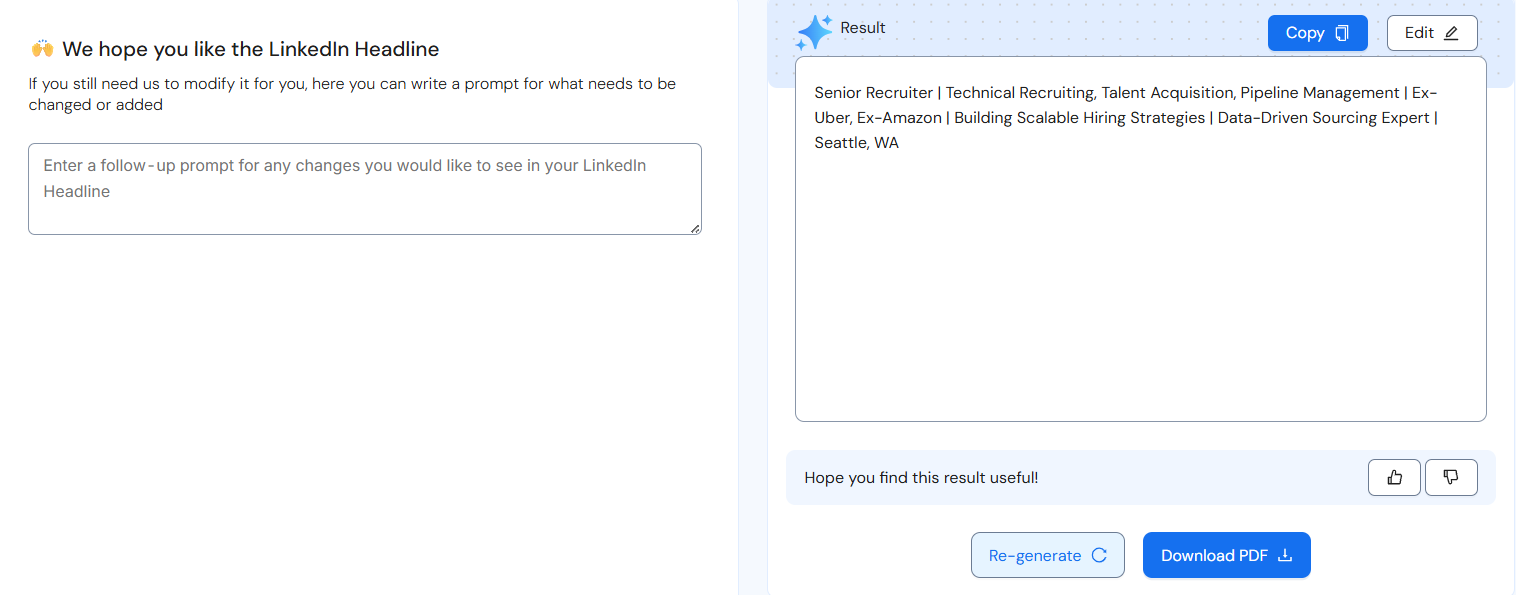
Headline and Summary Generators
- Select the Headline and Summary generator from your dashboard to write a professional headline and an "About" section.
- The generators suggest specific keywords based on your target job titles.
- Simply copy and paste these high-quality sections directly into your profile to stand out.
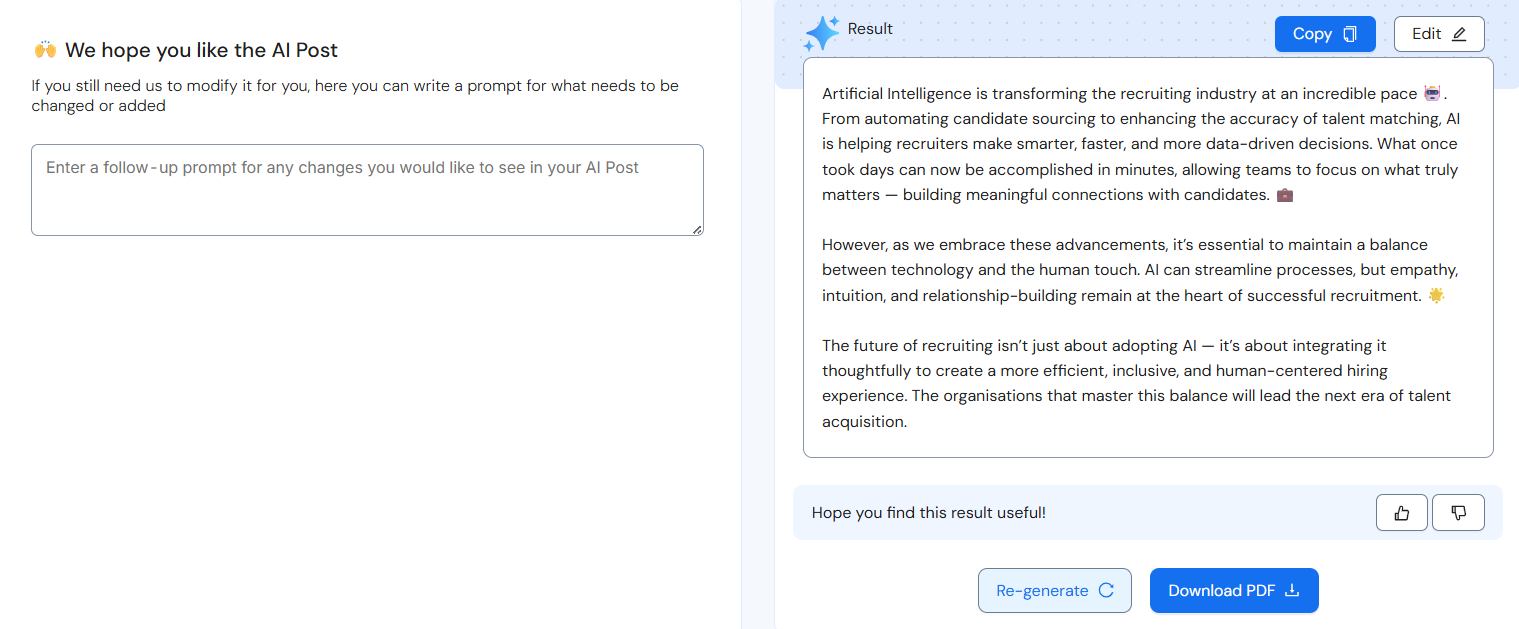
AI Post Writer
- Select the AI Post Writer from your dashboard to get personalized content ideas.
- Generate professional posts or comments to share with your network.
- Use this weekly to stay active on LinkedIn and remain visible to hiring managers.
Tool 5: AI Job Tracker With Autofill and Automated Reminders
What It Does
Most job seekers manage dozens of applications at once. An AI job tracker keeps everything in one place. It saves jobs from any website, fills out forms for you, and reminds you when to follow up. This keeps you organized so you never miss an interview or a deadline.
How to Use It
- Save jobs via browser extension: Use a tool that lets you save a job from LinkedIn or Indeed with one click. It will automatically save the title, company, and link.
- Tag stage and add deadlines: Mark each job as "Applied," "Interviewing," or "Offer." Add dates for when you need to follow up.
- Turn on automated reminders: Set alerts to follow up one week after you apply. This ensures you stay on the recruiter's radar.
- Use autofill for applications: Use the autofill feature to complete job applications faster. It can fill in your name, contact info, and work history for you.
Workflow Tip: 10–15 Minute End-of-Day Habit
Spend a few minutes every day updating your tracker. Save new jobs, update your status for current roles, and check your reminders for the next day. This prevents you from feeling overwhelmed.
How to Do This With Careerflow
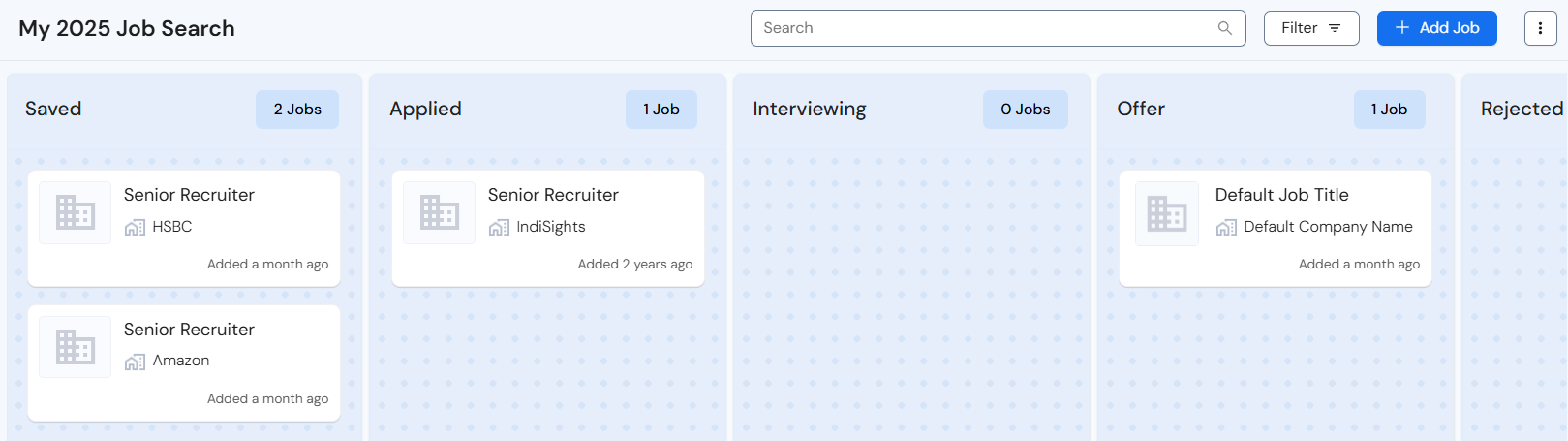
Job Tracker
- Open your Job Tracker dashboard to see all your applications in one organized view.
- Move jobs between columns like "Applied," "Interviewing," or "Offer" to track your progress.
- Add research notes, contacts, and custom tasks to each job entry.
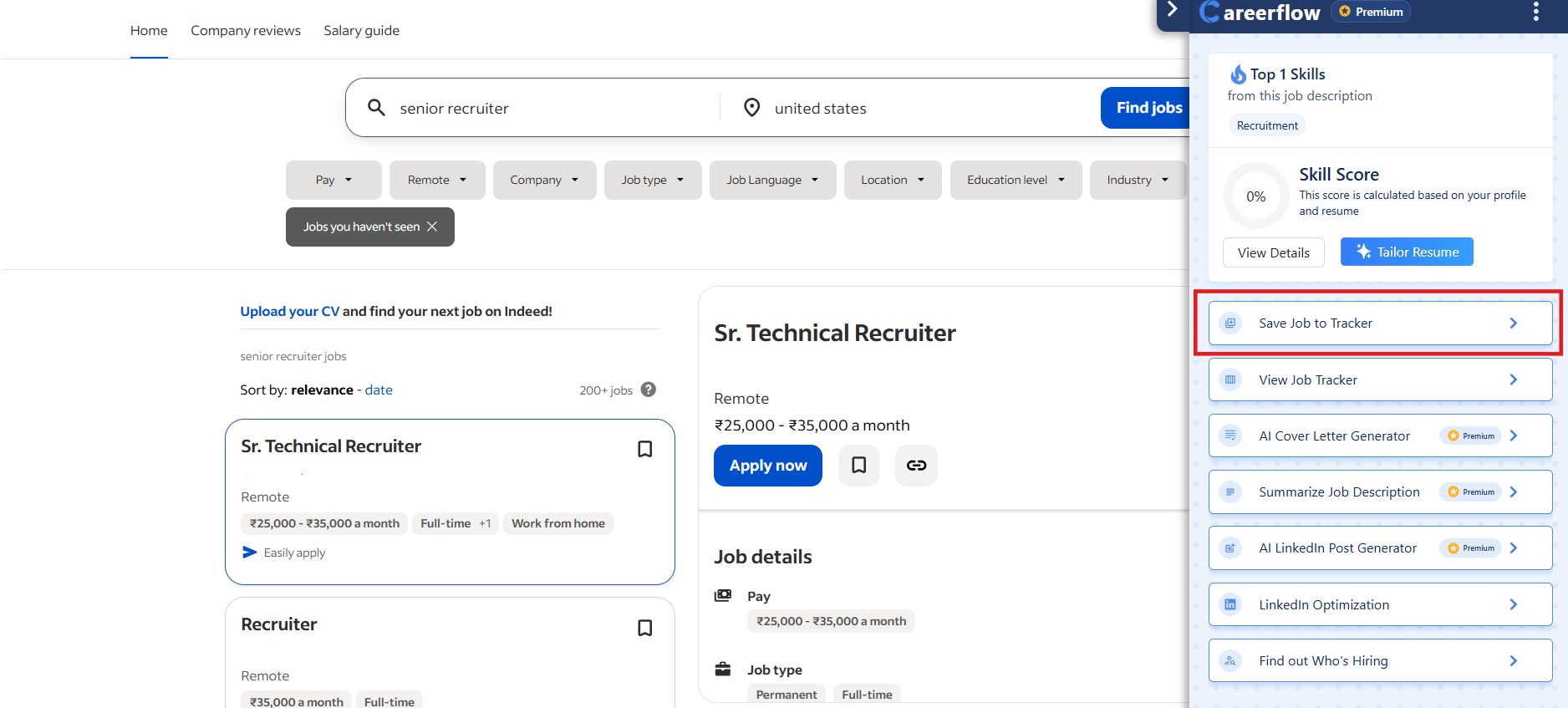
Save From Any Site
- Use the Careerflow Chrome Extension while browsing job boards like LinkedIn, Indeed, or Glassdoor.
- Click the "Save Job" button to automatically pull the job title, company, and description into your tracker.
- This allows you to save roles from over 100 different sites with just one click.
Autofill
- When you’re on a company application page, use the Autofill feature to save time.
- It automatically populates fields like your name, contact information, work history, and education.
- This tool can save you 10 minutes on every application, letting you apply to more roles faster.
Put It Together: A 5-Hour Weekly AI-Powered Job Search Plan
This AI-powered workflow cuts your weekly application time from 20 hours to just five hours. Using the right tools strategically helps you stay organized while improving your response rates. This schedule breaks down exactly how to manage your search without burning out.
Monday (1 hour): Build Target List and Summarize Postings
Start your week by finding the best roles. Spend 15 minutes searching two or three job boards for new openings. Save 10 to 15 promising roles directly to your Careerflow Job Tracker to stay organized.
Use a job description summarizer on your top five roles to find must-have skills. This takes about 20 minutes. Tag the three to five best roles as "Ready to Apply." Finish by spending 15 minutes researching company news and LinkedIn posts.
Tuesday (1.5 hours): Tailor Resumes and Run ATS Checks
Resumes need specific keywords to pass through applicant tracking systems. Focus on your two highest priority roles today. Run your master resume through a Resume Optimizer for each position.
Spend 20 minutes per role updating your bullet points. Add missing skills, metrics and relevant achievements. Use an ATS formatting check to fix any hidden errors. Save these tailored versions in your tracker so you're ready to submit.
Wednesday (1 hour): Write and Send Outreach Emails
Networking increases your chances of getting an interview significantly. Use an AI email writer to draft five networking or referral emails. This step should only take about 30 minutes.
Spend 20 minutes personalizing each draft. Mention a specific detail about the person or the company to show you've done your research. Send the emails and log them in your CRM or job tracker to monitor responses.
Thursday (1 hour): Optimize LinkedIn and Stay Active
Recruiters use LinkedIn to find talent every day. Use the LinkedIn Profile Optimizer to find and fix the top three issues on your profile. This helps you show up in more searches.
Stay visible by sharing one update about a project or industry insight. Spend 15 minutes commenting on five posts from recruiters or industry leaders. This builds your professional brand and keeps you on their radar.
Friday (1.5 hours): Apply to Roles and Schedule Next Week
Finish your applications today using autofill tools to speed up the process. It takes about 15 minutes per role. Generate tailored cover letters with AI and add two personal sentences to each one.
Update your application status in your tracker. Set a follow-up reminder for one week from today. Finally, check your calendar for next week and block out time for any scheduled interviews.
Time savers
AI tools speed up your search by removing repetitive manual work. Here's how much time you'll save each week:
- Resume Optimizer: Reduces tailoring time from 45 minutes to 15 minutes per role.
- Job Summarizer: Cuts research time from 15 minutes to 3 minutes per posting.
- Autofill: Saves 10 minutes on every application form.
- AI Email Writer: Cuts email drafting from 30 minutes to 10 minutes for five messages.
Quality checks
You must review all AI-generated content to ensure it's accurate and feels human. Follow these rules for every application:
- Fact-check outputs: Don't let AI fabricate skills or experience you don't actually have.
- Personalize messages: Add at least two sentences in your own voice to every letter or email.
- Review resumes: Read every tailored version before submitting to ensure it sounds natural.
- Monitor results: Track your response rates and iterate on your materials if you aren't getting callbacks.
Ethics, Accuracy, and Privacy
AI tools make your job search faster, but you're responsible for the accuracy and authenticity of every application. Follow these rules to use AI tools safely and effectively.
Do:
- Fact-check all outputs: AI sometimes fabricates metrics or job titles. Review every bullet point and email to ensure the facts are correct.
- Keep metrics truthful: Correct any suggested numbers to reflect your actual results. Exaggerations will cause problems during interviews or reference checks.
- Remove sensitive data: Don't paste confidential company data or personal details like your home address into AI tools. Use generic descriptions for your projects instead.
- Maintain your voice: Edit AI drafts to include your tone and personality. Your application should sound like a polished version of you, not a robot.
Do not:
- Invent credentials: Don't claim titles or experience you don't have. If you weren't a "Senior Manager," don't use that title just because the AI suggests it matches the posting.
- Claim fake skills: Don't add skills like "Python" just to pass an ATS if you've never used the language. You'll struggle in technical interviews.
- Paste proprietary data: Avoid inputting your current employer's internal strategies or financial data into free AI tools.
- Over-automate: Never let AI apply to jobs or send emails without your review. Automation without oversight leads to embarrassing mistakes.
Transparency Tips for Interviews
If an interviewer asks if you used AI to prepare, be honest. Most hiring managers in 2025 appreciate using AI as a productivity tool. Here's how to respond:
- "I used AI tools to optimize my resume for ATS compatibility, but I personalized everything to reflect my actual experience."
- "I use AI as a writing assistant to organize my thoughts. It helps me catch gaps, but the achievements are all my own."
- "AI helped me identify which keywords to emphasize. I only included skills I have and can discuss in detail."
Examples and Templates
Example 1: Project Management
❌ Before: "Managed several projects for the marketing team."
✅ After: "Led 8 cross-functional marketing projects using Asana, coordinating teams of 5-12 across design, content and analytics. Delivered all campaigns on time with 20% average improvement in engagement metrics."
Example 2: Customer Success
❌ Before: "Helped customers with onboarding and support."
✅ After: "Onboarded 60+ enterprise clients to the platform using Salesforce and Gainsight, reducing average time-to-first-value from 8 weeks to 4 weeks and achieving 95% customer satisfaction rating."
Example 3: Sales
❌ Before: "Responsible for sales in the Northeast territory."
✅ After: "Drove $2.3M in new business revenue across the Northeast territory, exceeding quota by 18% through strategic outbound prospecting, consultative selling, and partnership development with 40+ accounts."
Cover Letter Template
Subject: Application for [Job Title] - [Your Name]
Dear [Hiring Manager Name or "Hiring Team"],
I'm excited to apply for the [Job Title] position at [Company]. I was particularly drawn to [specific detail about the company—recent product launch, mission statement, notable achievement] because it aligns with my experience in [relevant area].
In my current role as [Your Title] at [Company], I [describe your most relevant achievement with metrics]. For example, I [specific action] which resulted in [quantified outcome—e.g., "30% increase in customer retention" or "reduced onboarding time by 50%"]. This experience has prepared me to [connect to key responsibility from the job posting].
I'd love to bring my skills in [top 3 skills from the posting] to [Company] and contribute to [specific goal or initiative mentioned in the posting]. I'm confident I can deliver [relevant outcome] and would welcome the opportunity to discuss how my background aligns with your team's needs.
Thank you for considering my application. I look forward to the possibility of speaking with you.
Best regards, [Your Name] [LinkedIn URL] | [Phone] | [Email]
Networking Email Template
Subject: Quick question about [Role] at [Company]
Hi [First Name],
I came across the [Job Title] opening at [Company] and was really impressed by [specific detail about the company or their work]. I noticed we both [shared connection, alma mater, or common interest], and I wanted to reach out.
I have [X years] of experience in [relevant area] and recently [notable achievement or project]. I'd love to learn more about the role and the team culture at [Company].
Would you be open to a brief 15-minute call this week or next? I'm happy to work around your schedule.
Thanks for considering!
Best, [Your Name] [LinkedIn URL]
LinkedIn Headline Bank for 3 Common Roles
- Data Analyst: "Data Analyst | SQL, Python, Tableau | Turning Complex Data into Actionable Insights for B2B SaaS"
- UX Designer: "Senior UX Designer | User Research, Prototyping, Design Systems | Creating Intuitive Experiences for FinTech & HealthTech"
- Account Executive: "Enterprise Account Executive | B2B SaaS Sales | Helping Companies Scale Revenue Through Consultative Selling & Strategic Partnerships"
When to Upgrade and What to Skip
Most job seekers find that free tools are enough for a basic search. You don't need to pay for advanced features if you apply to fewer than 10 roles per week. Free versions work well if you have one clear career path and don't mind copying and pasting between tools.
When Premium Saves Time (and is worth it)
Upgrade to an all-in-one platform like Careerflow when your search gets complex. Paid tools are a great investment if you're applying to 15+ roles weekly or managing multiple career paths. These platforms save hours by keeping everything in one tab instead of five separate tools.
Consider a premium plan if you're job searching while working full-time. Features like autofill and bulk actions speed up your workflow significantly. You'll also get access to advanced tools like AI interview practice and LinkedIn profile reviews to help you stand out.
Red Flags: When to Skip or Downgrade a Tool
Avoid tools that promise to "apply to 100 jobs with one click." Mass-applying with generic materials will lower your response rate and waste your time. If a tool doesn't let you customize your applications, it's not worth using.
Don't pay for AI that creates generic cover letters or stuffs keywords unnaturally. If a tool makes your resume sound robotic, it'll hurt your chances with human recruiters. Always skip platforms that aren't transparent about their privacy policies or how they score your resume.
.webp)
.webp)